

Support our independent tech coverage. Chrome Unboxed is written by real people, for real people—not search algorithms. Join Chrome Unboxed Plus for just $2 a month to get an ad-free experience, access to our private Discord, and more. Learn more about membership here.
START FREE TRIAL (MONTHLY)START FREE TRIAL (ANNUAL)
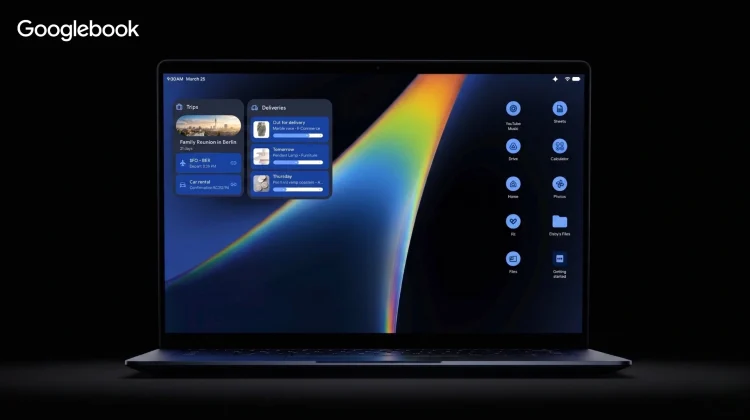
Ever since rumors began circulating about Google bringing the Android tech stack over to power a new desktop-class computing experience, a lot of us in this space have been asking a very logical question: how will Googlebook’s OS actually differ from the standard Android Desktop interface Google is also working very hard on improving lately?
Android Desktop has been getting a ton of updates lately, and with Android 17, it looks like Google’s vision for a solid desktop experience will arrive for phones and tablets simply plugged into an external display. And with the small looks we’ve had at Googlebook’s OS, there are some pretty clear comparisons to be drawn between the two.
During our exclusive sit-down interview with Google VP John Maletis, we put these exact questions to him. His response clears up the confusion quite a bit and highlights why Googlebook is a different beast than just a simple Android Desktop interface derived from a plugged in Pixel phone.
Form factor first
Right out of the gate, Maletis made it clear that the distinction between the two experiences comes down to the physical reality of the hardware. When Google set out to design this new category a couple of years ago, they took a step back to look at what makes a laptop uniquely different from a tablet or a smartphone.
While you can plug a phone into a dock or clip a keyboard onto a tablet, a laptop is a dedicated, integrated productivity machine. It features a massive screen, a permanent physical keyboard, and a trackpad.
Instead of just blowing up phone apps to fit a larger monitor, Google used those physical characteristics as the starting point for the operating system. They looked at the core components of the laptop form factor and asked how they could innovate on things that the rest of the tech industry has essentially ignored for decades.
Designing the Magic Pointer
A perfect example of this form-factor-first philosophy is a new feature debuted with Googlebook called Magic Pointer.
The standard mouse cursor hasn’t fundamentally changed or evolved in over forty years. In traditional desktop environments, the mouse is just a simple input tool used to click links and drag windows. If you bolt an AI assistant onto the side of the OS, the mouse still doesn’t change; you just use it to click on the AI chat box.
With Googlebook, Google is taking Gemini’s intelligence layer and baking it directly into the core navigation mechanics of the trackpad and cursor. While Maletis kept the exact feature details close to his chest, the concept changes the pointer from a basic clicking tool into an active, contextual assistant that adapts to your workflow in real time.
An end-to-end intelligence system
Ultimately, however, the core difference is that Android Desktop mode is an optional feature pinned onto a mobile operating system, whereas Googlebook is an end-to-end, unified platform built from the ground up.
Google is working directly with silicon giants like Intel, Qualcomm, and MediaTek to ensure the underlying processors are fully optimized for this environment. They are controlling the software stack natively to prevent the fragmentation issues that plague standard Android deployment.
Instead of a temporary workspace you toggle on when you connect an external screen, Googlebook is what Google is now dubbing as an “intelligence system”. The AI isn’t a separate app screaming for your attention; it is woven into the architecture of the machine to quietly remove friction from your daily tasks. It is a complete reimagining of desktop productivity, anchored by custom laptop silicon and built explicitly for the way we work on a laptop.
There will be far more Goooglebook-exclusive features for sure, but the few we’ve seen so far highlight the conceptual and practical differences between these two desktop environments. Google will have the task of making those distinctions clear this fall, but it seems apparent that they will be leveraging custom hardware/software capabilities to set Googlebook apart in some very new, very interesting ways. And we can’t wait to see it!
SUBSCRIBE TO UPSTREAM
Get Chrome Unboxed delivered straight to your inbox
Upstream is our flagship, curated newsletter with the top stories, most click-worthy deals, giveaways, and trending articles from Chrome Unboxed sent directly to your inbox a few times a week. Join 31,000+ subscribers.

