


Support our independent tech coverage. Chrome Unboxed is written by real people, for real people—not search algorithms. Join Chrome Unboxed Plus for just $2 a month to get an ad-free experience, access to our private Discord, and more. Learn more about membership here.
START FREE TRIAL (MONTHLY)START FREE TRIAL (ANNUAL)
I’ll be honest, this shocked me a little bit. Though my review of the excellent Lenovo IdeaPad Chromebook Flex 3i (ugh, that name) was quite glowing, it’s not the sort of device I’d expect to run a bunch of Steam games on any time soon. Yet, with what I’ve found in the Chromium Repositories, it looks like devices like the Flex 3i (based on ‘Nissa’) will soon have access to the still-in-beta Steam container for Chromebooks, internally called ‘Borealis’.
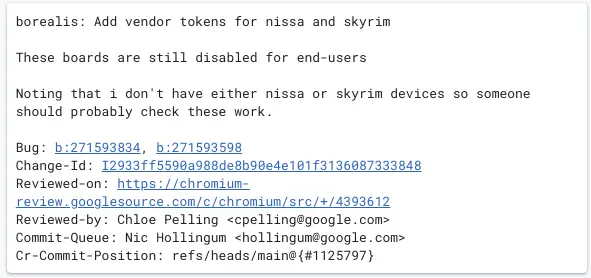
Now, don’t get too excited at this point. All this means is these devices have a token to begin testing Steam games: it doesn’t mean they are ready to roll just yet. And even if/when they do become eligible, there are some caveats that exist that need to be taken into consideration with all this.
First, Steam on Chromebooks is still very much a work in progress. I tried it recently, and though things install, framerates on a game like CS:GO were completely and utterly unusable. With a device like the Acer Chromebook 516 GE, I expected to be able to drop the settings to medium and at least play a bit. That wasn’t the case, and this was just last week. Trust me: ‘Borealis’ is still not ready for prime time.
Second, just because it is being tested, there’s no guarantee that it will see the light of day. In the end, Google could try it out and decide against it. While I was impressed by the general speed of the N100 chip inside the Flex 3i, this is not a CPU/GPU built for gaming in any sense of the word.
And finally, this is not an indication that Intel’s Alder Lake-N chips are hiding some unknown, massive power. They are great, efficient processors for Chromebooks, but they won’t be pushing AAA games any time soon. So, even if Google gets this in order and out the door down the road, don’t expect to be able to play all the games available via Steam.
So, what’s the point in this, then? I suppose it will be very handy for gaming on a different level. Not every game is all about pixel counts and the number of polygons being rendered on-screen. Not all great games need ray tracing. There are plenty of Steam titles that are fun, enjoyable, and likely completely realistic to run on something like the Lenovo IdeaPad Chromebook Flex 3i. And if Steam on this device enables those sorts of experiences, I think it’s a great thing to see it added.
Steam on Chromebooks still has a long way to go, and it needs to be pretty stable before Google makes it available to the masses, so it may still be a while before we see it arrive at general availability. But, this is Google we’re talking about, so an official release could be just around the corner and those that take advantage early on may all end up as what amounts to a second wave of beta testers. Either way, Steam games are coming, and if this latest commit is anything to go by, even the cheaper Chromebooks may eventually get in on the fun.
SUBSCRIBE TO UPSTREAM
Get Chrome Unboxed delivered straight to your inbox
Upstream is our flagship, curated newsletter with the top stories, most click-worthy deals, giveaways, and trending articles from Chrome Unboxed sent directly to your inbox a few times a week. Join 31,000+ subscribers.

