

Support our independent tech coverage. Chrome Unboxed is written by real people, for real people—not search algorithms. Join Chrome Unboxed Plus for just $2 a month to get an ad-free experience, access to our private Discord, and more. Learn more about membership here.
START FREE TRIAL (MONTHLY)START FREE TRIAL (ANNUAL)
We all know the story by now. Stadia didn’t have a pristine, issue-free launch and it didn’t deliver on many pre-launch promises made on its behalf. That being said, playing any of the relatively-small number of games on Stadia right now is a pretty pleasurable experience, whether you do so via the Chromecast, on your phone, or in the Chrome browser on you Chromebook, Mac, or Windows machine. And Google is getting around to those other promised features pretty quickly, too, with Assistant support from the controller rolling out recently and Buddy Passes now available to early adopters.
Eventually, as the platform matures, I’d imagine those in charge of Stadia would like the end user experience to be the same regardless of what device they are using. As it stands right now, there are TONS of things that are exclusive to different parts of the Stadia experience on different hardware. For instance, you can only adjust the ‘Display’, ‘Data Usage & Quality’ or Google Assistant settings in the app on your phone. The wireless setup for the controller only works with the Chromecast, and purchasing games can only happen on the phone app as well.
Of all the things I think Google needed to remedy quickly, that last one was primary. With the ability to fully open and run Stadia on my TV with just the controller in-hand, it feels clunky and silly to need to go get my phone to shop around for games. The folks at Stadia have done a spectacular job of building a singular look and interface across all the platforms and that makes users expect to be able to do all things Stadia across all of them.
SUBSCRIBE TO UPSTREAM
Get Chrome Unboxed delivered straight to your inbox
Upstream is our flagship, curated newsletter with the top stories, most click-worthy deals, giveaways, and trending articles from Chrome Unboxed sent directly to your inbox a few times a week. Join 31,000+ subscribers.
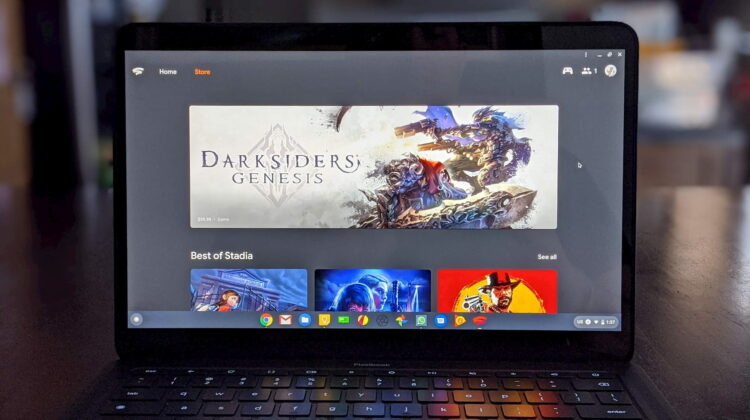
While I understand there may be some nuances to getting the store functionality onto the Chromecast, there should have never been a scenario where I couldn’t buy games when using Stadia in a desktop browser. However, that is exactly how its been up until now. With this server-side change, (no update needed…it’s the web!) stadia.google.com now has a built-in store option exactly where you expect up next to the Home navigation in the top-left corner.
The store’s layout is clean and looks like what you’d expect from the desktop layout version of the current app store pages. I was able to use it to go in and claim my free December games with no issues whatsoever. After claiming Tomb Raider, for example, a small splash screen popped up with a play button that enticed me to jump right in and get started. It is in those moments where you realize how great this platform is going to be once the game library is fully fleshed out in the coming months.
For users like myself, I prefer the convenience and simplicity of playing on my Chromebook. I like the feeling of being able to fire up Destiny when the mood hits me and finish a mission without the need of any external hardware apart from the controller or a mouse. As the game library expands soon, I’ll be much more interested in digging around the store to see what is new before or after a quick gaming session, so having that ability in the web player is an absolute win for both users and Stadia alike.

