
• Skip to main content
  • Skip to primary sidebar
  • Deals
  • Features
  • Guides
  • Chromebooks
  • Videos
  • Podcast
  • More +
    • Reviews
    • Unboxing
    • Upcoming Devices
    • Chromebook Plus
    • Chrome
    • ChromeOS
    • Chrome OS Flex
  • Search
  • Sign Up
  • Log In
Chrome Unboxed – The Latest Chrome OS News

Chrome Unboxed - The Latest Chrome OS News

A Space for All Things Chrome, Google, and More!

  • Deals
  • Features
  • Guides
  • Chromebooks
  • Videos
  • Podcast
  • More +
    • Reviews
    • Unboxing
    • Upcoming Devices
    • Chromebook Plus
    • Chrome
    • ChromeOS
    • Chrome OS Flex
  • Search
  • Sign Up
  • Log In

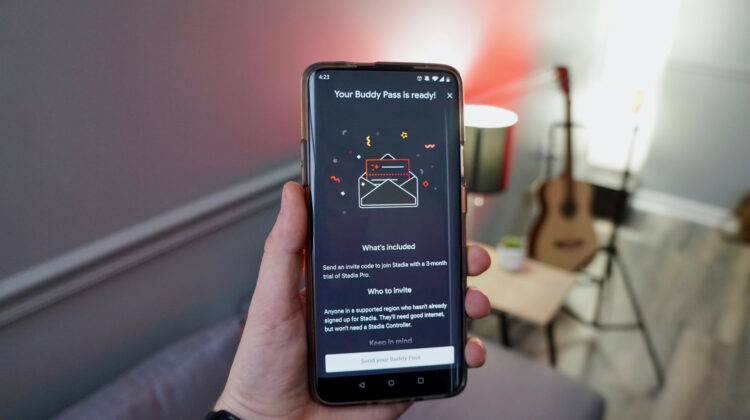
We’re giving away a Google Stadia Buddy Pass

January 21, 2020 By Joseph Humphrey View Comments

Support our independent tech coverage. Chrome Unboxed is written by real people, for real people—not search algorithms. Join Chrome Unboxed Plus for just $2 a month to get an ad-free experience, access to our private Discord, and more. Learn more about membership here.
START FREE TRIAL (MONTHLY)START FREE TRIAL (ANNUAL)

The experience of playing video games on Google’s new cloud gaming platform – Stadia – is something that is hard to wrap your head around. The way you can switch between devices seamlessly or purchase a game and start playing immediately without any downloads is amazing. And yet, even with all this technical magic happening in the background, when you actually sit down to play a game you almost forget that you are playing video games in the cloud. We are all big fans of this new platform and want to share the experience with one lucky winner by giving away a Buddy Pass.

In case you aren’t aware, a Buddy Pass will give you 3 months of full access to the Google Stadia Platform as a Pro user. This plan is normally $9.99 a month and gets you up to 4K resolution and 60 FPS, along with free games and Pro-exclusive discounts on select game purchases.

Xremove ads

Shop The Best Chromebooks of 2019 at Chrome Shop

The great thing about Stadia is that you don’t have to buy anything if you simply play in the browser with a mouse/keyboard or a 3rd party controller you already own – no console and cables to go buy. However, if you want to spend $69 on the Stadia Controller you can use a wired connection to your Chromebook/laptop or select Android devices to play games. You can also stream to your TV using a Chromecast Ultra and the Stadia Controller. Some other third-party controllers will work but we definitely recommend using the Stadia Controller.

Featured Videos

Xremove ads

Although the launch has not been flawless and has, at times, kind of felt like a beta test, Google is making significant strides recently and has recently announced tons of new games and multiple new features that will be rolling out to the platform soon. And with Stadia Base launching soon (the free-to-play version) it is a really fun time to be a part of the ecosystem. So we’re excited to extend a Buddy Pass to one lucky winner to try it out and be a part of the Stadia community with us. Enter to win using the giveaway box below (or click the button if viewing this article in AMP) – the more actions you take, the more entries you get, the better your odds are of winning. Good luck!

Click Here To Enter
 
Google Stadia Buddy Pass Giveaway

Filed Under: Stadia

About Joseph Humphrey

Joe has been a part of Chrome Unboxed since 2016 when he started helping Robby produce YouTube videos. Although normally behind the scenes, Joe has spent countless hours editing reviews and unboxings of many, many Chromebooks. Now a Partner in Unboxed Media, Joe is constantly thinking strategically about the Chromebook industry and how Chrome Unboxed can continue to innovate in the space.

Primary Sidebar

Xremove ads

Deals

Save $40 on the Google Pixel Watch 4 before the Spring Sale ends

By Joseph Humphrey
April 24, 2026

The best Chromebook deals today

By Robby Payne
April 20, 2026

Deal Alert: the excellent Lenovo Chromebook Plus 2-in-1 returns to $429

By Robby Payne
April 20, 2026

Lenovo Legion Tab Gen 3 drops to $399, ahead of the much pricier Gen 5 release

By Joseph Humphrey
April 18, 2026

How to get 50% off YouTube Premium for a full year with Google One

By Robby Payne
April 16, 2026

More Deals

Xremove ads

Reviews

Lenovo Chromebook Plus 2-in-1 Review: pretty great in a vacuum

By Robby Payne
April 23, 2026

Acer Chromebook Plus Spin 514 Review: Kompanio Ultra power in a convertible

By Robby Payne
December 24, 2025

My review after 6 weeks with the Lenovo Chromebook Plus 14 [VIDEO]

By Robby Payne
August 11, 2025

One week with the best small Android tablet you can buy, and I’m sold

By Robby Payne
May 9, 2025

Best Chromebooks of 2024 [VIDEO]

By Robby Payne
November 28, 2024

More Reviews

Xremove ads

Guides

This Chromebook trackpad shortcut is definitely not new, but is blowing my mind

By Robby Payne
March 11, 2024

How to reduce broadcast delay on YouTube TV to stop live spoilers

By Robby Payne
December 8, 2023

Windows PC keyboard and Chromebook

How to use a Windows keyboard with a Chromebook

By Joseph Humphrey
December 8, 2023

How reset and revert your Chromebook to the previous version of Chrome OS

By Robby Payne
November 29, 2023

My Chromebook Plus features disappeared: here’s how I fixed it

By Robby Payne
November 24, 2023

More Guides

TWITTER · FACEBOOK · INSTAGRAM · YOUTUBE · EMAIL · ABOUT

Copyright © 2026 · Chrome Unboxed · Chrome is a registered trademark of Google Inc.
We are participants in various affiliate advertising programs designed to provide a means for us to earn fees by linking to affiliated sites.

PRIVACY POLICY