


Support our independent tech coverage. Chrome Unboxed is written by real people, for real people—not search algorithms. Join Chrome Unboxed Plus for just $2 a month to get an ad-free experience, access to our private Discord, and more. Learn more about membership here.
START FREE TRIAL (MONTHLY)START FREE TRIAL (ANNUAL)
Chromebooks and their accompanying operating system – ChromeOS – are based on open source code. That means if you take the time to search through the seemingly-infinite number of entries in the Chromium Repositories, you can find nuggets of info about upcoming features for ChromeOS, Chromebook hardware and the Chrome browser for all platforms. It’s tough to decipher if – like myself – you aren’t a programmer, but with enough looking, you can find fun stuff in there if you put in the time.
At the end of the day, however, those same repos are really meant for developers to submit code changes and to peer review them as projects move forward. That means those working on certain hardware or new features have a significantly higher awareness of the subject at hand than those of us that are just generally perusing the Gerrit.
Because of this, there is always the chance that something you find there might not be pointing to the conclusion you expect it to. I’ve made this mistake before and, frankly speaking, it’s easy to do without all the context around a given subject. And that’s what happened today. Starting with a report from Chrome Story, quite a few tech publications picked up on the story that Google was removing a long-standing sign-in feature for Chromebooks: Smart Lock.
Sure, the feature has always been a bit hit-or-miss, but we’ve recently shown on video (embedded below) that Google was in the process of revamping this exact feature. Why would they put all that effort into remaking a feature if they were just going to kill it? Turns out, that’s not the case at all, and though we’ve not been able to put all the clues together for ourselves quite as well as 9to5 Google did, we knew that Smart Lock couldn’t be on the way out. So we asked Google about it.
Short answer: Smart Lock is being changed a bit, but not removed. Right now, Smart Lock can be used to unlock your device and sign into your Chromebook. If you are familiar with Android, you know Google isn’t too keen on this and when you restart an Android phone, you have to put in your password, PIN, or pattern before something like biometric identification is able to be used.
This revamped Smart Lock will fall more in line with those sorts of unlock features and won’t log you into a Chromebook moving forward. Instead, it will simply act as an unlock mechanism similar to the fingerprint scanner on your device. This is what is being removed in the commit below, not the feature as a whole.
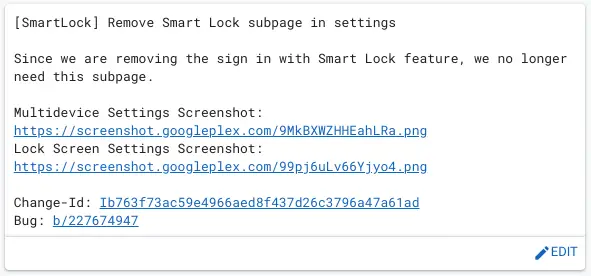
Admittedly, the language in the commit is a tad bit misleading, but if you dig through things a bit, you can eventually get to the point where you see that the ability to log in is being removed, not the ability to unlock your device. As we covered in our Chrome OS 98 features video shown below, the revamped Smart Lock looks great and works incredibly well. Though I’m sure there will be some users that will miss it, the fact is many don’t even know that it works to log into your device, too (when it actually works). With a faster UI, a better look and a more-stable behavior, the new Smart Lock should be a welcome addition to Chrome OS when it does officially launch.
SUBSCRIBE TO UPSTREAM
Get Chrome Unboxed delivered straight to your inbox
Upstream is our flagship, curated newsletter with the top stories, most click-worthy deals, giveaways, and trending articles from Chrome Unboxed sent directly to your inbox a few times a week. Join 31,000+ subscribers.

