• Skip to main content
  • Skip to primary sidebar
  • Deals
  • Features
  • Guides
  • Chromebooks
  • Videos
  • Podcast
  • More +
    • Reviews
    • Unboxing
    • Upcoming Devices
    • Chromebook Plus
    • Chrome
    • ChromeOS
    • Chrome OS Flex
  • Search
  • Sign Up
  • Log In
Chrome Unboxed – The Latest Chrome OS News

Chrome Unboxed - The Latest Chrome OS News

A Space for All Things Chrome, Google, and More!

  • Deals
  • Features
  • Guides
  • Chromebooks
  • Videos
  • Podcast
  • More +
    • Reviews
    • Unboxing
    • Upcoming Devices
    • Chromebook Plus
    • Chrome
    • ChromeOS
    • Chrome OS Flex
  • Search
  • Sign Up
  • Log In

Google celebrates the adoption of Smart Canvas features, announces more to come

February 25, 2022 By Johanna Romero View Comments

Illustration of Google Workspace's Smart Canvas

Support our independent tech coverage. Chrome Unboxed is written by real people, for real people—not search algorithms. Join Chrome Unboxed Plus for just $2 a month to get an ad-free experience, access to our private Discord, and more. Learn more about membership here.
START FREE TRIAL (MONTHLY)START FREE TRIAL (ANNUAL)

Building off of their announcement back in May of last year which introduced Smart Canvas – a new product experience that delivers the next evolution of collaboration for Google Workspace – Google posted today on The Keyword a summary of all the Smart Canvas features released to date.

Additionally, Google boasted of the welcomed adoption of these features by revealing that they are being used in documents more often than well-established features, such as commenting. Below are all the Smart Canvas features so far:

Xremove ads
  1. Auto-generated summaries in Google Docs: High-level overview of your document’s contents without having to read the entire page upfront.
  2. Pageless format in Google Docs: Allows any text, images, tables and more to “re-flow” automatically based on the size of the screen.
  3. Expansion of the “@” menu: We were able to previously @-mention colleages in Docs and Sheets, but this expansion allows for the use of the “@” menu to insert additional things like images, tables, and templates.
  4. Meeting notes template: Automatically imports information from a calendar meeting invite into a Google Doc, which you can use to take notes during said meeting.
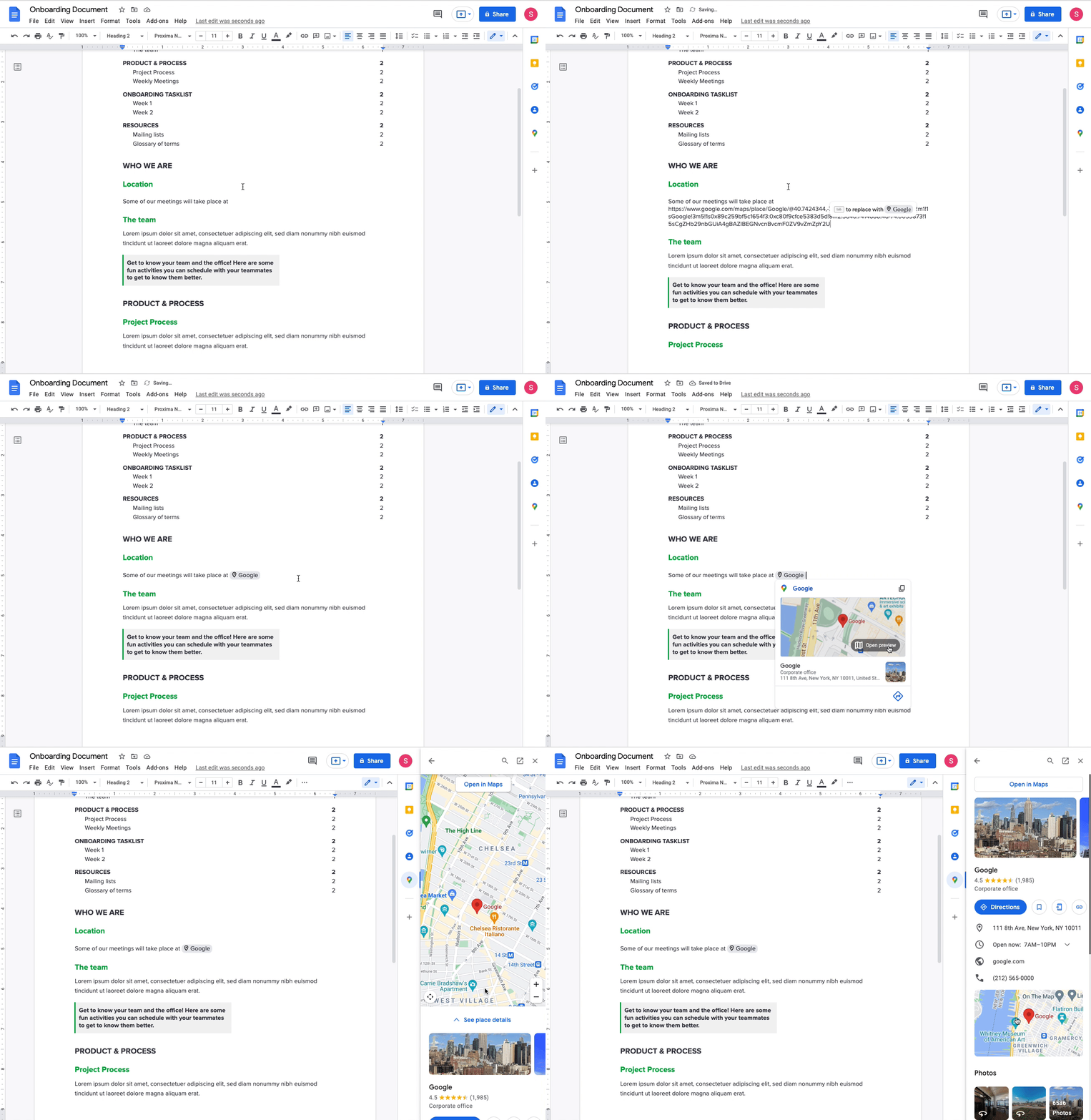
  5. Previewing of Google Maps links directly in Google Docs: This utilizes a smart chip for which you will see a thumbnail. Once you click on it, it will expand on the right sidebar of the Doc.
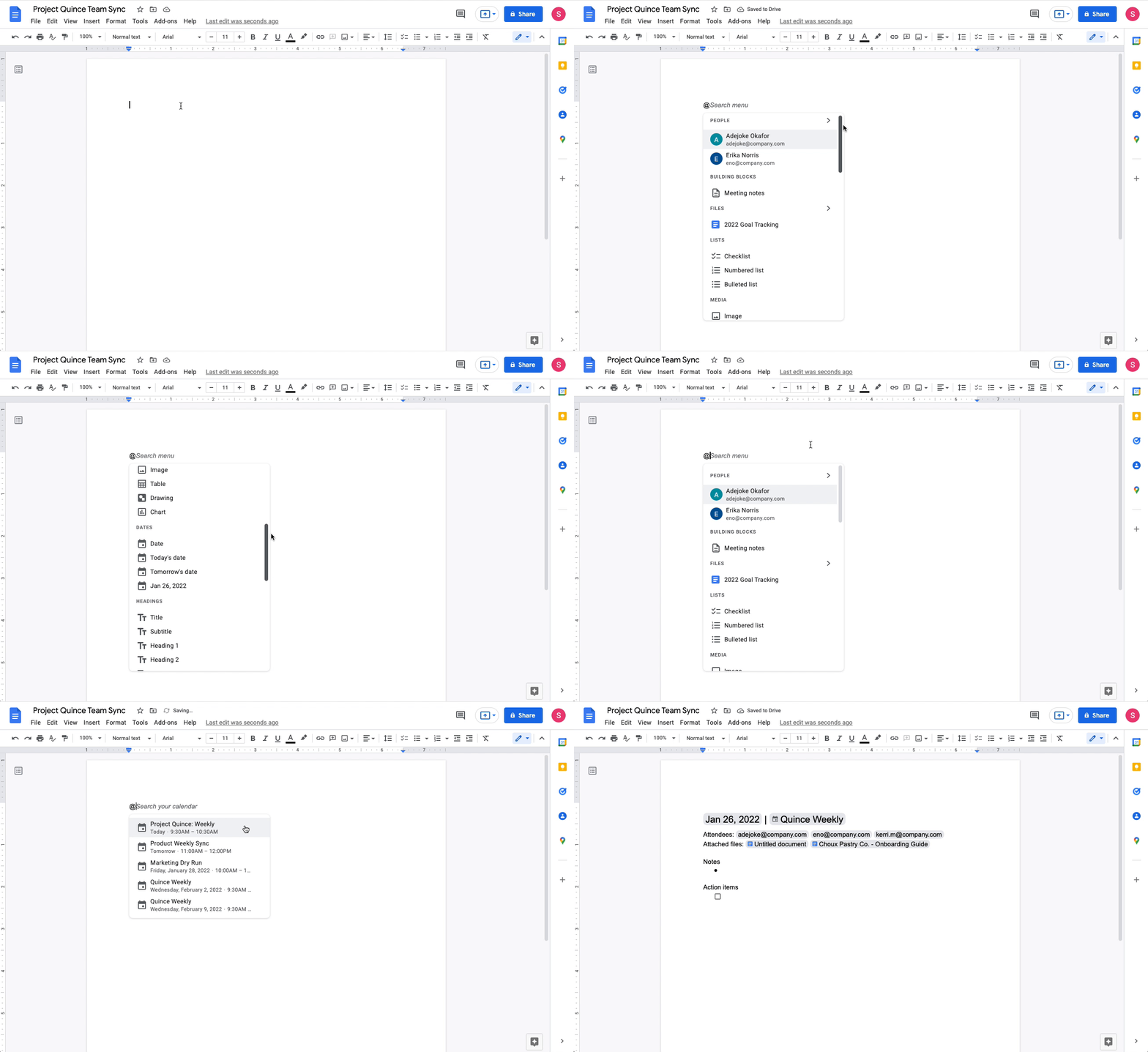
Meeting notes template creation on Google Docs
Google Maps Smart Chip within Google Docs

Google also took this opportunity to announce that with the expansion of the “@” menu, a new feature will be available in the coming weeks that will allow collaboration with others on an email within Docs. This will entail exporting your finished email as a draft. We have yet to see how this feature will work exactly, but we can’t wait to try it. We’ll be keeping an eye out and will report back as new features become available in Workspace.

SUBSCRIBE TO UPSTREAM

Get Chrome Unboxed delivered straight to your inbox

Upstream is our flagship, curated newsletter with the top stories, most click-worthy deals, giveaways, and trending articles from Chrome Unboxed sent directly to your inbox a few times a week. Join 31,000+ subscribers.

Featured Videos

Xremove ads
SUBSCRIBE HERE!

Filed Under: Enterprise, New & Upcoming Features, Updates, Workspace Tagged With: google docs, google sheets, smart canvas, workspace

Primary Sidebar

Xremove ads

Deals

You can score $40 off Google’s battery-powered Nest Doorbell right now

By Joseph Humphrey
March 20, 2026

The touchscreen Lenovo Chromebook Slim 3 is a steal at under $200

By Robby Payne
March 16, 2026

Google TV Streamer and Remote held in front of a wall-mounted TV

The premium Google TV Streamer 4K is back down to $80

By Joseph Humphrey
March 16, 2026

The best Chromebook deals today

By Robby Payne
March 16, 2026

Pixel Buds Pro 2 running

I still love the Pixel Buds Pro 2 and they are $60 off right now

By Joseph Humphrey
March 13, 2026

More Deals

Xremove ads

Reviews

Acer Chromebook Plus Spin 514 Review: Kompanio Ultra power in a convertible

By Robby Payne
December 24, 2025

My review after 6 weeks with the Lenovo Chromebook Plus 14 [VIDEO]

By Robby Payne
August 11, 2025

One week with the best small Android tablet you can buy, and I’m sold

By Robby Payne
May 9, 2025

Best Chromebooks of 2024 [VIDEO]

By Robby Payne
November 28, 2024

Samsung Galaxy Chromebook Plus Review: Samsung is back! [VIDEO]

By Robby Payne
October 28, 2024

More Reviews

Xremove ads

Guides

This Chromebook trackpad shortcut is definitely not new, but is blowing my mind

By Robby Payne
March 11, 2024

How to reduce broadcast delay on YouTube TV to stop live spoilers

By Robby Payne
December 8, 2023

Windows PC keyboard and Chromebook

How to use a Windows keyboard with a Chromebook

By Joseph Humphrey
December 8, 2023

How reset and revert your Chromebook to the previous version of Chrome OS

By Robby Payne
November 29, 2023

My Chromebook Plus features disappeared: here’s how I fixed it

By Robby Payne
November 24, 2023

More Guides

TWITTER · FACEBOOK · INSTAGRAM · YOUTUBE · EMAIL · ABOUT

Copyright © 2026 · Chrome Unboxed · Chrome is a registered trademark of Google Inc.
We are participants in various affiliate advertising programs designed to provide a means for us to earn fees by linking to affiliated sites.

PRIVACY POLICY