

Support our independent tech coverage. Chrome Unboxed is written by real people, for real people—not search algorithms. Join Chrome Unboxed Plus for just $2 a month to get an ad-free experience, access to our private Discord, and more. Learn more about membership here.
START FREE TRIAL (MONTHLY)START FREE TRIAL (ANNUAL)
Google Slides is receiving a significant update aimed at simplifying and enhancing the presentation creation process. A new sidebar, coupled with the integration of Imagen 3 and a suite of visual tools, promises to make crafting compelling presentations more efficient than ever.
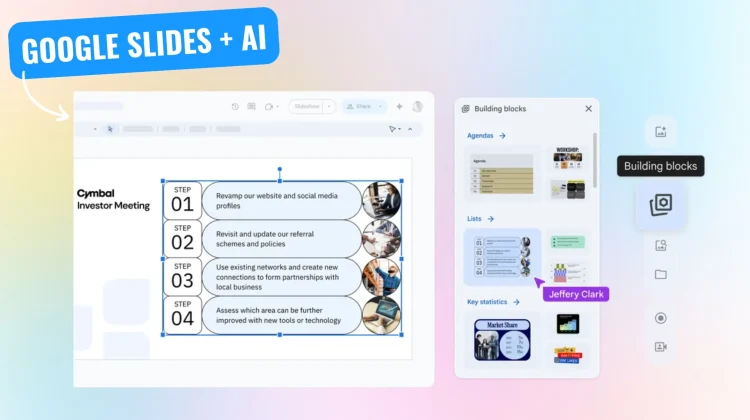
The most prominent change is the introduction of a dedicated sidebar on the right side of the canvas. This centralized hub provides quick access to a range of features, including templates, image generation, and new design components. Users can now seamlessly incorporate pre-formatted content blocks, such as agendas, quotes, and key statistics, directly into their slides. These “building blocks,” akin to those in Google Docs, are fully customizable, allowing for tailored presentations.

Visual enhancements extend beyond pre-designed elements. Google Slides now leverages Imagen 3, Google’s latest image generation model, enabling users to create AI-powered visuals directly within the application. Additionally, an expanded stock library offers access to millions of high-quality images, web images, stickers, and GIFs. This wealth of visual resources streamlines the process of adding impactful imagery to presentations.
Further improvements include new templates designed for various presentation needs, from project planning to sales pitches. Proportional scaling allows for the resizing of grouped objects and text while maintaining image clarity, ensuring polished visuals. Existing features like speaker spotlight and slide recordings are also accessible through the new sidebar, creating a unified workflow.
This update impacts all end users, aiming to provide a consistent location for insertion-related actions and to save time by offering design tools and inspiration without leaving Google Slides. The focus is on empowering users to create visually stunning presentations with greater ease.
Rollout of these features will occur in phases. Rapid Release domains will see an extended roll-out starting March 31, 2025, while Scheduled Release domains will experience a gradual roll-out beginning April 14, 2025.
Availability of these tools vary depending on the Google Workspace edition. Templates and building blocks will be available to all Google Workspace customers, Workspace Individual Subscribers, and users with personal Google accounts (using the “English (United States)” language setting). Speaker spotlight and Slides recordings are available in Business Standard and Plus, Enterprise Essentials and Plus, Enterprise Standard and Plus, and Education Plus. Gemini features in Google Slides are available in Business Standard and Plus, Enterprise Standard and Plus, and customers with the Gemini Education or Gemini Education Premium add-on, and customers with the Gemini Business or Gemini Enterprise add-on.
SUBSCRIBE TO UPSTREAM
Get Chrome Unboxed delivered straight to your inbox
Upstream is our flagship, curated newsletter with the top stories, most click-worthy deals, giveaways, and trending articles from Chrome Unboxed sent directly to your inbox a few times a week. Join 31,000+ subscribers.

