


Support our independent tech coverage. Chrome Unboxed is written by real people, for real people—not search algorithms. Join Chrome Unboxed Plus for just $2 a month to get an ad-free experience, access to our private Discord, and more. Learn more about membership here.
START FREE TRIAL (MONTHLY)START FREE TRIAL (ANNUAL)
Google has itself historically been confused about where it wants you to list what you need in your refrigerator, pantry, and freezer. Back in the day, a “Groceries” list could be made in Google Keep, and asking Assistant to add something to your shopping list would place it there. Then, one day, the company uprooted your list and dropped it into Google Shopping as a “Google Shopping List”. I found this out the hard way by visiting my local grocery store and realizing that when my cell connection dropped off due to the building’s roof, I was left standing in the middle of the produce aisle without a clue of what else I was supposed to buy as the web list simply disappeared. Back in Keep, this list could be accessed even offline, making it the ideal location to store things.
Well, despite how much I’ve detested Shopping List on the web, I’ve come to utilize it for a number of things, groceries and household items alike thanks to my increased reliance on Google’s new golden child and central focus – Shopping, which it’s literally baking into nearly every one of its services in an effort to monetize beyond ad revenue. The design was pretty ugly, but at least it had intelligent grouping features like food groups, smart chips showing food item icons, and even the ability to quickly search Google Shopping for something with a tap.
This week, the tech giant gave Shopping’s web app on desktop and mobile a redesign, and yes, I admit that it looks quite nice, but in the process, it’s lost a lot of what made it worth using. Now, Shopping is far less useful than it was before, and that’s saying something as it was already significantly less attractive than Keep for the aforementioned reasons.
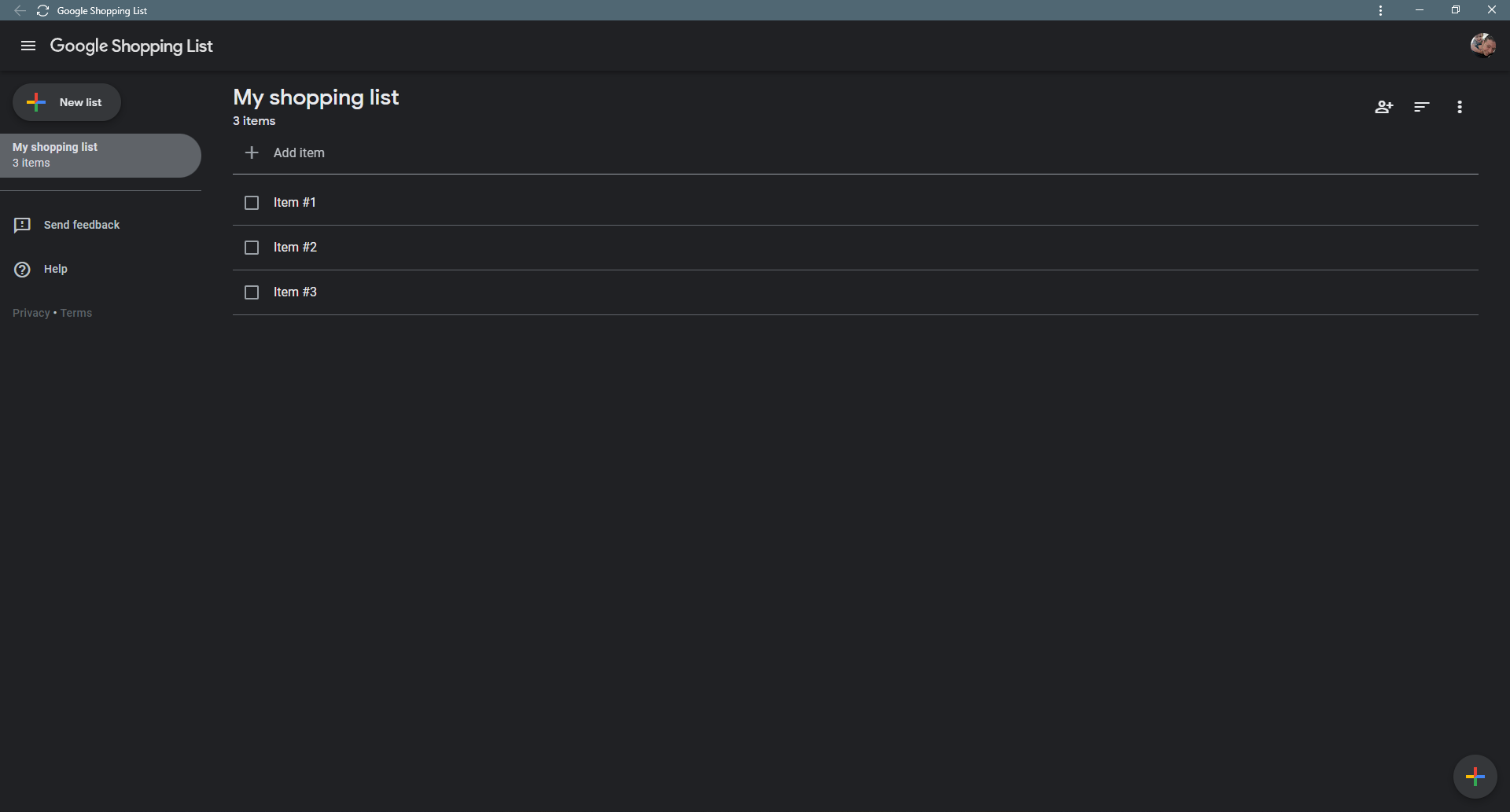
Gone are the smart groupings, and smart chips. No longer can you swipe something away, and instead, there’s an ever-present check box that clutters the screen. Sure, it’s more functional, but why was this necessary? Does Google have big plans for Shopping List that we’re unaware of? I’m not sure. Sometimes, if the company doesn’t choose to “spring clean” a product by sunsetting it, said product or service gets a facelift just because, and it often means nothing.
Anyway, the whole thing is now no more special than a standard checklist you’d find in Keeps, so why the heck aren’t we using Keep again? You can check stuff off – that’s it. You can sort it alphabetically, but again, no food grouping capabilities. It may look pretty now, but does anyone really care if most of the functionality has been stripped away?
The familiar FAB, or Floating Action Button found on Gmail and other services now graces the top-left of the web app, allowing for an easy way to add a new list, but I don’t really know anyone who would add a list often enough to need a button like this. Luckily, a FAB does exist at the bottom-right which allows you to add individual items to a list, but my eyes immediately went to the redundant “Add item” plain text above my top list item.
Added food items no longer have cute icons showing what they are, and you can no longer tap an item to search for it on Google Shopping. Autocomplete is gone while adding things to a list, and so are details or notes for each item. What on earth was Google thinking? I don’t even know what to say about this, but I will be watching to see if the web app evolves at all now that it’s prematurely launched in this new state. Let me know in the comments what you think about this, and whether or not you even use “Google Shopping List” on the web or on the go.
SUBSCRIBE TO UPSTREAM
Get Chrome Unboxed delivered straight to your inbox
Upstream is our flagship, curated newsletter with the top stories, most click-worthy deals, giveaways, and trending articles from Chrome Unboxed sent directly to your inbox a few times a week. Join 31,000+ subscribers.

