

Support our independent tech coverage. Chrome Unboxed is written by real people, for real people—not search algorithms. Join Chrome Unboxed Plus for just $2 a month to get an ad-free experience, access to our private Discord, and more. Learn more about membership here.
START FREE TRIAL (MONTHLY)START FREE TRIAL (ANNUAL)
The word ‘Google’ has become so many things at this point. It is the name of a globally-recognized advertising company, a hardware manufacturer, a software maker, a services provider, a cloud computing juggernaut, and lest we forget, a search engine. Core to all the things Google does as a company is the most central part of its overall profit: search. As Google defines it, they are in the business of organizing the worlds information. So important to Google’s identity is searching that the word ‘search’ itself is often replaced with ‘Google’ as a verb in our less buttoned-up vernacular.
So, when changes happen to the core search experience, those changes have a lasting impact and affect on nearly anyone who uses the internet. Think about the sheer volume of searches that happen on a minute to minute basis all around the world. It is mind-numbing to think of the amount of traffic google.com sees on a very routine basis. When Google changes anything on their core website, it is worth taking a look at.

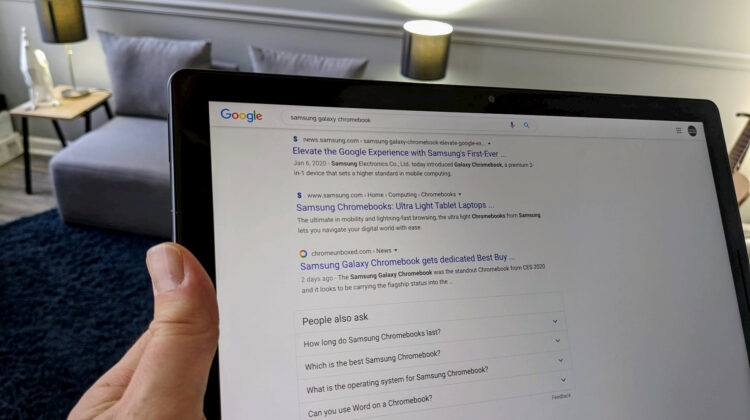
Rolling out over the last few days is a change that alters the look of your search results across the board. From now on, when you search for anything, the websites that show up as a result will not only have the title and a snippet of info in the result, but the favicon will show up as well. Favicons are the little icons that show up in your browser’s URL bar or tab and accompany the website/web app if you place a shortcut on your home screen or in your app tray.
Favicons are the quick, snackable version of most companies’ logos that we begin to attribute to their brand over time. Google’s colorful G, Stadia’s wedge-shaped S, and even the Chrome Unboxed O are all examples of a favicon in action. They don’t tend to get a ton of front-seat billing, but that seems to be old news now. From here on out, search results will also feature a site’s favicon right above the title of the page and I love it.
Shop The Best Chromebooks of 2019 at Chrome Shop
In a nutshell, this offers a quick, visual queue to users to help them discern exactly where the article they are about to click on is actually taking them. Don’t get me wrong: it’s not like the website name and URL wasn’t always right there to see. It’s just clearer and easier to sort visually now. If I’m performing a search for the Samsung Galaxy Chromebook, for instance, and I’m looking quickly for what Chrome Unboxed has to say about it, I can now see the relevant results and visually hone in on the ones I was looking for with a great deal more ease.
This isn’t an overhaul to the algorithm or the entire search page for Google. Instead, this is a small, helpful change that will help users parse the staggering amount of info offered up by a simple search. Branding and iconography are important and useful for us to navigate things on a more visual basis, and Google’s new addition to search results takes advantage of that in all the right ways.
SUBSCRIBE TO UPSTREAM
Get Chrome Unboxed delivered straight to your inbox
Upstream is our flagship, curated newsletter with the top stories, most click-worthy deals, giveaways, and trending articles from Chrome Unboxed sent directly to your inbox a few times a week. Join 31,000+ subscribers.

