


Support our independent tech coverage. Chrome Unboxed is written by real people, for real people—not search algorithms. Join Chrome Unboxed Plus for just $2 a month to get an ad-free experience, access to our private Discord, and more. Learn more about membership here.
START FREE TRIAL (MONTHLY)START FREE TRIAL (ANNUAL)
Google’s efforts toward providing improved education and distanced learning technologies to students, parents, and teachers since the beginning of the pandemic are extremely impressive. From its improvements to Google Meet, the launch of Google Workspace for Education, and more, the company has really stepped up to the plate and provided a service where there was a major gap. Some say that our adoption of digital environments has been accelerated by at least two years thanks to the current state of things.
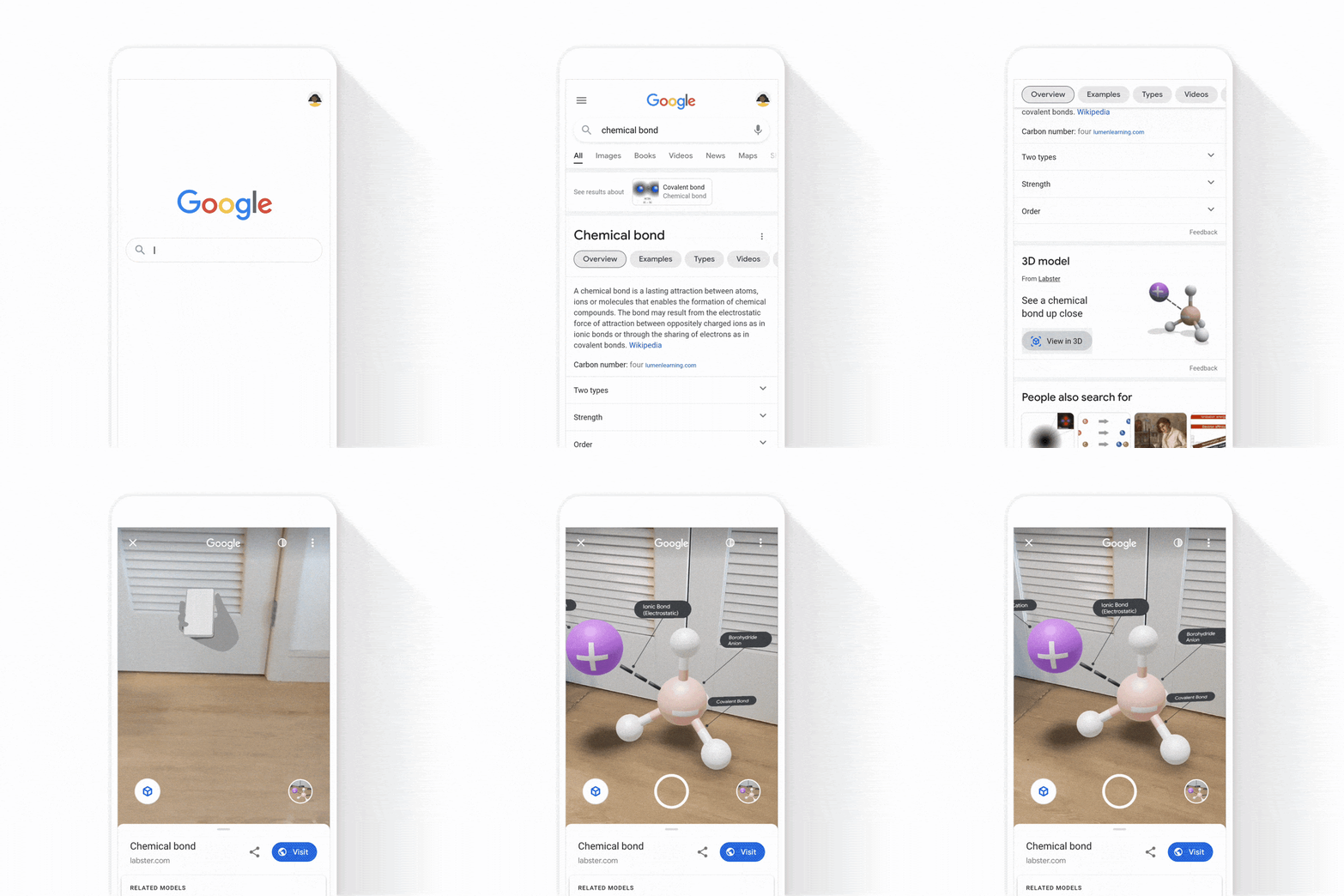
Just this week, Google gave some tips on how students could leverage Search to get help with complex math problems, practice STEM concepts, and more. We can explore some awesome tricks that the search engine has built right in that benefit students on their path to higher education, so let’s take a brief look. For example, you can look up over 2,000 STEM concepts for quick access to educational resources. By searching for something like ‘chemical bonds’, you can find overviews of the concept, useful examples, videos, and more. This awesome sidebar also provides additional tools for you to make use of in order to get the most out of your search session.

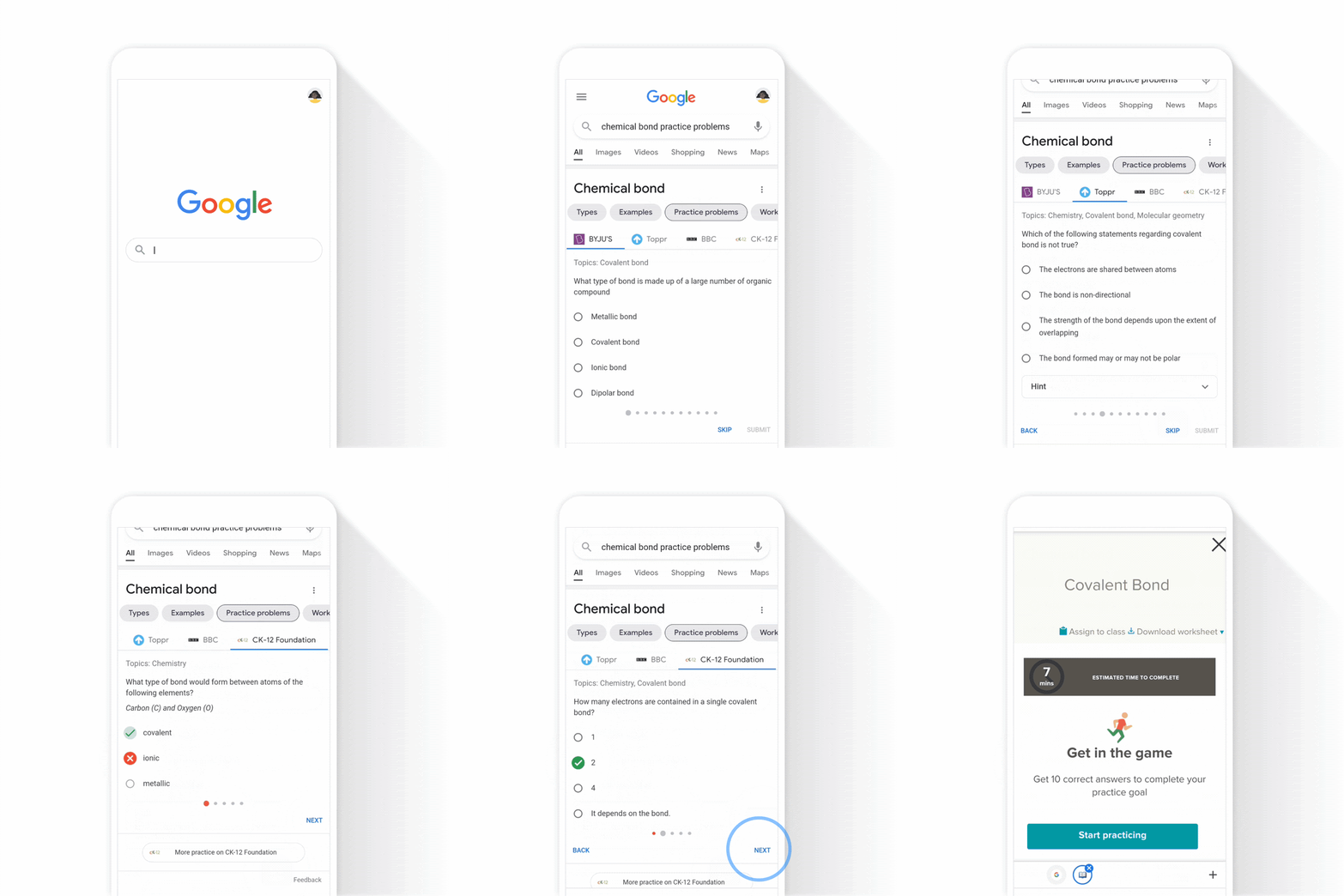
By clicking on the Practice Problems section on the left sidebar, you can actually go through an entirely free practice test that grades you as you answer questions. Though the image below is that of a mobile phone, I want to encourage students to take advantage of this from the comfort of their Chromebooks as well in order to prepare for tests and more. This interactive feature tests your knowledge of high school math, chemistry, physics, and more directly through the web browser! If you want to try it out, just type in something like ‘chemical bond practice problems‘. If you’re curious about how Google determines which practice questions to present you with, they come from sources like BBC Bitesize, Byjus, Careers360, Chegg, CK12, Education Quizzes, GradeUp, Great Minds, Kahoot!, OpenStax, Toppr, Vedantu, and more. Most of these are reputable sources and things like Kahoot! tend to consist of user-generated content, so you’ll just need to vet the uploader for that specific quiz if you are wary.
If you’re doing all of this on your phone, you can also take advantage of Google’s insanely cool AR technology and place over 200 chemistry, biology, physics, and anatomy concepts right in your living room with realistic lighting and shadows. This takes advantage of Google’s AR Core. You can even place a human skeleton right before your very eyes to study anatomy. That’s wild!
If you’re a student or a parent that’s stuck on a particular math problem, you can type the equation into Google Search and get the answer in a fraction of a second or take a picture of it using Google Lens. Boy, do I wish I had this back when I was in school. I’m actually feeling pretty jealous of kids these days! Don’t worry, Google isn’t just going to give you the answer and call it a day though – instead, you’re presented with step-by-step instructions on how to solve the problem so that you can feel confident that you’re learning the concept behind the problem itself. Hey, so long as you’re learning how to think critically, who cares if you get the answer upfront, right? I’m personally all for this method, and these step-by-step instructions are provided by companies like Symbolab, Mathway (a Chegg Service), and Tiger Algebra, and they’re available in over 70 languages!
In the coming weeks, Google will be providing detailed explanations and targeted resources for complex and tricky STEM questions like “0.50 moles of NaCL are dissolved in 2.5 L of water, what is the molarity?‘, for example, so that students can take their understanding to the next level. I’m genuinely blown away at the level of dedication has shown toward teachers, students, and parents in this time of need. I know that I’ve given them crap about slacking when it comes to Stadia and other such services recently, but I think they’ve risen above and gone far beyond for very important matters like educating and equipping our society for a greater chance to rise above during and after the pandemic.
SUBSCRIBE TO UPSTREAM
Get Chrome Unboxed delivered straight to your inbox
Upstream is our flagship, curated newsletter with the top stories, most click-worthy deals, giveaways, and trending articles from Chrome Unboxed sent directly to your inbox a few times a week. Join 31,000+ subscribers.

