
• Skip to main content
  • Skip to primary sidebar
  • Deals
  • Features
  • Guides
  • Chromebooks
  • Videos
  • Podcast
  • More +
    • Reviews
    • Unboxing
    • Upcoming Devices
    • Chromebook Plus
    • Chrome
    • ChromeOS
    • Chrome OS Flex
  • Search
  • Sign Up
  • Log In
Chrome Unboxed – The Latest Chrome OS News

Chrome Unboxed - The Latest Chrome OS News

A Space for All Things Chrome, Google, and More!

  • Deals
  • Features
  • Guides
  • Chromebooks
  • Videos
  • Podcast
  • More +
    • Reviews
    • Unboxing
    • Upcoming Devices
    • Chromebook Plus
    • Chrome
    • ChromeOS
    • Chrome OS Flex
  • Search
  • Sign Up
  • Log In

Google bags exclusive interview with Santa, and the Search team bakes in some holiday treats

December 23, 2021 By Michael Perrigo View Comments

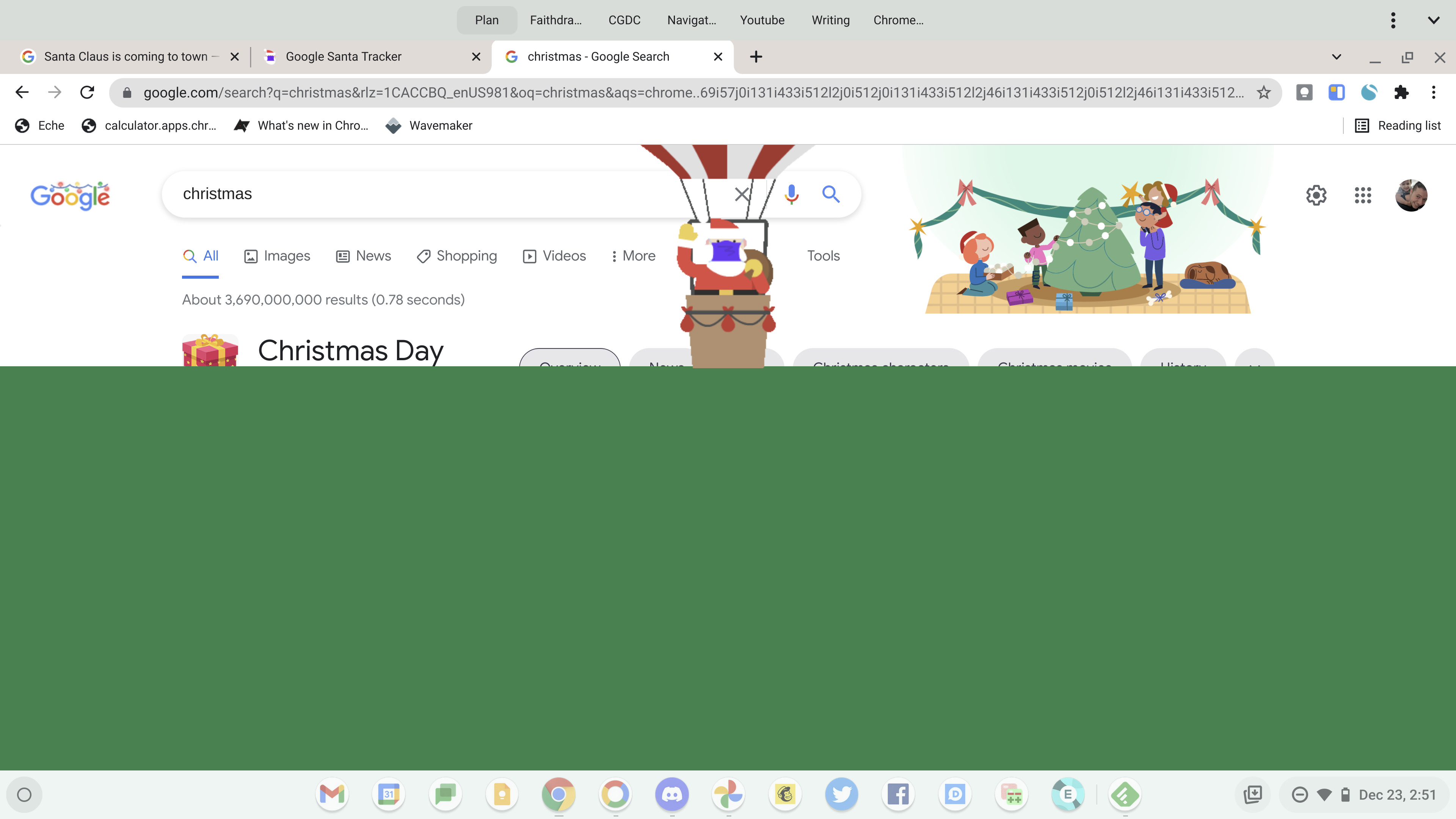
It’s that time of the year again, and Google’s Santa Tracker is getting loads of traffic as kids around the globe check in to see what’s new at the North Pole and track Santa before his big night. This year, the Google Search team has added a few easter eggs into your results when you search for “Christmas”, and apparently, they will vary based on where you are in the world.

When I did this, a cute little present dropped in from the top of the screen right next to the words “Christmas Day”, and upon clicking it, I was taken directly to the Santa Tracker, but not before the jolly elf in a face mask flew up my screen in a hot air balloon. Oh, and a nice family decorating a Christmas tree appeared on the right side of the search bar too.
Xremove ads
Search Google for “Christmas”

In a new Keyword blog post, Google bagged an exclusive interview with the Jolly guy himself and he took time to share the history of Christmas across different cultures as well as to highlight some of the most popular holiday tools that Google has created over the past few years. For example, the Blob Opera has been a big hit with kids and adults alike, and Google Arts and Culture even has a Christmas-themed coloring book you can work on.

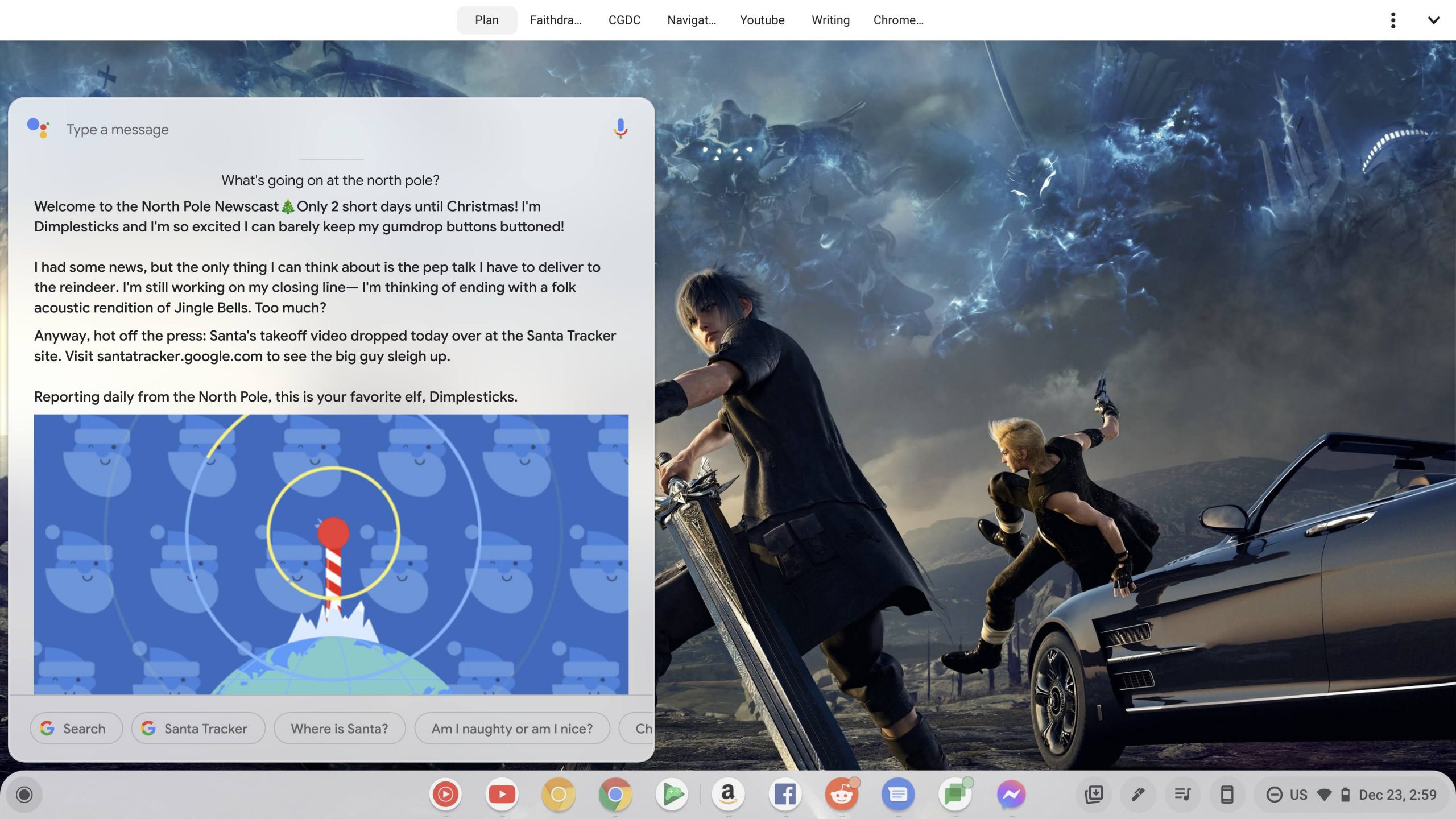
Additionally, the “North Pole Newscast” returns this year, so by simply asking Google Assistant “What’s going on at the North Pole?”, you can get a fun little report each day from the elf named Dimplesticks. You can do this on your Chromebook too if you have Assistant enabled, of course, so give it a try! By calling this up, I was made aware that Santa’s takeoff video dropped today. It shows him being dragged out of bed and prepared for the trip by his elves before speeding off into the night in his eco-friendly sleigh to deliver presents. Very clever, Google, very clever.
Featured Videos

Xremove ads

As a reminder, you can have your kids interact with Santa tonight by saying “Hey Google, Call Santa” from any smart home device with Assistant baked in. Upon doing so, they will be greeted by the big fella and be able to have a conversation with him and even help the elves create a holiday song.

As of right now, I’m not seeing any new games or interactive experiences on the Santa Tracker for kids to enjoy if they’ve already played last year’s content to death. There’s still plenty to tinker with, and it’s fun to revisit the animations and songs each year, so if you have children, be sure to let them install it on their Chromebooks by clicking the “Install” button at the top-right of the Chrome browser’s Omnibox or search bar! Lastly, you should definitely say “Hey Google, track Santa”, or “Hey Google, where’s Santa?” to give the kiddos something fun to do while you wrap the last of the presents.

Join Chrome Unboxed Plus

Introducing Chrome Unboxed Plus – our revamped membership community. Join today at just $2 / month to get access to our private Discord, exclusive giveaways, AMAs, an ad-free website, ad-free podcast experience and more.

Xremove ads

Plus Monthly

$2/mo. after 7-day free trial

Pay monthly to support our independent coverage and get access to exclusive benefits.

Start free trial

Plus Annual

$20/yr. after 7-day free trial

Xremove ads

Pay yearly to support our independent coverage and get access to exclusive benefits.

Start free trial

Our newsletters are also a great way to get connected. Subscribe here!

Click here to learn more and for membership FAQ

Filed Under: Apps, New & Upcoming Features, News, Updates

About Michael Perrigo

Known as "Google Mike" to his customers, Michael worked at Best Buy as a Chromebook Expert who dedicated his time to understanding the user experience from a regular Chromebook owner's perspective. Having spent nearly 20 years meeting you face-to-face, he strives to help you understand your technology through carefully crafted guides and coverage, relentlessly seeking out the spark in what's new and exciting about ChromeOS.

Primary Sidebar

Xremove ads

Deals

The best Chromebook deals today

By Robby Payne
December 22, 2025

Save $220 on the powerful, versatile Acer Chromebook Plus Spin 714

By Robby Payne
December 10, 2025

The Google Pixel 9a just hit its lowest price ever at $150 off

By Joseph Humphrey
December 8, 2025

At $349, this Lenovo Chromebook Plus is one of the best value laptops you can buy

By Joseph Humphrey
December 3, 2025

The elusive 8GB Lenovo Chromebook Duet 11 is finally back in stock and down to $279

By Robby Payne
December 2, 2025

More Deals

Xremove ads

Reviews

My review after 6 weeks with the Lenovo Chromebook Plus 14 [VIDEO]

By Robby Payne
August 11, 2025

One week with the best small Android tablet you can buy, and I’m sold

By Robby Payne
May 9, 2025

Best Chromebooks of 2024 [VIDEO]

By Robby Payne
November 28, 2024

Samsung Galaxy Chromebook Plus Review: Samsung is back! [VIDEO]

By Robby Payne
October 28, 2024

Lenovo Chromebook Duet 11″ Review [VIDEO]

By Robby Payne
October 19, 2024

More Reviews

Xremove ads

Guides

This Chromebook trackpad shortcut is definitely not new, but is blowing my mind

By Robby Payne
March 11, 2024

How to reduce broadcast delay on YouTube TV to stop live spoilers

By Robby Payne
December 8, 2023

Windows PC keyboard and Chromebook

How to use a Windows keyboard with a Chromebook

By Joseph Humphrey
December 8, 2023

How reset and revert your Chromebook to the previous version of Chrome OS

By Robby Payne
November 29, 2023

My Chromebook Plus features disappeared: here’s how I fixed it

By Robby Payne
November 24, 2023

More Guides

TWITTER · FACEBOOK · INSTAGRAM · YOUTUBE · EMAIL · ABOUT

Copyright © 2025 · Chrome Unboxed · Chrome is a registered trademark of Google Inc.
We are participants in various affiliate advertising programs designed to provide a means for us to earn fees by linking to affiliated sites.

PRIVACY POLICY