

Support our independent tech coverage. Chrome Unboxed is written by real people, for real people—not search algorithms. Join Chrome Unboxed Plus for just $2 a month to get an ad-free experience, access to our private Discord, and more. Learn more about membership here.
START FREE TRIAL (MONTHLY)START FREE TRIAL (ANNUAL)
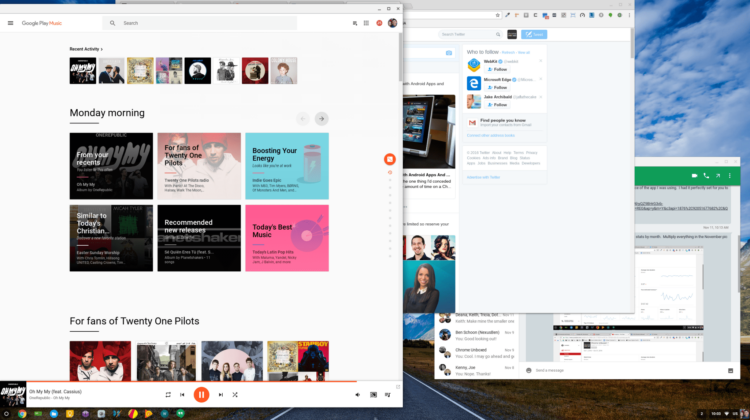
 This morning as I logged into my Chromebook and fired up my ever-present apps, I was met with a slightly shocking new interface when Google Play music loaded up. So far, I like it!
From the beginning, this is a pared-down UI meant (hopefully) for great speed increases. I use Play Music every day, all day. It’s UI hasn’t been the most intuitive or the fastest. Today’s update helps both of those issues.
Looking around at the new layout, at least on the web version, we are met with much less orange, replaced mainly by a very slight gray. Additionally, we now have a section simply called ‘Home’. For me, the ‘Listen Now’ section was my home. From that screen, Google Play Music offered up suggestive playlists, recent activity (my usual landing spot) and then other suggested music based on your listening.
AI Comes To Music
What has been added is suggestions based not just on time of day. Play Music has done this for some time, now. What is new is the ability for the app to recognize where you are and tailor suggestions based on that location.
 Right now, one of my suggestions is ‘Working to a Beat’ as Google recognizes I’m at work. Under the title, it says ‘Looks like you’re at work.’
This doesn’t seem like a huge departure, but what is happening behind the scenes is a pretty big deal. It is nice to have selections based on work or personal locations. If I open the app and I’m on the road, offering up music for work is not the best suggestion. Location-based picks help this feature along, and that is great.
But, what Google has deployed here is bigger than location and time-based suggestions. It will consistently get better with time. Google has stated that machine learning (AI) is behind the new recommendations system, so as you listen in different places and with different conditions around you, the app will learn to better suggest using deep machine learning over time.
Think Google Assistant for your personal music DJ.
Other Cosmetic Tweaks
Additionally, in the ‘Home’ section, my recents are right up top. This is my most-used section in Google Play Music, so I’m happy about that. The recommendations that follow are a mix of time and location-based selections and new artists for the day and time. I’d guess most people will find themselves in these two sections most of the time.
Scrolling further down the home page, we have a new layout version of what was already on offer: suggested titles and artists based on your listening habits. As you scroll through the sections, the background shifts colors and photos in an interesting and unique way. Where the longer scroll used to be just artist and albums, it is now littered with radio stations, artists, mood-based playlists, and new albums.
We’ll see how it all performs as time goes on.
One Last Great Addition
Google says of the updated app:
When you subscribe, you’ll always be prepped with an offline playlist based on what you’ve listened to recently. As long as you remember to charge your phone, you’ll have your favorite tunes, even if you forgot to download them ahead of time.
I’ve been in that predicament many, many times. No connection and no downloaded music. Looks like machine learning is aiming at intelligently fixing that issue as well.
Overall, I’m happy with the changes and am very excited about future suggestive help. If the design keeps things moving faster (like the Google+ update did months ago), I’m all for it. Now let’s see how AI does as a DJ.

