
• Skip to main content
  • Skip to primary sidebar
  • Deals
  • Features
  • Guides
  • Chromebooks
  • Videos
  • Podcast
  • More +
    • Reviews
    • Unboxing
    • Upcoming Devices
    • Chromebook Plus
    • Chrome
    • ChromeOS
    • Chrome OS Flex
  • Search
  • Sign Up
  • Log In
Chrome Unboxed – The Latest Chrome OS News

Chrome Unboxed - The Latest Chrome OS News

A Space for All Things Chrome, Google, and More!

  • Deals
  • Features
  • Guides
  • Chromebooks
  • Videos
  • Podcast
  • More +
    • Reviews
    • Unboxing
    • Upcoming Devices
    • Chromebook Plus
    • Chrome
    • ChromeOS
    • Chrome OS Flex
  • Search
  • Sign Up
  • Log In

Google Play Books gets an upgrade with 4 new ways to enjoy reading

May 2, 2024 By Joseph Humphrey View Comments

Google Play Books gets 4 new ways to enjoy reading

Support our independent tech coverage. Chrome Unboxed is written by real people, for real people—not search algorithms. Join Chrome Unboxed Plus for just $2 a month to get an ad-free experience, access to our private Discord, and more. Learn more about membership here.
START FREE TRIAL (MONTHLY)START FREE TRIAL (ANNUAL)

Google is making a big push to get everyone reading and listening more with a bunch of exciting new features in Google Play Books. Whether you’re an avid reader like me or trying to get your kids hooked on books, there’s something in this update for you.

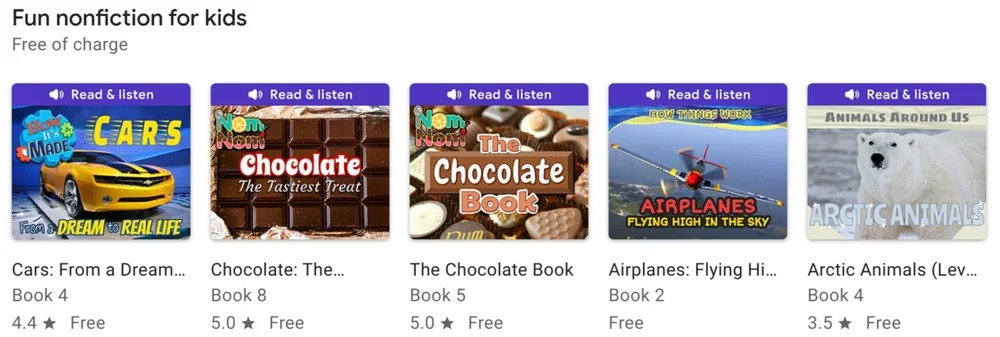
First up, Google Play Books has significantly expanded its collection of free ebooks for children. Over 300 non-fiction books are ready to grab, and as a bonus for parents, they feature a “Read & Listen” option. This means the book will read itself to your child while the pages turn.
Xremove ads

For all the audiobook fans, there’s also a new way to preview books. If you’re unsure about committing to a full audiobook purchase, you can now you can head over to the Google Play Books YouTube channel and check out thousands of audiobook previews. This is in addition to the previews already available within the Play Books app itself.

Check out Today’s Best Chomebook Deals

And if you’re constantly pre-ordering books by your favorite authors, you’ll love the new “Upcoming” section. It’s found within the “Library” tab of the Android app and gives you a calendar view of your pre-orders. You can even filter it to specific series or authors.

Featured Videos

Xremove ads

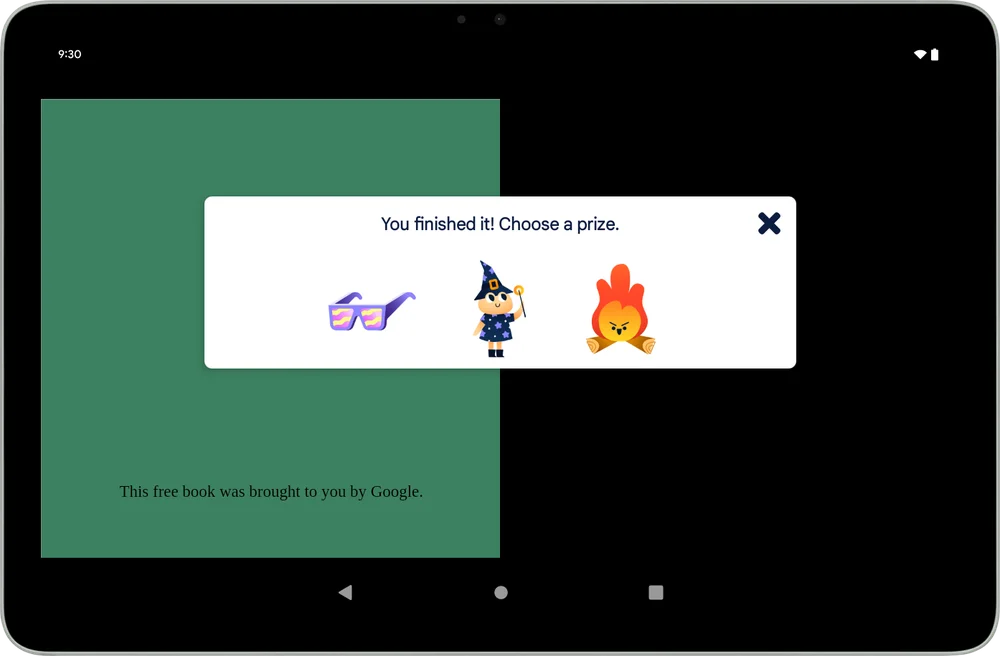
Lastly, if you are looking to motivate your little reader, Google has also introduced “Reading Rewards” which are digital stickers kids earn for hitting reading milestones. You’ll find this feature in the Play Books app for Android and Google Kids Space. Kids can see their “Prizes” and track all the stickers they’ve collected in the Kids Reader toolbar. It’s a fun way to make reading even more engaging for youngsters.
It’s great to see how committed Google is to expanding its book offerings, especially for kids, which I can appreciate as a new parent. I’ve rekindled my love for reading over the past few years by reading on my phone (lately on the Pixel Fold) before bed and I can’t wait to introduce my little guy to reading in Google Play Books. It’s one of my favorite apps on my phone, to be honest, and these updates make it even better. So, if you haven’t explored Google Play Books in a while, it might be time to give it a look.

SUBSCRIBE TO UPSTREAM

Get Chrome Unboxed delivered straight to your inbox

Upstream is our flagship, curated newsletter with the top stories, most click-worthy deals, giveaways, and trending articles from Chrome Unboxed sent directly to your inbox a few times a week. Join 31,000+ subscribers.

Xremove ads
SUBSCRIBE HERE!

Filed Under: Apps, News

About Joseph Humphrey

Joe has been a part of Chrome Unboxed since 2016 when he started helping Robby produce YouTube videos. Although normally behind the scenes, Joe has spent countless hours editing reviews and unboxings of many, many Chromebooks. Now a Partner in Unboxed Media, Joe is constantly thinking strategically about the Chromebook industry and how Chrome Unboxed can continue to innovate in the space.

Primary Sidebar

Xremove ads

Deals

The touchscreen Lenovo Chromebook Slim 3 is a steal at under $200

By Robby Payne
March 16, 2026

Google TV Streamer and Remote held in front of a wall-mounted TV

The premium Google TV Streamer 4K is back down to $80

By Joseph Humphrey
March 16, 2026

The best Chromebook deals today

By Robby Payne
March 16, 2026

Pixel Buds Pro 2 running

I still love the Pixel Buds Pro 2 and they are $60 off right now

By Joseph Humphrey
March 13, 2026

The Lenovo Chromebook Slim 3 is the one to get, starting at just $139 right now

By Robby Payne
March 6, 2026

More Deals

Xremove ads

Reviews

Acer Chromebook Plus Spin 514 Review: Kompanio Ultra power in a convertible

By Robby Payne
December 24, 2025

My review after 6 weeks with the Lenovo Chromebook Plus 14 [VIDEO]

By Robby Payne
August 11, 2025

One week with the best small Android tablet you can buy, and I’m sold

By Robby Payne
May 9, 2025

Best Chromebooks of 2024 [VIDEO]

By Robby Payne
November 28, 2024

Samsung Galaxy Chromebook Plus Review: Samsung is back! [VIDEO]

By Robby Payne
October 28, 2024

More Reviews

Xremove ads

Guides

This Chromebook trackpad shortcut is definitely not new, but is blowing my mind

By Robby Payne
March 11, 2024

How to reduce broadcast delay on YouTube TV to stop live spoilers

By Robby Payne
December 8, 2023

Windows PC keyboard and Chromebook

How to use a Windows keyboard with a Chromebook

By Joseph Humphrey
December 8, 2023

How reset and revert your Chromebook to the previous version of Chrome OS

By Robby Payne
November 29, 2023

My Chromebook Plus features disappeared: here’s how I fixed it

By Robby Payne
November 24, 2023

More Guides

TWITTER · FACEBOOK · INSTAGRAM · YOUTUBE · EMAIL · ABOUT

Copyright © 2026 · Chrome Unboxed · Chrome is a registered trademark of Google Inc.
We are participants in various affiliate advertising programs designed to provide a means for us to earn fees by linking to affiliated sites.

PRIVACY POLICY