


Support our independent tech coverage. Chrome Unboxed is written by real people, for real people—not search algorithms. Join Chrome Unboxed Plus for just $2 a month to get an ad-free experience, access to our private Discord, and more. Learn more about membership here.
START FREE TRIAL (MONTHLY)START FREE TRIAL (ANNUAL)
Since their inception, the Pixelbook line of Chromebooks has largely stayed in the premium lane. Sure, the Pixelbook Go was a tad bit of a departure from that formula, but not much of one. After all, the top trim of that device costs a cool $1399 and is easily one of the most expensive Chromebooks you can buy. The entry level model did debut at $649, but by today’s standards, it is a bit under-powered and lacks features available on Chromebooks that cost less.
For the entirety of their existence, Pixelbooks (I’m including the Pixel Slate in this conversation, too) and the Chromebook Pixels that preceded them have been all about delivering the best overall Chrome OS experience money can buy. Little consideration has been given over the years to aggressive pricing and as we’ve seen with the hype that surrounded the initial fire sales of the Pixel Slate, this was a marketing mistake on Google’s part. People tend to love Google’s hardware, but don’t feel particularly inclined to spend a premium amount of money on it.
Overall, most would agree this has long been the problem with Pixel phones as well. The Pixel 4 wasn’t a bad phone per se, but most didn’t feel it worth the $899 price tag and still don’t. Too many other options exist in that price range and Google’s hardware has never really stacked up. I made an argument this time last year that maybe – maybe – Google was going to take the success of the Pixel 3a and extrapolate that to the Pixelbook line. While I felt a tad bit vindicated in the arrival of the $649 Pixelbook Go, it was still not quite the aggressive take on the Pixelbook I was hoping for.
What a Pixel 4a approach could look like in a Chromebook
So, what would that look like? We have little proof that Google is even making a Pixelbook this year, so perhaps we can just dream a bit, here. Just as we’ve seen with early reviews of the Pixel 4a, making good hardware is not always about stacking the spec sheet with the best of everything. We all know where those types of stat-sheet-stuffers end up from a cost standpoint, and I think far more consumers are interested in a solid device from Google that is great at the basics and little else. So, let’s build this thing, shall we?
Starting with the chassis, we’re definitely talking premium plastics. Aluminum bodies cost lots of money, so a super-affordable Chromebook doesn’t really get that treatment and I think most people are fine with that. For this, Google could simply reinforce the chassis so it is still firm and solid and no one actually minds. When Google worked with HP on the Chromebook 11 from years ago, they did exactly that. The device had a one-finger open, a unique look, and felt absolutely solid despite the all-plastic body.
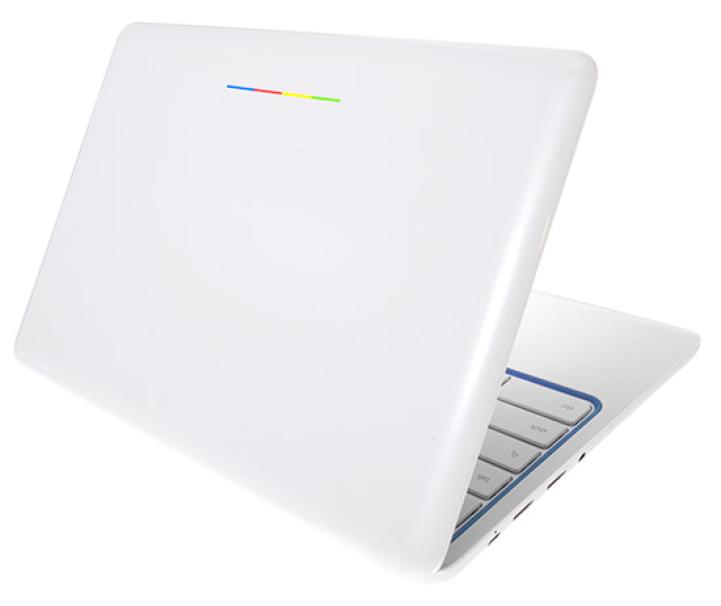
In addition to the solid feel, I do think Google would need to keep the convertible form factor. While I honestly didn’t miss it with the Pixelbook Go, I think the convertible Chromebook gives Google the one device to test everything on and is the reason we still see tons of internal testing done on the original Pixelbook. With no plans to release a tablet soon, Google should have a current device made in-house that supports tablet mode and the USI pen standard that many Chromebooks – affordable and expensive – have in 2020.
The other things Google would need to get right are the display, keyboard and trackpad. These are all things they’ve done well on a budget with the Pixelbook Go, so they could simple do it again. They have the keyframe and trackpad from multiple years of production and nothing needs to change there. I’d opt for a 16:10 or 3:2 screen and those are not terribly expensive to come by, either. It doesn’t have to be AMOLED or QLED, just a solid 300+ nit screen that looks nice.
Ports are about as generic as they come and I wouldn’t even fault them if the audio took a step back. The Pixelbook Go speakers are a gold standard at this point, but I think everyone would fully understand if replacing them with cheaper speakers was a cost-saving measure. Give us a couple USB Type C ports and everyone could make due. No need for elaborate port setups: they could, again, just do what they’ve done prior.
The other real concession for an affordable Pixelbook would be the processor and internals. This is where I think Google could really get creative. They could go with the AMD route and still give what we think will be great performance in one of the upcoming ‘Zork’ Chromebooks that will rival Intel’s best while driving prices down. They could opt for one of the Snapdragon 7c models we’re expecting to be thin, light, powerful and easier on the wallet than a Core i processor from Intel.
Or, they could opt for some of Intel’s lower-end chips that, by all measure are getting quite good. The Pentium Silver I’m using to create this post is quite smooth and much lower-cost than what we’ve seen in Pixelbooks before it. If this imaginary, affordable Pixelbook ever did ship, any of these processor options could easily be in play. Low-end Chromebooks suffer far less performance decline than they used to, so skimping a bit on the processor isn’t the death sentence it used to be in better Chromebooks.
Where I don’t think they would benefit from cutting corners is in the RAM and storage departments. Plastic builds, decent screens, and lacking speakers can be forgiven at lower prices. Paltry RAM and storage are just obnoxious. They could give the device 8GB of RAM and at least 128GB of eMMC storage and you’d have internals that are fast enough for nearly all users across the board. We all know RAM and eMMC storage aren’t that expensive, so it would be an easy place to pad performance without breaking the bank.
So, what exactly am I envisioning, then? I think the Samsung Chromebook 4 is a good place to start from an aesthetic point. Keep the boxy nature of the Pixelbook along with the gray and white colors: just make it all out of plastic. Ultimately, it could look very close to the original Pixelbook for all intents an purposes and just be made from lightweight plastics instead. From there, drop in a reasonably-priced 16:10 or 3:2 panel (Lenovo did so with the Duet), keep the keyboard/trackpad that’s been in previous models, and put in a decent processor flanked by 8GB of RAM and 128GB of storage. Done.
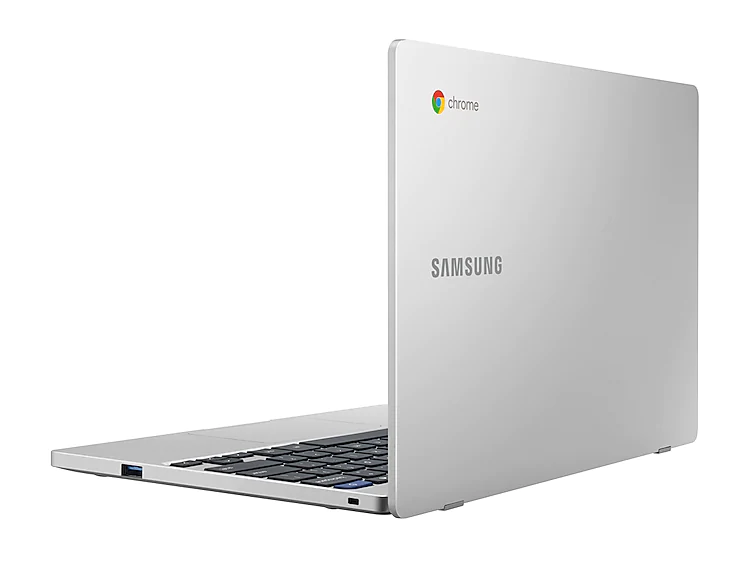
Think about it: the Lenovo Duet does most of this for $299. It even has the extra engineering of a detachable keyboard and extra expense of magnets and the attaching kickstand. Google and other manufacturers clearly have the whole convertible thing down pat, so no need for innovation there. They would just need to source the parts wisely and put it all together well. Then, sell it for somewhere south of $400 and we’d have our first Google-made Chromebook that could sell very, very well right off the bat.
People have gone absolutely bonkers over the Duet because it brings together solid hardware, a solid overall experience, and a rock-bottom price. Google is proving they have the chops to do this in the very-competitive phone space with the Pixel 4a, and I think they need to do so in the Chromebook arena, too. While the market is clearly moving in that direction already with devices like the Duet, Flex 5 and Acer Spin 713, I think Google could set a new standard for affordability and quality that few others could match and, hopefully many would attempt to match afterwards. Will they? We have no idea. Do we hope they will? Absolutely.
Shop Best Chromebooks of 2020 So Far on Chrome Shop
SUBSCRIBE TO UPSTREAM
Get Chrome Unboxed delivered straight to your inbox
Upstream is our flagship, curated newsletter with the top stories, most click-worthy deals, giveaways, and trending articles from Chrome Unboxed sent directly to your inbox a few times a week. Join 31,000+ subscribers.

