

Support our independent tech coverage. Chrome Unboxed is written by real people, for real people—not search algorithms. Join Chrome Unboxed Plus for just $2 a month to get an ad-free experience, access to our private Discord, and more. Learn more about membership here.
START FREE TRIAL (MONTHLY)START FREE TRIAL (ANNUAL)
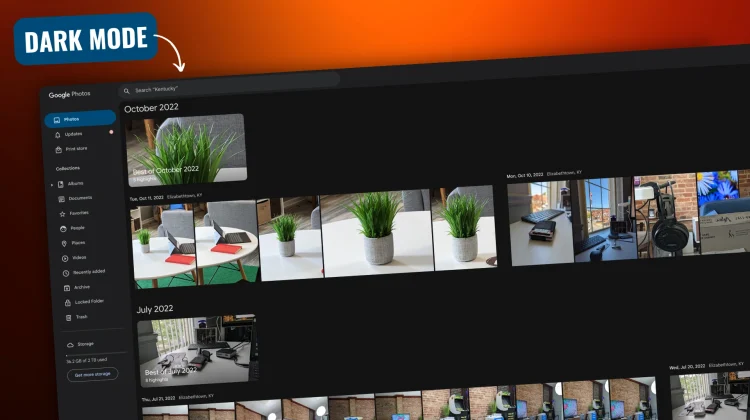
Google has officially rolled out dark mode for its Photos web interface, offering users a long-awaited visual alternative to the stark-white UI we’re all accustomed to. This update addresses the needs of those who prefer a darker aesthetic for reduced eye strain and potential power savings on OLED displays.
Earlier this year, Google began hinting at the arrival of dark mode for Photos on the web. While some users gained access during the initial stages, the feature’s availability was limited, indicating a staggered rollout. Now, after a couple of months, Google has confirmed its widespread availability through a formal announcement on its Photos community forum.
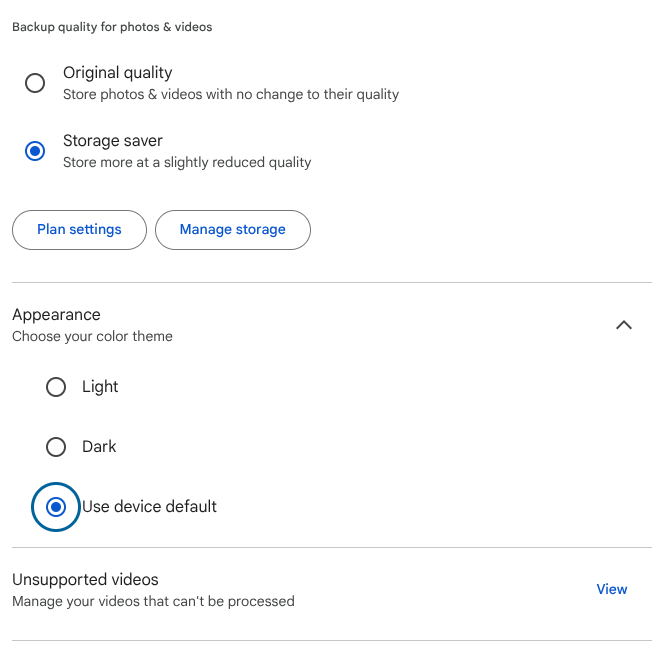
The option to switch between light and dark themes, or to align with system settings, is now consistently available across all the accounts I’ve tested thus far, implying a full-blown roll-out by this point.
For years, the Google Photos mobile app has supported dark mode, allowing users to manage their image libraries with a darker interface. However, the web version lagged behind for quite some time, leaving desktop users without this option. This update brings parity, offering a consistent experience across platforms.
The benefits of dark mode are well-documented. Many users report reduced eye strain when viewing content with dark backgrounds, particularly in low-light environments. Additionally, on OLED displays, dark mode can contribute to battery efficiency by minimizing the number of illuminated pixels.
With the official release, users can now access the color theme settings within Google Photos on the web and select their preferred display mode. Whether opting for a dedicated dark mode, sticking with the traditional light theme, or syncing with system preferences, Google Photos now provides greater user customization.
SUBSCRIBE TO UPSTREAM
Get Chrome Unboxed delivered straight to your inbox
Upstream is our flagship, curated newsletter with the top stories, most click-worthy deals, giveaways, and trending articles from Chrome Unboxed sent directly to your inbox a few times a week. Join 31,000+ subscribers.

