
• Skip to main content
  • Skip to primary sidebar
  • Deals
  • Features
  • Guides
  • Chromebooks
  • Videos
  • Podcast
  • More +
    • Reviews
    • Unboxing
    • Upcoming Devices
    • Chromebook Plus
    • Chrome
    • ChromeOS
    • Chrome OS Flex
  • Search
  • Sign Up
  • Log In
Chrome Unboxed – The Latest Chrome OS News

Chrome Unboxed - The Latest Chrome OS News

A Space for All Things Chrome, Google, and More!

  • Deals
  • Features
  • Guides
  • Chromebooks
  • Videos
  • Podcast
  • More +
    • Reviews
    • Unboxing
    • Upcoming Devices
    • Chromebook Plus
    • Chrome
    • ChromeOS
    • Chrome OS Flex
  • Search
  • Sign Up
  • Log In

Album sharing in Google Photos gets a much-needed update

May 19, 2020 By Joseph Humphrey View Comments

Support our independent tech coverage. Chrome Unboxed is written by real people, for real people—not search algorithms. Join Chrome Unboxed Plus for just $2 a month to get an ad-free experience, access to our private Discord, and more. Learn more about membership here.
START FREE TRIAL (MONTHLY)START FREE TRIAL (ANNUAL)

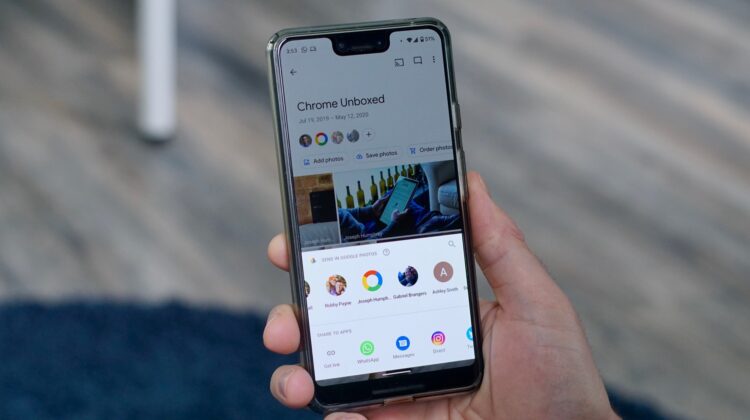
Google Photos has been a great tool for sharing photos with my friends and family during the pandemic. It is perfect for those more personal family photos that you don’t really want to share on social media. A photo is worth a thousand words and can help us continue to feel connected even when we can’t see each other in person, which explains why Google Photos has seen a 50 percent increase in shared photos in some regions. To help people share multiple photos more easily, Google has announced a new way to share albums in Google Photos. 

Last December, Google launched direct sharing – which drastically improved the sharing functionality – and now albums have received the same treatment. When you go to share an album, the default option will now be to share with a specific person or multiple people using their Google account. The shared albums don’t create the same style of ongoing thread that was launched with direct sharing, but you can click the chat icon in the top right to add comments.

Xremove ads
Source: Google Keyword

When you share an album with someone, it will show up in their ‘Sharing’ tab, where they can add photos or save individual photos from that album to their Google Photos account. You can also click the three-dot menu in the top right corner and select ‘Show in albums’ to make this shared album appear in your ‘Albums’ tab. The photos are not saved to your account, so if you want a photo saved you will need to click the ‘Save photos’ button at the top of the album. Or you can select the photos you want to save and then click the cloud icon in the top right. 

You can still create a link to share photos with someone who doesn’t have Google Photos or a Google account and you have the option to turn link sharing on or off at any time. If you don’t want others adding to the Album, you can click the three-dot menu in the top right of the album, select ‘Options’ and then turn off the ‘Collaborate’ toggle. You can also remove a user altogether, which will also remove the photos and videos they have added to the album. 

Featured Videos

Xremove ads

Although some of the settings are still a little confusing, this album sharing update has made it much easier to multiple photos and makes it create an on-going, private thread with friends and family. The update has started rolling out this week and should be available for all users.

Shop All The Latest Chromebook Deals

SUBSCRIBE TO UPSTREAM

Get Chrome Unboxed delivered straight to your inbox

Upstream is our flagship, curated newsletter with the top stories, most click-worthy deals, giveaways, and trending articles from Chrome Unboxed sent directly to your inbox a few times a week. Join 31,000+ subscribers.

Xremove ads
SUBSCRIBE HERE!

Filed Under: Apps, News

About Joseph Humphrey

Joe has been a part of Chrome Unboxed since 2016 when he started helping Robby produce YouTube videos. Although normally behind the scenes, Joe has spent countless hours editing reviews and unboxings of many, many Chromebooks. Now a Partner in Unboxed Media, Joe is constantly thinking strategically about the Chromebook industry and how Chrome Unboxed can continue to innovate in the space.

Primary Sidebar

Xremove ads

Deals

Save $40 on the Google Pixel Watch 4 before the Spring Sale ends

By Joseph Humphrey
April 24, 2026

The best Chromebook deals today

By Robby Payne
April 20, 2026

Deal Alert: the excellent Lenovo Chromebook Plus 2-in-1 returns to $429

By Robby Payne
April 20, 2026

Lenovo Legion Tab Gen 3 drops to $399, ahead of the much pricier Gen 5 release

By Joseph Humphrey
April 18, 2026

How to get 50% off YouTube Premium for a full year with Google One

By Robby Payne
April 16, 2026

More Deals

Xremove ads

Reviews

Lenovo Chromebook Plus 2-in-1 Review: pretty great in a vacuum

By Robby Payne
April 23, 2026

Acer Chromebook Plus Spin 514 Review: Kompanio Ultra power in a convertible

By Robby Payne
December 24, 2025

My review after 6 weeks with the Lenovo Chromebook Plus 14 [VIDEO]

By Robby Payne
August 11, 2025

One week with the best small Android tablet you can buy, and I’m sold

By Robby Payne
May 9, 2025

Best Chromebooks of 2024 [VIDEO]

By Robby Payne
November 28, 2024

More Reviews

Xremove ads

Guides

This Chromebook trackpad shortcut is definitely not new, but is blowing my mind

By Robby Payne
March 11, 2024

How to reduce broadcast delay on YouTube TV to stop live spoilers

By Robby Payne
December 8, 2023

Windows PC keyboard and Chromebook

How to use a Windows keyboard with a Chromebook

By Joseph Humphrey
December 8, 2023

How reset and revert your Chromebook to the previous version of Chrome OS

By Robby Payne
November 29, 2023

My Chromebook Plus features disappeared: here’s how I fixed it

By Robby Payne
November 24, 2023

More Guides

TWITTER · FACEBOOK · INSTAGRAM · YOUTUBE · EMAIL · ABOUT

Copyright © 2026 · Chrome Unboxed · Chrome is a registered trademark of Google Inc.
We are participants in various affiliate advertising programs designed to provide a means for us to earn fees by linking to affiliated sites.

PRIVACY POLICY