
• Skip to main content
  • Skip to primary sidebar
  • Deals
  • Features
  • Guides
  • Chromebooks
  • Videos
  • Podcast
  • More +
    • Reviews
    • Unboxing
    • Upcoming Devices
    • Chromebook Plus
    • Chrome
    • ChromeOS
    • Chrome OS Flex
  • Search
  • Sign Up
  • Log In
Chrome Unboxed – The Latest Chrome OS News

Chrome Unboxed - The Latest Chrome OS News

A Space for All Things Chrome, Google, and More!

  • Deals
  • Features
  • Guides
  • Chromebooks
  • Videos
  • Podcast
  • More +
    • Reviews
    • Unboxing
    • Upcoming Devices
    • Chromebook Plus
    • Chrome
    • ChromeOS
    • Chrome OS Flex
  • Search
  • Sign Up
  • Log In

Google Photos adds a new pop-up UI that streamlines sharing and other common tasks

July 6, 2022 By Michael Perrigo View Comments

Support our independent tech coverage. Chrome Unboxed is written by real people, for real people—not search algorithms. Join Chrome Unboxed Plus for just $2 a month to get an ad-free experience, access to our private Discord, and more. Learn more about membership here.
START FREE TRIAL (MONTHLY)START FREE TRIAL (ANNUAL)

Yesterday, I was about to share an image from Google Photos when what I thought was an accidentally shown share bar appeared at the bottom. As it turns out, this is a part of a new user interface update by Google in the app! It appears only on one of my accounts and not the others, indicating that this is still in testing or simply not fully rolled out yet.
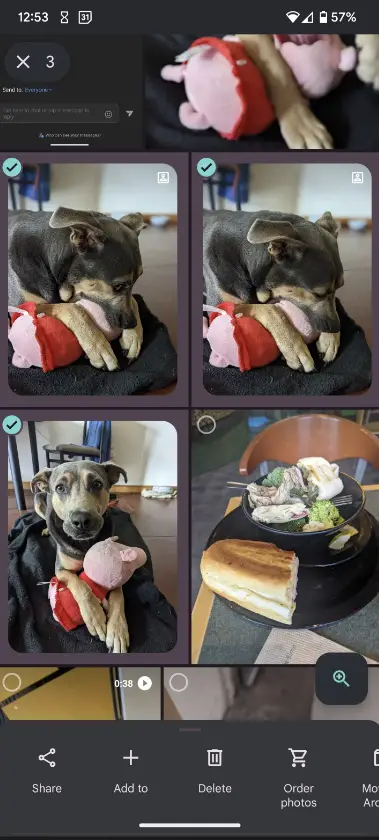
Source: Nick Cipriani

Several users have already pointed out to Android Police that “Share”, “Add to”, “Delete”, “Order photos”, and “Move to archive” all appear preemptively across the bottom of the screen. This could be Google Photos attempting to take a step out of sharing. Until now, you’d multi-select a few images, tap the plus at the top of the screen and then select one of these options.

Xremove ads

However, having everything out in the open the moment you press and hold one or multiple images seems like a welcome feature, so I’ll take it. The only problem is that I think like me, many users may start off confused with such a drastic change to the experience. Perhaps a tutorial can appear once the feature launches in full to walk everyone through the shift in process of sharing or managing photos.

In addition to the menu appearing at the bottom once you select something, you can slide upward on the pop-up itself to see the usual recommendations like other Google Photos users you’re connected with, additional sharing options, albums, and even the photo information.

Featured Videos

Xremove ads

SUBSCRIBE TO UPSTREAM

Get Chrome Unboxed delivered straight to your inbox

Upstream is our flagship, curated newsletter with the top stories, most click-worthy deals, giveaways, and trending articles from Chrome Unboxed sent directly to your inbox a few times a week. Join 31,000+ subscribers.

SUBSCRIBE HERE!

Filed Under: Apps, New & Upcoming Features, News, Updates

About Michael Perrigo

Known as "Google Mike" to his customers, Michael worked at Best Buy as a Chromebook Expert who dedicated his time to understanding the user experience from a regular Chromebook owner's perspective. Having spent nearly 20 years meeting you face-to-face, he strives to help you understand your technology through carefully crafted guides and coverage, relentlessly seeking out the spark in what's new and exciting about ChromeOS.

Primary Sidebar

Googlebook

Flagships, tablets, or budget laptops: why the Googlebook launch was always going to be a gamble

By Robby Payne
November 25, 2026

Googlebook ‘Pelion’ borrows its battery from one of my favorite Acer Chromebooks

By Robby Payne
November 25, 2026

Entry-level Googlebooks might finally be coming with Snapdragon C silicon

By Robby Payne
November 24, 2026

When I need to get technical work done, I still reach for a Chromebook over a Googlebook

By Robby Payne
November 24, 2026

Googlebook’s Chrome browser is still missing desktop basics like ‘Cast Tab’

By Robby Payne
November 23, 2026

More Googlebook

Xremove ads

Deals

The best Black Friday Googlebook and Chromebook deals

By Robby Payne
November 27, 2026

The first Googlebook deals are here, slashing up to $300 off two 3K OLED models

By Robby Payne
November 20, 2026

My favorite convertible Chromebook is $150 off right now and primed for Googlebook OS

By Robby Payne
September 29, 2026

Google Pixel Buds 2a in Hazel bundled with a new Googlebook laptop at Best Buy

Score a free $129 pair of Pixel Buds 2a with any Googlebook pre-order at Best Buy

By Robby Payne
September 28, 2026

The best Chromebook ever made is $350 off at Best Buy right now

By Robby Payne
August 21, 2026

More Deals

Xremove ads

Reviews

My brutally honest thoughts on Googlebook after one month [VIDEO]

By Robby Payne
November 2, 2026

Acer Chromebook Plus Spin 514 Review: the best convertible you can buy [VIDEO]

By Robby Payne
July 1, 2026

Lenovo Chromebook Plus 2-in-1 Review: pretty great in a vacuum

By Robby Payne
April 23, 2026

My review after 6 weeks with the Lenovo Chromebook Plus 14 [VIDEO]

By Robby Payne
August 11, 2025

One week with the best small Android tablet you can buy, and I’m sold

By Robby Payne
May 9, 2025

More Reviews

Xremove ads

TWITTER · FACEBOOK · INSTAGRAM · YOUTUBE · EMAIL · ABOUT

Copyright © 2026 · Chrome Unboxed · Chrome is a registered trademark of Google Inc.
We are participants in various affiliate advertising programs designed to provide a means for us to earn fees by linking to affiliated sites.

PRIVACY POLICY