


Support our independent tech coverage. Chrome Unboxed is written by real people, for real people—not search algorithms. Join Chrome Unboxed Plus for just $2 a month to get an ad-free experience, access to our private Discord, and more. Learn more about membership here.
START FREE TRIAL (MONTHLY)START FREE TRIAL (ANNUAL)
Google Messages continues its quest to make the RCS experience smoother and more intuitive for users. While RCS (Rich Communication Services) offers a significant upgrade over standard SMS/MMS – bringing features like typing indicators, read receipts, high-resolution media sharing, and end-to-end encryption – figuring out which of your contacts actually support it before starting a conversation remains a bit of a guessing game. Currently, you often don’t see the “Chat message” indicator until you’ve already opened the chat window.
Thanks to some digging into a recent beta version of the Google Messages app by Android Authority, it looks like Google is preparing a helpful visual tweak to address this exact issue. An APK teardown revealed work-in-progress code for new RCS indicators directly within the main contact list.
When this feature rolls out, opening the “Start chat” screen will present more than just a list of names. Next to contacts who have RCS enabled, a distinct “RCS” label will appear. This simple addition immediately clarifies whether your conversation will benefit from the richer feature set offered by RCS or fall back to standard SMS/MMS.
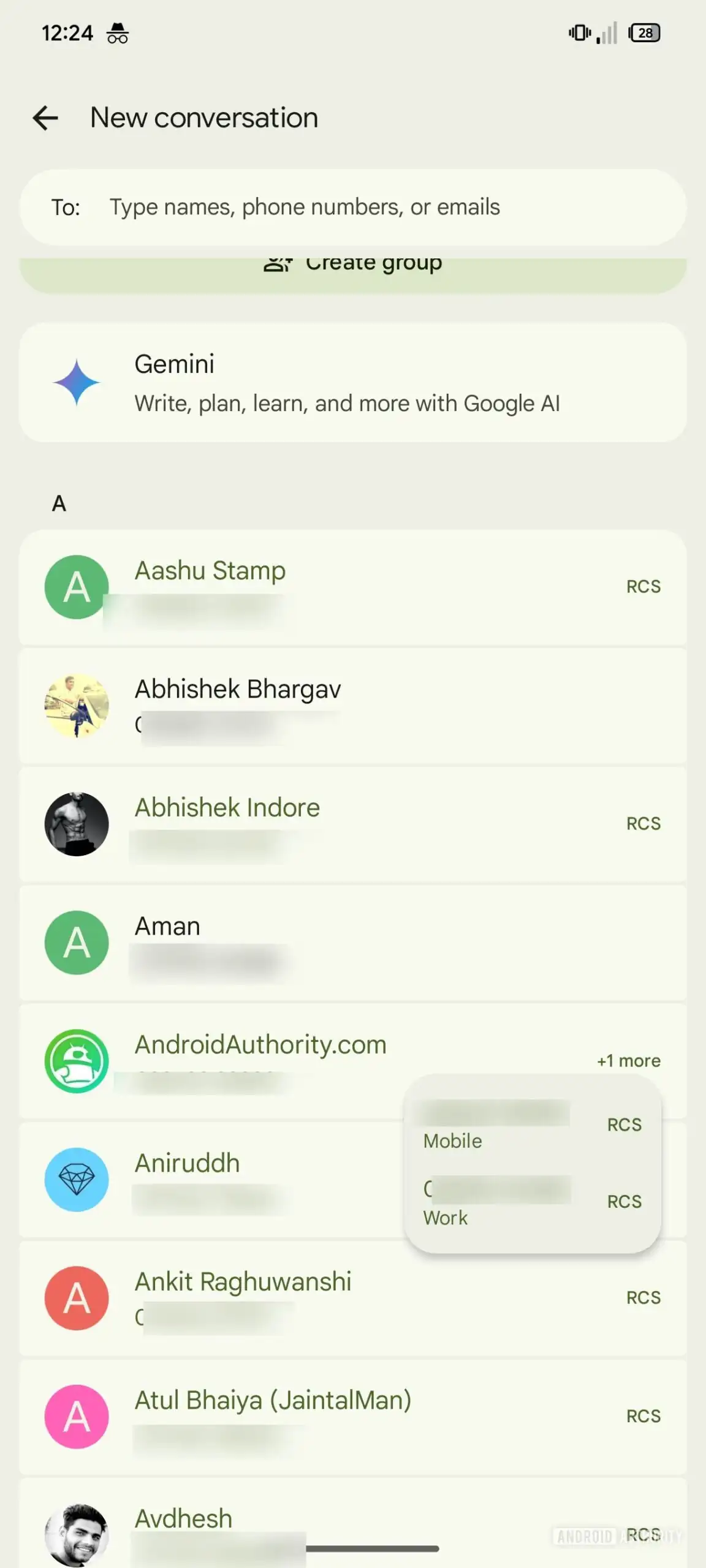
Beyond the explicit label, subtle UI changes are also in the works to differentiate RCS-enabled contacts. Depending on your theme (light or dark mode), the names of contacts with RCS will be tinted using Material You accent colors, while SMS-only contacts will remain standard. This color difference is expected to be more noticeable in dark mode, offering another quick visual cue.
This new labeling system appears smart enough to handle contacts with multiple phone numbers saved, too. If only one of a contact’s numbers is RCS-compatible, the label will specifically appear next to that number, guiding you to select the right one if you want to ensure an RCS chat.
Knowing upfront whether a conversation will be RCS-enabled will allow users to make informed choices based on the features they value, whether it’s the better media quality, the security of encryption, or simply knowing if read receipts are active. It also provides a clearer picture of how widely adopted RCS is becoming amongst your personal contacts: especially as iPhone users begin supporting the standard.
As this feature was uncovered in an APK teardown of a beta version, there’s no official timeline for when it might roll out to all Google Messages users. However, its presence suggests Google is actively developing it, and we could potentially see it arrive in a future update. It’s a small but welcome refinement that further polishes the modern messaging experience on Android.
SUBSCRIBE TO UPSTREAM
Get Chrome Unboxed delivered straight to your inbox
Upstream is our flagship, curated newsletter with the top stories, most click-worthy deals, giveaways, and trending articles from Chrome Unboxed sent directly to your inbox a few times a week. Join 31,000+ subscribers.

