

Support our independent tech coverage. Chrome Unboxed is written by real people, for real people—not search algorithms. Join Chrome Unboxed Plus for just $2 a month to get an ad-free experience, access to our private Discord, and more. Learn more about membership here.
START FREE TRIAL (MONTHLY)START FREE TRIAL (ANNUAL)
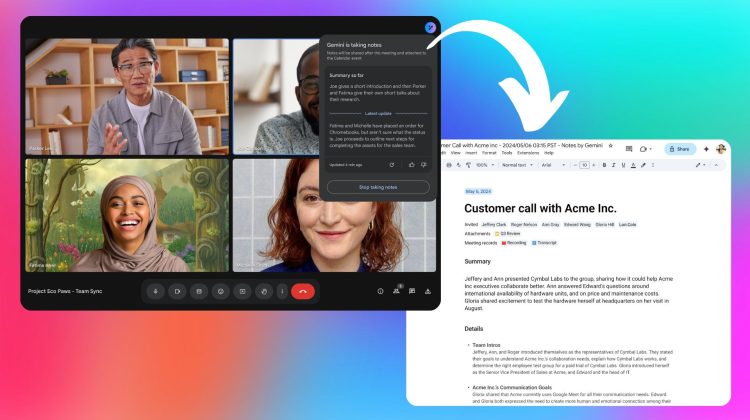
Google Meet’s handy “Take notes for me” feature – a powerful tool that leverages AI to capture meeting discussions – is now expanding its language capabilities. This advancement brings support for seven additional languages, making Google Meet an even more inclusive platform for global teams.
As of today, March 12, 2025, users will begin to see the rollout of “Take notes for me” in French, German, Italian, Japanese, Korean, Portuguese, and Spanish. This expansion significantly broadens the utility of the feature, enabling a wider audience to benefit from automated note-taking during meetings.
When initiating the “Take notes for me” function, participants will now be able to clearly identify the language being utilized for transcription. Should a change be necessary, users can easily adjust the language settings directly within the meeting interface or through the settings menu under Meeting records. It’s important to note that, currently, multilingual meetings are not supported, meaning a single language must be selected for the duration of the note-taking process.
.png)
The activation of “Take notes for me” is straightforward. Once enabled, all meeting participants will see a blue pencil icon on their screens, accompanied by a notification indicating that notes are being actively recorded. A simple click on the pencil icon provides immediate access to the transcribed notes, allowing for real-time review and reference.
.png)
General availability
For Google Workspace administrators seeking to enable this feature for their users, detailed instructions are available in the Google Meet Help Center. Similarly, end-users can find comprehensive guidance on utilizing “Take notes for me” through the same resource.
It’s worth noting that the rollout of this language expansion will proceed at a slightly slower pace. Google is taking extra care to monitor the performance and quality of the feature across these new languages, and as such, the full rollout may extend beyond the typical 15-day window. Updates regarding the completion of each language’s rollout will be provided as they become available.
This latest update is accessible to Google Workspace Business Standard and Plus, Enterprise Standard and Plus, and those utilizing the Gemini Education Premium add-on. Additionally, users who previously acquired the Gemini Enterprise or AI Meetings & Messaging add-ons will also automatically receive this update.
SUBSCRIBE TO UPSTREAM
Get Chrome Unboxed delivered straight to your inbox
Upstream is our flagship, curated newsletter with the top stories, most click-worthy deals, giveaways, and trending articles from Chrome Unboxed sent directly to your inbox a few times a week. Join 31,000+ subscribers.

