
• Skip to main content
  • Skip to primary sidebar
  • Deals
  • Features
  • Guides
  • Chromebooks
  • Videos
  • Podcast
  • More +
    • Reviews
    • Unboxing
    • Upcoming Devices
    • Chromebook Plus
    • Chrome
    • ChromeOS
    • Chrome OS Flex
  • Search
  • Sign Up
  • Log In
Chrome Unboxed – The Latest Chrome OS News

Chrome Unboxed - The Latest Chrome OS News

A Space for All Things Chrome, Google, and More!

  • Deals
  • Features
  • Guides
  • Chromebooks
  • Videos
  • Podcast
  • More +
    • Reviews
    • Unboxing
    • Upcoming Devices
    • Chromebook Plus
    • Chrome
    • ChromeOS
    • Chrome OS Flex
  • Search
  • Sign Up
  • Log In

Google Maps rolls out estimated toll prices and more detailed navigation, iOS improvements

April 6, 2022 By Johanna Romero View Comments

Support our independent tech coverage. Chrome Unboxed is written by real people, for real people—not search algorithms. Join Chrome Unboxed Plus for just $2 a month to get an ad-free experience, access to our private Discord, and more. Learn more about membership here.
START FREE TRIAL (MONTHLY)START FREE TRIAL (ANNUAL)

Google Maps is rolling out a series of updates to the Android and iOS apps aimed at helping you plan your drive, save money and explore new places. More notable is the addition of estimated toll prices and a more detailed navigation map that now includes traffic lights and stop signs along your route, among other improvements.

The new toll prices feature builds on the already existing “Tolls” indicator that appears when you map out a route, except now it will include an estimate of how much your tolls will be in total based on trusted information from local tolling authorities. You will continue to have the ability to choose a toll-free route or choose to avoid seeing routes with toll roads altogether on your Maps settings. Google explains the below regarding this feature:

Xremove ads

We look at factors like the cost of using a toll pass or other payment methods, what the day of the week it is, along with how much the toll is expected to cost at the specific time you’ll be crossing it.

The Keyword
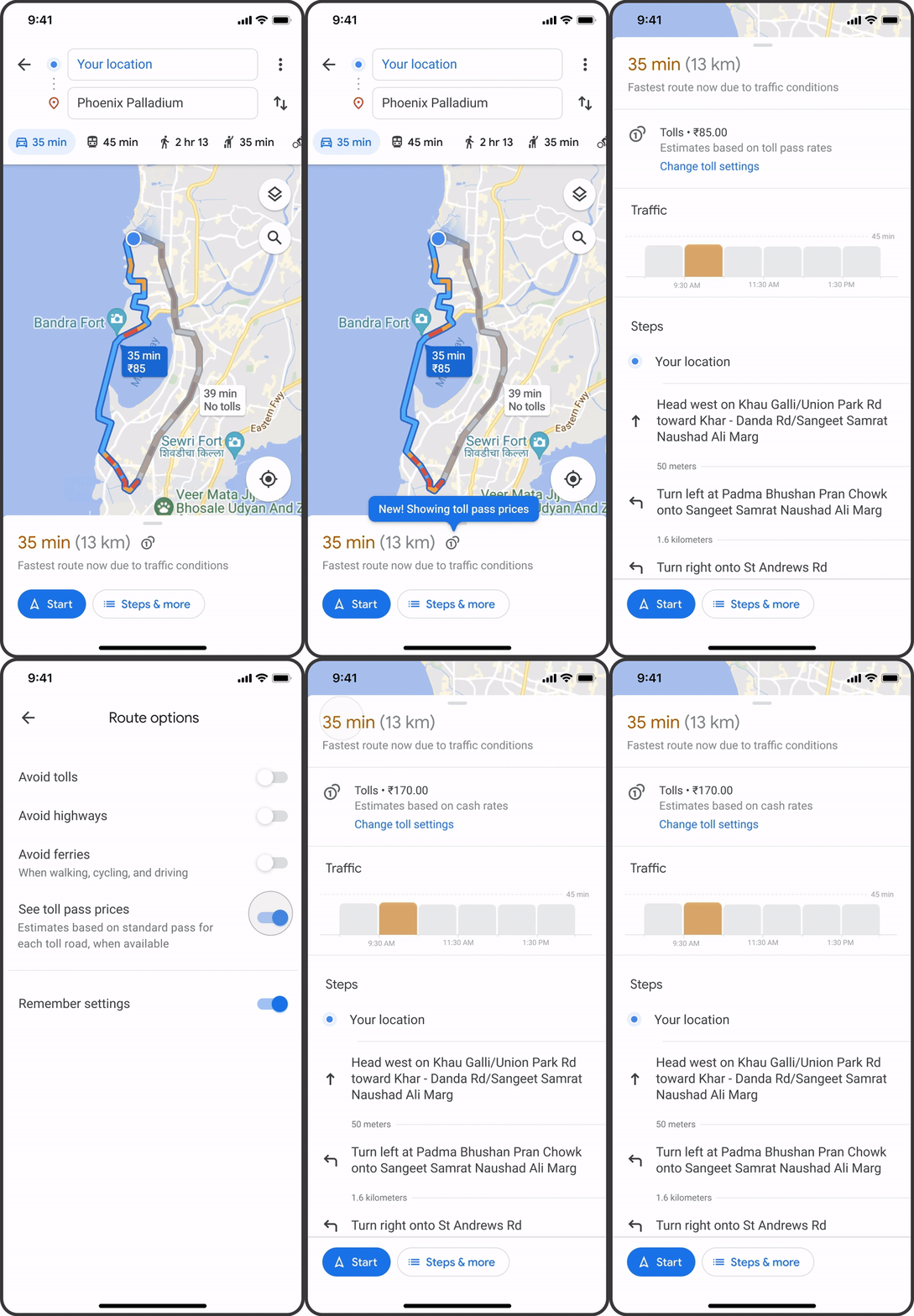
New toll prices in Google Maps

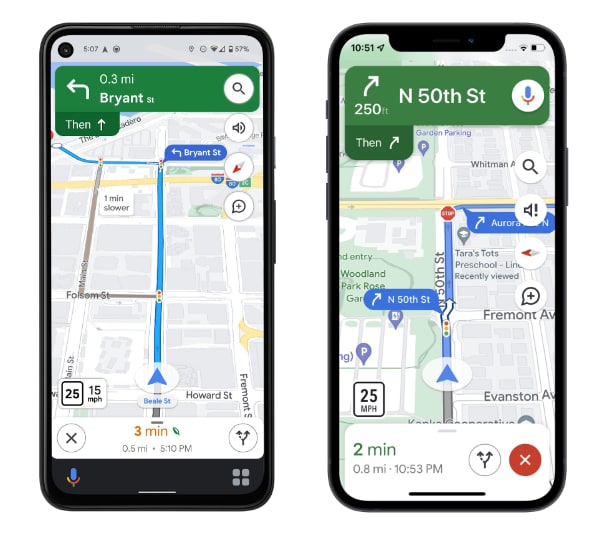
Google Maps will also be adding more details to the navigation experience by including stop signs and traffic lights that can be clearly seen along your route, as well as building outlines and areas of interest. Maps will also show you things like the shape and width of a road in select cities, including medians and islands.
In iOS, Google will be adding additional features such as a new home screen “pinned trip” widget, the ability to start navigation right from an Apple Watch, and direct integration into Spotlight, Siri, and the Shortcuts app. The additional iOS improvements will begin rolling out in the coming months; however, the toll prices will roll out to Android and iOS this month in the U.S., India, Japan, and Indonesia with more countries coming soon. The new navigation map will start rolling out to select countries in the coming weeks on Android and iOS, as well as Android Auto and CarPlay.

Featured Videos

Xremove ads

I think these improvements will be extremely helpful, especially in situations where traffic is hectic and you have to make fast decisions; otherwise, you can miss your turn and add unnecessary time to your trip. Additionally, the addition of stop signs and traffic lights will help tremendously with situational awareness in places you haven’t visited before. I welcome all these new features and can’t wait for them to become available in my city.

SUBSCRIBE TO UPSTREAM

Get Chrome Unboxed delivered straight to your inbox

Upstream is our flagship, curated newsletter with the top stories, most click-worthy deals, giveaways, and trending articles from Chrome Unboxed sent directly to your inbox a few times a week. Join 31,000+ subscribers.

SUBSCRIBE HERE!

Filed Under: Android, Apps, iOS, New & Upcoming Features, News Tagged With: detailed navigation, google maps, navigation, stop signs, toll prices, traffic lights

Primary Sidebar

Xremove ads

Deals

Massive Deal Alert: The Acer Chromebook Plus Spin 714 just hit an all-time low $499

By Robby Payne
April 1, 2026

The best Chromebook deals today

By Robby Payne
March 30, 2026

The Acer Chromebook Plus Spin 714 hits a new all-time low at $270 off

By Robby Payne
March 25, 2026

You can score $40 off Google’s battery-powered Nest Doorbell right now

By Joseph Humphrey
March 20, 2026

The touchscreen Lenovo Chromebook Slim 3 is a steal at under $200

By Robby Payne
March 16, 2026

More Deals

Xremove ads

Reviews

Acer Chromebook Plus Spin 514 Review: Kompanio Ultra power in a convertible

By Robby Payne
December 24, 2025

My review after 6 weeks with the Lenovo Chromebook Plus 14 [VIDEO]

By Robby Payne
August 11, 2025

One week with the best small Android tablet you can buy, and I’m sold

By Robby Payne
May 9, 2025

Best Chromebooks of 2024 [VIDEO]

By Robby Payne
November 28, 2024

Samsung Galaxy Chromebook Plus Review: Samsung is back! [VIDEO]

By Robby Payne
October 28, 2024

More Reviews

Xremove ads

Guides

This Chromebook trackpad shortcut is definitely not new, but is blowing my mind

By Robby Payne
March 11, 2024

How to reduce broadcast delay on YouTube TV to stop live spoilers

By Robby Payne
December 8, 2023

Windows PC keyboard and Chromebook

How to use a Windows keyboard with a Chromebook

By Joseph Humphrey
December 8, 2023

How reset and revert your Chromebook to the previous version of Chrome OS

By Robby Payne
November 29, 2023

My Chromebook Plus features disappeared: here’s how I fixed it

By Robby Payne
November 24, 2023

More Guides

TWITTER · FACEBOOK · INSTAGRAM · YOUTUBE · EMAIL · ABOUT

Copyright © 2026 · Chrome Unboxed · Chrome is a registered trademark of Google Inc.
We are participants in various affiliate advertising programs designed to provide a means for us to earn fees by linking to affiliated sites.

PRIVACY POLICY