

• Skip to main content
  • Skip to primary sidebar
  • Deals
  • Features
  • Guides
  • Chromebooks
  • Videos
  • Podcast
  • More +
    • Reviews
    • Unboxing
    • Upcoming Devices
    • Chromebook Plus
    • Chrome
    • ChromeOS
    • Chrome OS Flex
  • Search
  • Sign Up
  • Log In
Chrome Unboxed – The Latest Chrome OS News

Chrome Unboxed - The Latest Chrome OS News

A Space for All Things Chrome, Google, and More!

  • Deals
  • Features
  • Guides
  • Chromebooks
  • Videos
  • Podcast
  • More +
    • Reviews
    • Unboxing
    • Upcoming Devices
    • Chromebook Plus
    • Chrome
    • ChromeOS
    • Chrome OS Flex
  • Search
  • Sign Up
  • Log In

Google Lens in desktop Chrome adds translate and OCR text tool

April 18, 2022 By Johanna Romero View Comments

Support our independent tech coverage. Chrome Unboxed is written by real people, for real people—not search algorithms. Join Chrome Unboxed Plus for just $2 a month to get an ad-free experience, access to our private Discord, and more. Learn more about membership here.
START FREE TRIAL (MONTHLY)START FREE TRIAL (ANNUAL)

Google Lens recently got a nice, new update on the desktop Chrome browser that expands its functionality from just recognizing images across the web to also recognizing and translating text. This new update brings the desktop version more on par with its mobile counterpart, where this functionality has already been available for a while.

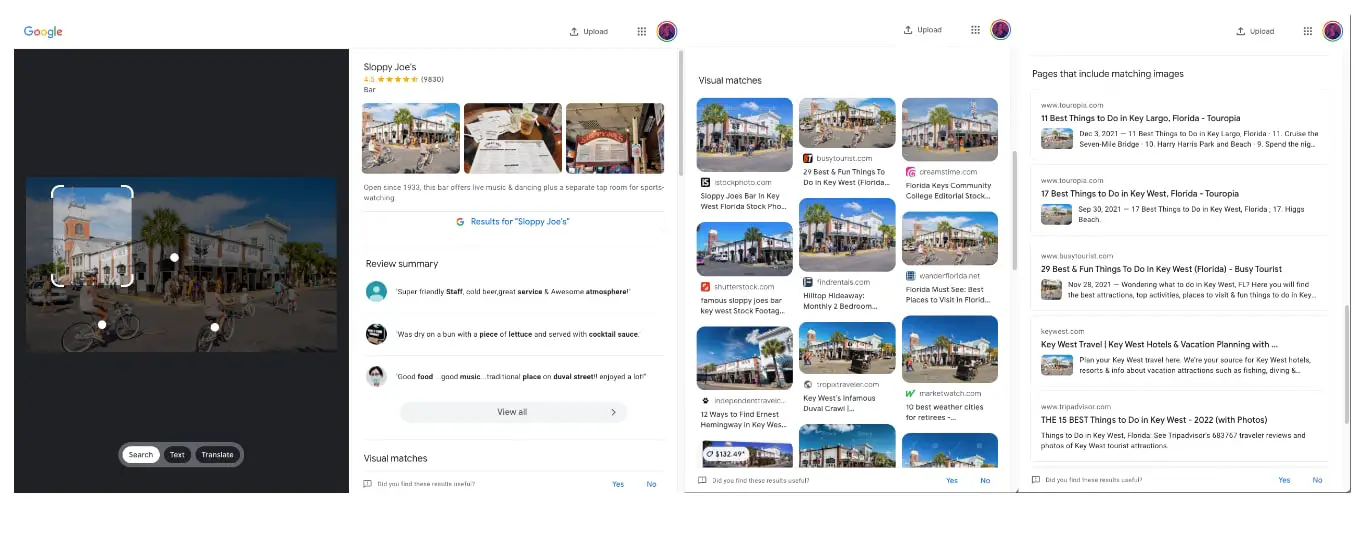
As reported by Android Police, before the update, when right-clicking on an image on a webpage and selecting “Search images with Google Lens,” the results opened a new two-paned lens.google.com/search browser tab with the searched image on the left and the results on the right, taking your focus away from the original page where you initiated the search.
Xremove ads

This new update provides expanded functionality by opening a Google Lens sidebar right on the original page where you can toggle between image search, OCR text search, and translate. All of this happens without having to open a new browser tab and keeping you on the same page where you started.
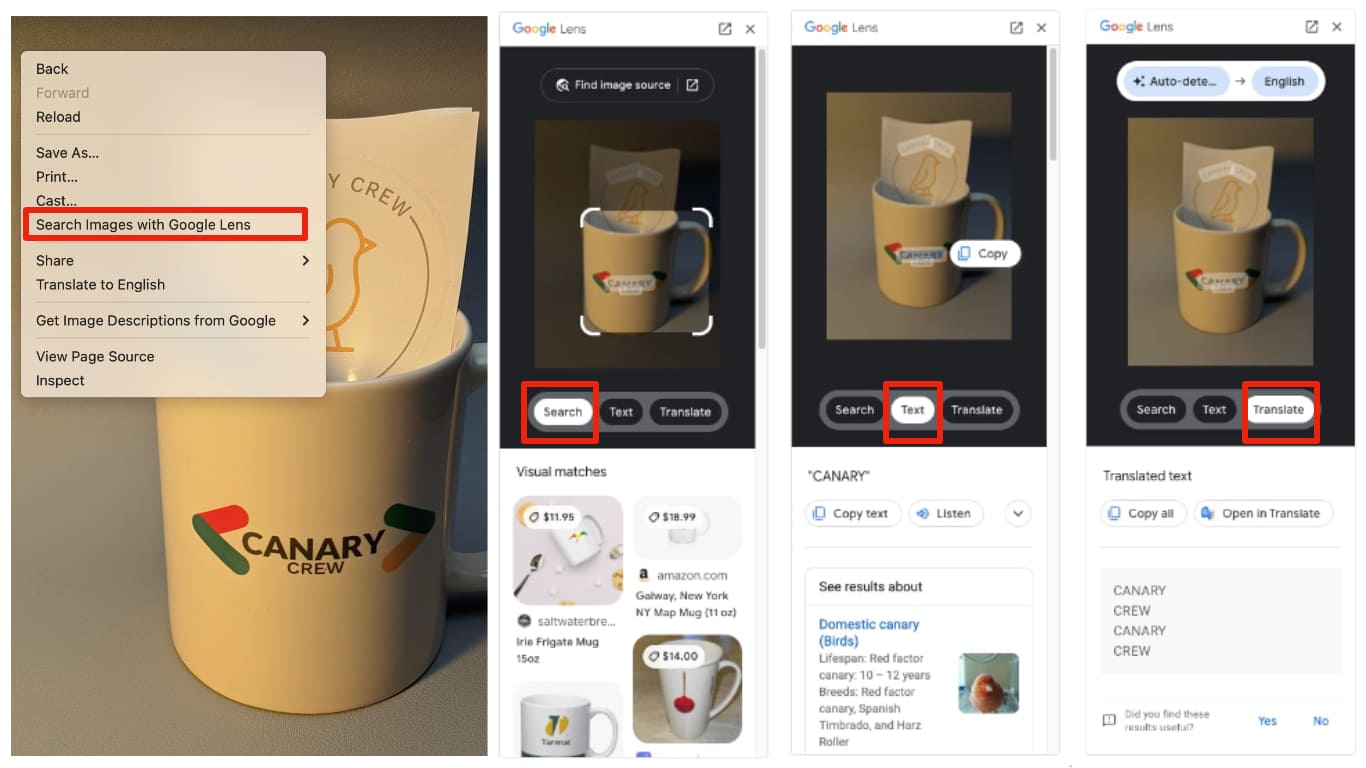
Being able to switch between the search, text, and translate options is not exactly new functionality on the Chrome browser. I was already able to do this both on ChromeOS and macOS last month when I wrote this guide to identifying images in Chrome using Google Lens, however, the fact that it now loads the results in the same tab makes this more obvious. Keep in mind that I have not been able to replicate this same-tab behavior on ChromeOS Beta 101, but I can on macOS Chrome. Because of this, it appears that the new functionality is still rolling out, and it is not account-specific.

Featured Videos

Xremove ads

I am excited to see Google taking such a proactive approach when it comes to bringing core mobile features, such as Google Lens, to the Chrome browser. With the proliferation of remote and now “hybrid” workplaces, more users and now looking to replicate the mobile experience onto their day-to-day work machines. This brings us one step closer.

SUBSCRIBE TO UPSTREAM

Get Chrome Unboxed delivered straight to your inbox

Upstream is our flagship, curated newsletter with the top stories, most click-worthy deals, giveaways, and trending articles from Chrome Unboxed sent directly to your inbox a few times a week. Join 31,000+ subscribers.

SUBSCRIBE HERE!

Filed Under: Chrome, ChromeOS, New & Upcoming Features Tagged With: chrome, chrome browser, desktop chrome, google lens, image search, ocr text, text search, translate

Primary Sidebar

Googlebook

If your Googlebook ‘Better Together’ features stopped working, you need to check this

By Robby Payne
October 16, 2026

One of the best Pixel-exclusive apps is quietly available on your new Googlebook

By Robby Payne
October 16, 2026

One of the biggest missing features in Googlebook’s Chrome browser is getting fixed

By Robby Payne
October 15, 2026

A new affordable wave of Snapdragon-powered Googlebooks is in the works

By Robby Payne
October 15, 2026

Googlebooks just solved one of the most annoying parts of using a laptop for work

By Robby Payne
October 14, 2026

More Googlebook

Xremove ads

Deals

My favorite convertible Chromebook is $150 off right now and primed for Googlebook OS

By Robby Payne
September 29, 2026

Google Pixel Buds 2a in Hazel bundled with a new Googlebook laptop at Best Buy

Score a free $129 pair of Pixel Buds 2a with any Googlebook pre-order at Best Buy

By Robby Payne
September 28, 2026

The best Chromebook deals today

By Robby Payne
September 2, 2026

The best Chromebook ever made is $350 off at Best Buy right now

By Robby Payne
August 21, 2026

The excellent, powerful Acer Chromebook Plus Spin 514 is $150 off right now

By Robby Payne
August 12, 2026

More Deals

Xremove ads

Reviews

Acer Chromebook Plus Spin 514 Review: the best convertible you can buy [VIDEO]

By Robby Payne
July 1, 2026

Lenovo Chromebook Plus 2-in-1 Review: pretty great in a vacuum

By Robby Payne
April 23, 2026

My review after 6 weeks with the Lenovo Chromebook Plus 14 [VIDEO]

By Robby Payne
August 11, 2025

One week with the best small Android tablet you can buy, and I’m sold

By Robby Payne
May 9, 2025

Best Chromebooks of 2024 [VIDEO]

By Robby Payne
November 28, 2024

More Reviews

Xremove ads

TWITTER · FACEBOOK · INSTAGRAM · YOUTUBE · EMAIL · ABOUT

Copyright © 2026 · Chrome Unboxed · Chrome is a registered trademark of Google Inc.
We are participants in various affiliate advertising programs designed to provide a means for us to earn fees by linking to affiliated sites.

PRIVACY POLICY