


Support our independent tech coverage. Chrome Unboxed is written by real people, for real people—not search algorithms. Join Chrome Unboxed Plus for just $2 a month to get an ad-free experience, access to our private Discord, and more. Learn more about membership here.
START FREE TRIAL (MONTHLY)START FREE TRIAL (ANNUAL)
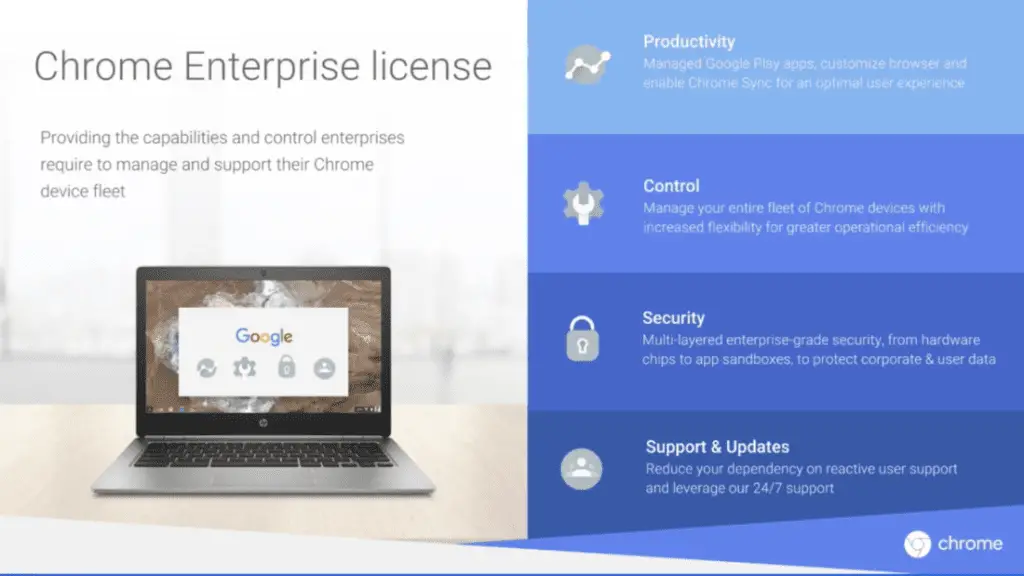 Tuesday, Google announced that their Chrome Device Management program would be replaced with the new Chrome Enterprise solution. While many of the new features have been in the works for some time, the launch of the rebranded platform speaks volumes to the future of Chrome OS and its roll in the corporate world.
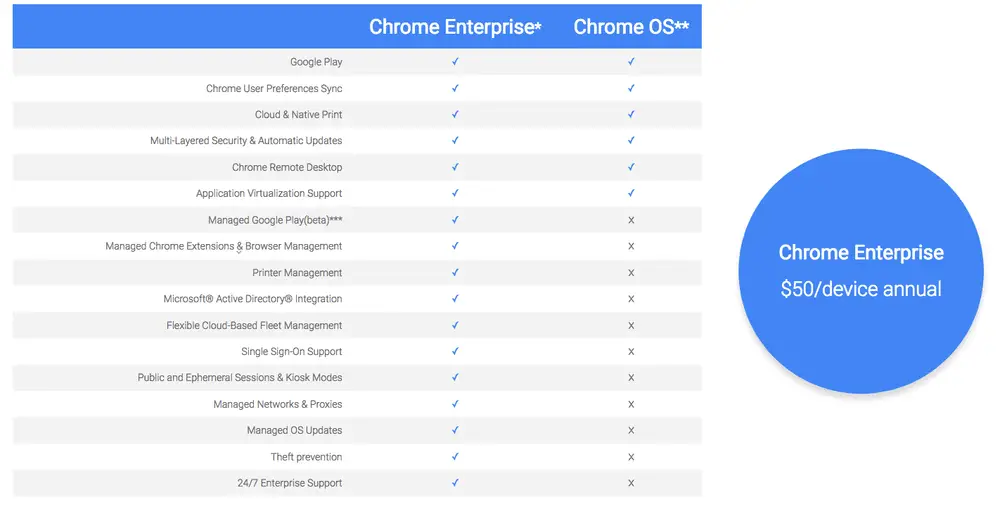
For those not familiar with the program, Chrome Device Management is a licensing product for Chrome, Chromebooks and other Chrome OS devices like kiosks and Chromeboxes. The license costs $50 per device per year and gives business administrative control over enrolled computers allowing IT departments to manage features like the Google Play Store, individual and mass policy implementation as well as remote kiosk management.
With the growing footprint of Chrome devices in the workplace, Google has now umbrellaed these features into an all-in-one solution for companies to take advantage of while adding support for accessing cross-platform software and legacy products.
Chrome Enterprise
More and more companies are seeing the benefit of deploying Chrome devices in various manners in the field and Chrome Enterprise aims to ease the transition for businesses who have depended on infrastructures long steeped in Microsoft products and other platforms by integrating virtual platforms, remote desktop systems, cost-effective devices and ease of deployment.
VMware Workspace One
One of the biggest additions to Chrome Enterprise is the first-ever third party Chrome management platform. VMware Workspace One gives IT administrators a powerful endpoint solution to manage devices across the board on a company, geographic and user-specific based depending on the individual need.
The VMware software brings together all the pieces companies need to seamlessly add Chrome devices while still accessing existing programs like Windows via a virtual desktop solution. Workspace One also gives admins the ability to manage device policies as well as centralize enterprise applications like cloud, web, native Android and virtual Windows all in a single catalog.
Microsoft Active Directory
Active Directory, as I understand it, is an infrastructure system that allows companies to manage directories, users, groups and devices on in-house networks and domains. Chrome Enterprise is 100% compatible with AD and allows employees to use native credentials across devices as well as multiple services.
Google Play Store
For companies looking to leverage Android Apps for employees or kiosk use, Managed Play Store is included with each Chrome Enterprise license. Admins can allow and push apps from the Play Store on a device by device basis or whitelist applications company-wide.
For a list of devices with Play Store capability check out the link here.
For users already using Chrome Device Management, Google has stated your license will continue to be honored and automatically upgraded upon renewal. Here’s a side-by-side of what’s new with the upgrade.
Google has done an unimaginable job of expanded Chrome OS in the education market and now it looks they are prepared to take a major bite out of the corporate world. Making it easier to deploy and integrate Chrome OS devices is a huge step in the right direction.
For more information about Chrome Enterprise head over to the Keyword. If you are looking to deploy Chrome devices for your business or would like more information on how they could work for you, you can contact Chrome Enterprise here.

