


Support our independent tech coverage. Chrome Unboxed is written by real people, for real people—not search algorithms. Join Chrome Unboxed Plus for just $2 a month to get an ad-free experience, access to our private Discord, and more. Learn more about membership here.
START FREE TRIAL (MONTHLY)START FREE TRIAL (ANNUAL)
When the COVID-19 pandemic descended on the world back in 2020, Chromebooks saw an explosion in sales and use across every market imaginable. Droves of students were issued ChromeOS devices as remote learning became the new normal while hybrid and displaced employees scrambled to relearn what it meant to work remotely. With that shift came the rise of the video conferencing wars. Zoom came out swinging and despite some early hiccups, the online video chat platform became the go-to for meetings for millions.
Of course, Zoom wasn’t the only option out there. Users around the globe quickly took to the web to learn how to create, join, share, and chat in video conferencing platforms such as Google Meet, Skype, Microsoft Teams and many, many more. Many of these video chat “apps” have their own, inbuilt shortcuts that coincide with the controls for muting the mic, disabling the camera, and sharing your screen.
For obvious reasons, Google would prefer that you use the company’s own Meet video chat but it appears that the ChromeOS team may be working on a native control panel for video chats on Chromebooks. In a recent update to the Developer channel of ChromeOS, a new flag appeared labeled #vc-controls-ui. The description is fairly self explanatory.
Video onferencing controls UI
Enables the built-in video conference controls UI – ChromeOS
Chromium Commit
Enabling the flag added some new buttons to my ChromeOS shelf and they are exactly what you would expect. Below, you can see the mic, camera, and screen sharing buttons all inside a unified bubble to the left of my stylus tools. Unfortunately, the tools are simply placeholders at this point and do absolutely nothing. A fact that is confirmed by a related commit in the Chromium repository.
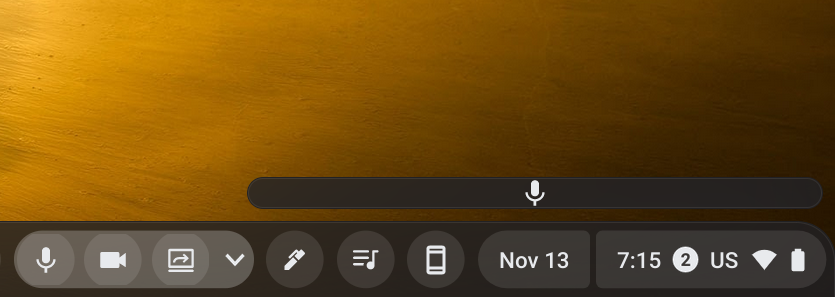
It is unclear at this point if these controls will work with a variety of video chat platforms but Kevin Tofel appears to have a hunch that Google could be working on a new Chromebook video conferencing application. I don’t know if that’s true but I would hope that third-party apps will be able to leverage this tool. The controls may seem redundant but one comment in the commit gives me the impression that these controls will only appear on the shelf when a video chat is active. That will make them very useful if they can be used outside of Google Meet for other applications. With a standard control center for most commonly used video chats, this will make the UI for online calls very user-friendly regardless of your preferred platform. I’ll keep a close eye on this feature so we can get a better idea of how it’s going to work when the functionality is finally added.
SUBSCRIBE TO UPSTREAM
Get Chrome Unboxed delivered straight to your inbox
Upstream is our flagship, curated newsletter with the top stories, most click-worthy deals, giveaways, and trending articles from Chrome Unboxed sent directly to your inbox a few times a week. Join 31,000+ subscribers.

