• Skip to main content
  • Skip to primary sidebar
  • Deals
  • Features
  • Guides
  • Chromebooks
  • Videos
  • Podcast
  • More +
    • Reviews
    • Unboxing
    • Upcoming Devices
    • Chromebook Plus
    • Chrome
    • ChromeOS
    • Chrome OS Flex
  • Search
  • Sign Up
  • Log In
Chrome Unboxed – The Latest Chrome OS News

Chrome Unboxed - The Latest Chrome OS News

A Space for All Things Chrome, Google, and More!

  • Deals
  • Features
  • Guides
  • Chromebooks
  • Videos
  • Podcast
  • More +
    • Reviews
    • Unboxing
    • Upcoming Devices
    • Chromebook Plus
    • Chrome
    • ChromeOS
    • Chrome OS Flex
  • Search
  • Sign Up
  • Log In

Google is making Chrome autofill way more useful for travel and shopping

December 5, 2025 By Joseph Humphrey View Comments

We all know the pain of filling out repetitive forms online—especially when you’re scrambling to book holiday travel or finish gift shopping. Google knows it too, and just in time for the busy season, they are rolling out four significant updates to Chrome autofill designed to make the whole process faster and less frustrating.

The biggest update is a much tighter integration with Google Wallet. Chrome can now access information like your loyalty card numbers, travel details, and vehicle info directly from your Wallet account.

Xremove ads

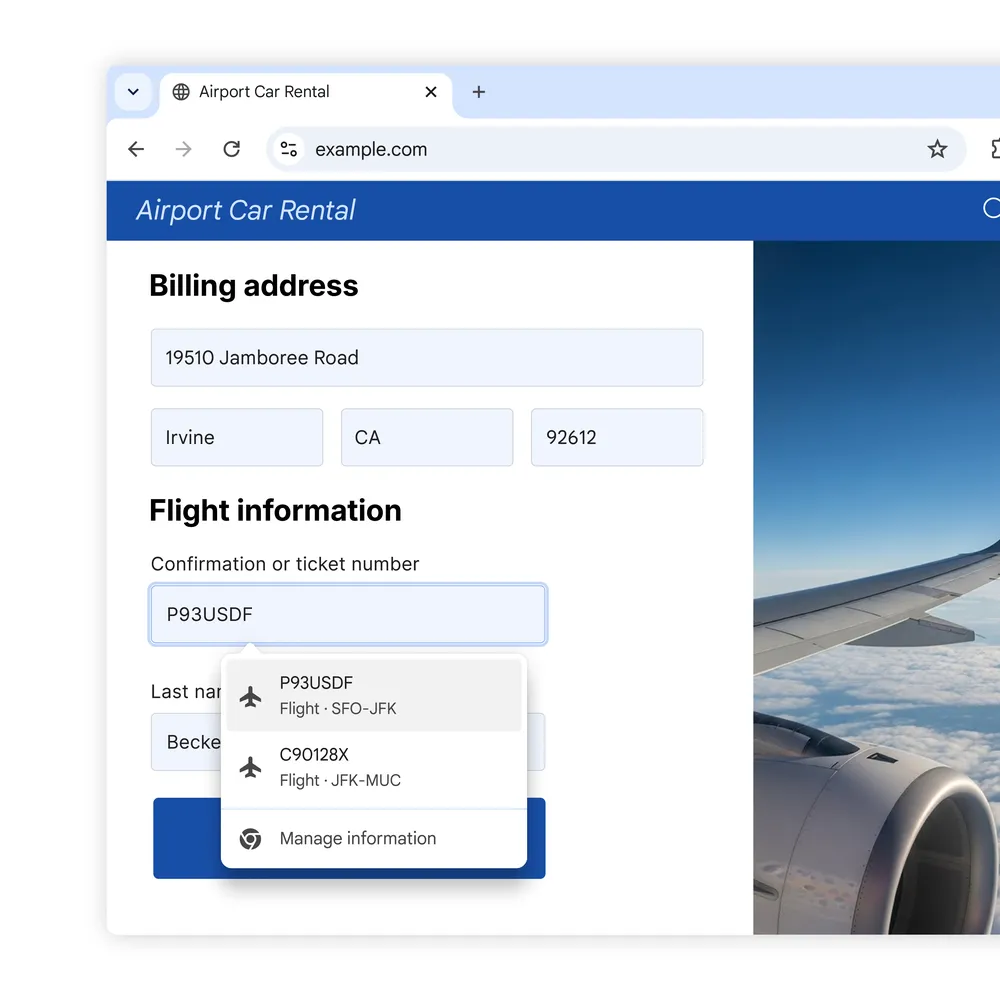
This means if you’re shopping online, Chrome can autofill your rewards number so you don’t have to go digging for your physical card. Even cooler, if you’re booking a rental car and need to provide your incoming flight info, Chrome can now recognize the form and pull the confirmation number and dates from your flight booking in Wallet. It turns a frantic search through your emails into a single click. To use these smart features, you’ll need to enable “enhanced autofill” in your Chrome settings.
For Android users, the autofill experience is getting a much-needed visual overhaul. Previously, suggestions above the keyboard could be cramped and hard to read. Google is introducing a new two-line display for autofill suggestions on mobile. This expanded view gives you more context for each option—like seeing the specific street address along with a name—making it much easier to tap the right one on the first try.

Featured Videos

Xremove ads

Finally, Chrome is getting better at handling complex international addresses (like “between streets” descriptions in Mexico) and is creating a deeper connection to your Google Account. When you’re signed in, Chrome can now more securely and instantly pull your name, email, and saved home/work addresses for sign-ups and checkouts across desktop, Android, and iOS.

These updates are rolling out now, just in time to save you a few clicks this holiday season.

Join Chrome Unboxed Plus

Introducing Chrome Unboxed Plus – our revamped membership community. Join today at just $2 / month to get access to our private Discord, exclusive giveaways, AMAs, an ad-free website, ad-free podcast experience and more.

Xremove ads

Plus Monthly

$2/mo. after 7-day free trial

Pay monthly to support our independent coverage and get access to exclusive benefits.

Start free trial

Plus Annual

$20/yr. after 7-day free trial

Xremove ads

Pay yearly to support our independent coverage and get access to exclusive benefits.

Start free trial

Our newsletters are also a great way to get connected. Subscribe here!

Click here to learn more and for membership FAQ

Xremove ads

Filed Under: Chrome, News Tagged With: videos

About Joseph Humphrey

Joe has been a part of Chrome Unboxed since 2016 when he started helping Robby produce YouTube videos. Although normally behind the scenes, Joe has spent countless hours editing reviews and unboxings of many, many Chromebooks. Now a Partner in Unboxed Media, Joe is constantly thinking strategically about the Chromebook industry and how Chrome Unboxed can continue to innovate in the space.

Primary Sidebar

Xremove ads

Deals

The best Chromebook deals today

By Robby Payne
December 26, 2025

The Acer Chromebook Plus Spin 514 hits an all-time low price of $499

By Robby Payne
December 23, 2025

Save $220 on the powerful, versatile Acer Chromebook Plus Spin 714

By Robby Payne
December 10, 2025

The Google Pixel 9a just hit its lowest price ever at $150 off

By Joseph Humphrey
December 8, 2025

At $349, this Lenovo Chromebook Plus is one of the best value laptops you can buy

By Joseph Humphrey
December 3, 2025

More Deals

Xremove ads

Reviews

Acer Chromebook Plus Spin 514 Review: Kompanio Ultra power in a convertible

By Robby Payne
December 24, 2025

My review after 6 weeks with the Lenovo Chromebook Plus 14 [VIDEO]

By Robby Payne
August 11, 2025

One week with the best small Android tablet you can buy, and I’m sold

By Robby Payne
May 9, 2025

Best Chromebooks of 2024 [VIDEO]

By Robby Payne
November 28, 2024

Samsung Galaxy Chromebook Plus Review: Samsung is back! [VIDEO]

By Robby Payne
October 28, 2024

More Reviews

Xremove ads

Guides

This Chromebook trackpad shortcut is definitely not new, but is blowing my mind

By Robby Payne
March 11, 2024

How to reduce broadcast delay on YouTube TV to stop live spoilers

By Robby Payne
December 8, 2023

Windows PC keyboard and Chromebook

How to use a Windows keyboard with a Chromebook

By Joseph Humphrey
December 8, 2023

How reset and revert your Chromebook to the previous version of Chrome OS

By Robby Payne
November 29, 2023

My Chromebook Plus features disappeared: here’s how I fixed it

By Robby Payne
November 24, 2023

More Guides

TWITTER · FACEBOOK · INSTAGRAM · YOUTUBE · EMAIL · ABOUT

Copyright © 2025 · Chrome Unboxed · Chrome is a registered trademark of Google Inc.
We are participants in various affiliate advertising programs designed to provide a means for us to earn fees by linking to affiliated sites.

PRIVACY POLICY