
• Skip to main content
  • Skip to primary sidebar
  • Deals
  • Features
  • Guides
  • Chromebooks
  • Videos
  • Podcast
  • More +
    • Reviews
    • Unboxing
    • Upcoming Devices
    • Chromebook Plus
    • Chrome
    • ChromeOS
    • Chrome OS Flex
  • Search
  • Sign Up
  • Log In
Chrome Unboxed – The Latest Chrome OS News

Chrome Unboxed - The Latest Chrome OS News

A Space for All Things Chrome, Google, and More!

  • Deals
  • Features
  • Guides
  • Chromebooks
  • Videos
  • Podcast
  • More +
    • Reviews
    • Unboxing
    • Upcoming Devices
    • Chromebook Plus
    • Chrome
    • ChromeOS
    • Chrome OS Flex
  • Search
  • Sign Up
  • Log In

Google Home Now Supports Multiple User Accounts

April 22, 2017 By Gabriel Brangers View Comments

Support our independent tech coverage. Chrome Unboxed is written by real people, for real people—not search algorithms. Join Chrome Unboxed Plus for just $2 a month to get an ad-free experience, access to our private Discord, and more. Learn more about membership here.
START FREE TRIAL (MONTHLY)START FREE TRIAL (ANNUAL)
The battle for the King of smart-home assistants is heating up and the newcomer, Google Home, just landed an uppercut that gives it a decisive edge over all other contenders.


In a move previewed earlier this month, Google Home has officially added multi-user support. According to the Keyword Blog, the update will begin rolling out to users in the U.S. this week with the United Kingdom following in the coming months.

Xremove ads

Google Assistant Product Manager Yury Pinsky shares:

Featured Videos

Xremove ads

When you connect your account on a Google Home, we ask you to say the phrases “Ok Google” and “Hey Google” two times each. Those phrases are then analyzed by a neural network, which can detect certain characteristics of a person’s voice.

— The Keyword


Setup

First, ensure you have the latest version on the Google Home app on your mobile device. Open up your app and navigate to the connected devices section. From there click on your Google Home. You should be greeted with a new notification stating “multi-user is available.”
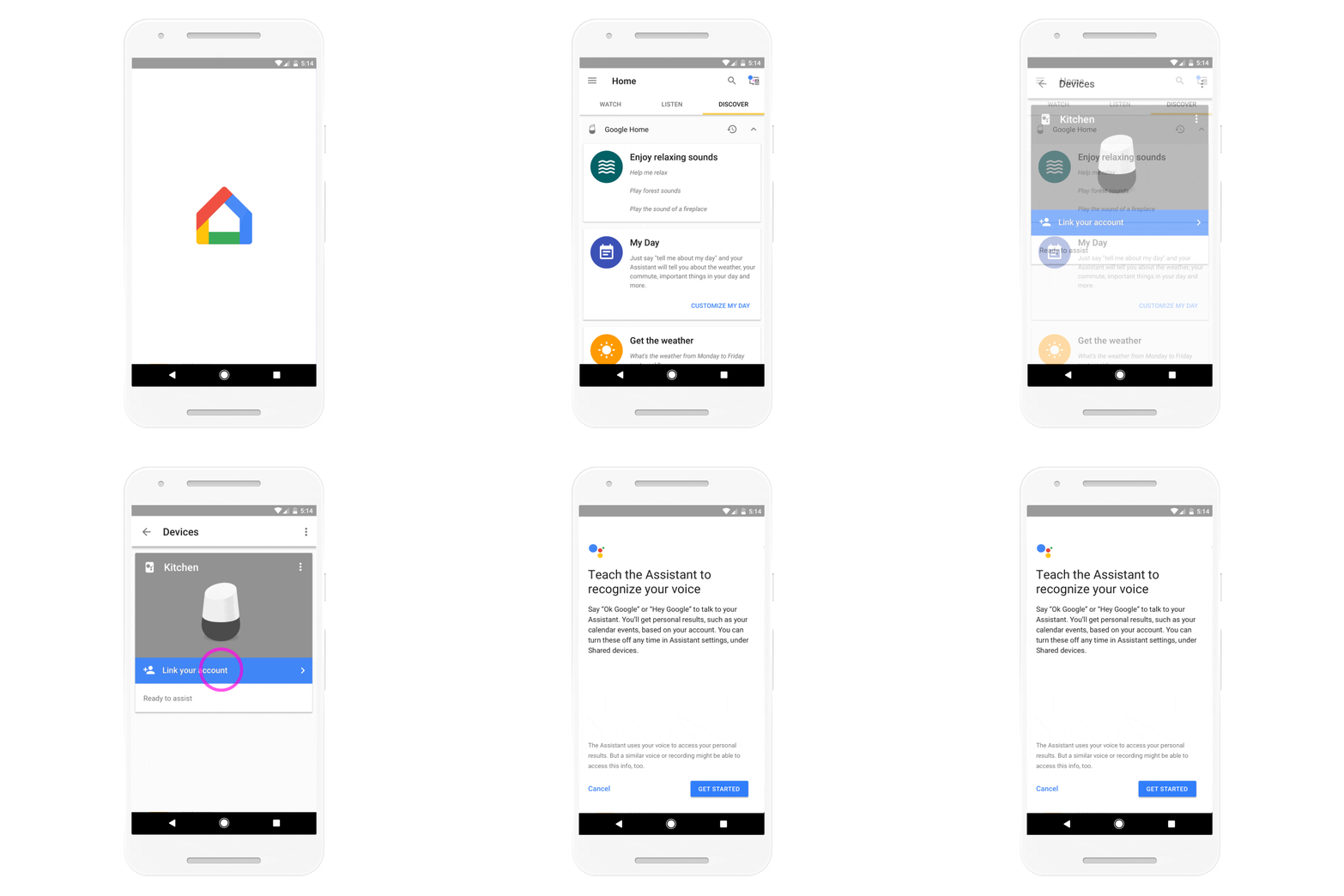
Once you’ve chosen to “link account”, each new user will be walked through training the Assistant to recognize your voice. Up to six users can be added to the Google Home device.

Xremove ads

Now your smart assistant will be able to personalize your experience by offering content from your account’s calendar, music, news and more.

This is a huge step for Google Home and connected devices. Although Amazon’s Echo is still leading the way in available commands and connected things, Home is expanding rapidly and the addition of multi-user functionality gives it a serious advantage.

Xremove ads

Lastly, if security concerns you, Pisky goes on to say that “this (voice) comparison takes place only on your device, in a matter of milliseconds.” That means the voice recognition is happening locally on your Google Home device. No servers, no third party, just you, your family and your Assistant.

Having Issues?

With all the new features rapidly showing up for the Google Home, you may be running into issues here and there. For that, we’ve found a great resource to help you troubleshoot the daily problems you might encounter. Head over to Joy of Android to check that out!

Source: Google

Xremove ads

Filed Under: All Stories, Apps, Google Assistant, News

About Gabriel Brangers

Lover of all things coffee. Foodie for life. Passionate drummer, hobby guitar player, Web designer and proud Army Veteran. I have come to drink coffee and tell the world of all things Chrome. "Whatever you do, Carpe the heck out of that Diem" - Roman poet, Horace. Slightly paraphrased.

Primary Sidebar

Xremove ads

Deals

Save $40 on the Google Pixel Watch 4 before the Spring Sale ends

By Joseph Humphrey
April 24, 2026

The best Chromebook deals today

By Robby Payne
April 20, 2026

Deal Alert: the excellent Lenovo Chromebook Plus 2-in-1 returns to $429

By Robby Payne
April 20, 2026

Lenovo Legion Tab Gen 3 drops to $399, ahead of the much pricier Gen 5 release

By Joseph Humphrey
April 18, 2026

How to get 50% off YouTube Premium for a full year with Google One

By Robby Payne
April 16, 2026

More Deals

Xremove ads

Reviews

Lenovo Chromebook Plus 2-in-1 Review: pretty great in a vacuum

By Robby Payne
April 23, 2026

Acer Chromebook Plus Spin 514 Review: Kompanio Ultra power in a convertible

By Robby Payne
December 24, 2025

My review after 6 weeks with the Lenovo Chromebook Plus 14 [VIDEO]

By Robby Payne
August 11, 2025

One week with the best small Android tablet you can buy, and I’m sold

By Robby Payne
May 9, 2025

Best Chromebooks of 2024 [VIDEO]

By Robby Payne
November 28, 2024

More Reviews

Xremove ads

Guides

This Chromebook trackpad shortcut is definitely not new, but is blowing my mind

By Robby Payne
March 11, 2024

How to reduce broadcast delay on YouTube TV to stop live spoilers

By Robby Payne
December 8, 2023

Windows PC keyboard and Chromebook

How to use a Windows keyboard with a Chromebook

By Joseph Humphrey
December 8, 2023

How reset and revert your Chromebook to the previous version of Chrome OS

By Robby Payne
November 29, 2023

My Chromebook Plus features disappeared: here’s how I fixed it

By Robby Payne
November 24, 2023

More Guides

TWITTER · FACEBOOK · INSTAGRAM · YOUTUBE · EMAIL · ABOUT

Copyright © 2026 · Chrome Unboxed · Chrome is a registered trademark of Google Inc.
We are participants in various affiliate advertising programs designed to provide a means for us to earn fees by linking to affiliated sites.

PRIVACY POLICY