



Support our independent tech coverage. Chrome Unboxed is written by real people, for real people—not search algorithms. Join Chrome Unboxed Plus for just $2 a month to get an ad-free experience, access to our private Discord, and more. Learn more about membership here.
START FREE TRIAL (MONTHLY)START FREE TRIAL (ANNUAL)
Google Drive allows you to store almost any and all filetypes from general formats like zip archives, images, audio, and videos to Microsoft, Apple, and Adobe files. While it was originally only really known for its Document storage, it’s become so much more over the years.
With that, however, many people have forgotten that there are still rules for what you can and can not store there, but that hasn’t stopped people from doing so. Things like hate speech, sexually explicit material, spam, violence and gore, and everything else unspeakable that’s listed in the company’s Abuse Program Policies and Enforcement support article.
The service has always enforced these policies for the protection of its users, and of course, for its own liability, but until now, any files that violated these terms have simply been restricted against public sharing. In an update to this process, Google is now also sending users who go against the grain an email that details the violation and alerts them of how they can request a review of the restriction in case it was a mistake.
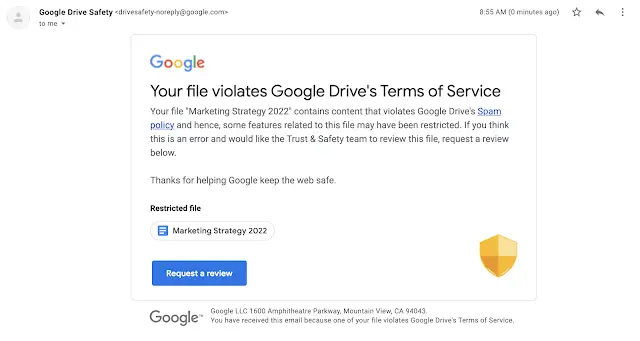
When a Google Drive file is identified as violating Google’s Terms of Service or program policies, it may be restricted. When it’s restricted, you may see a flag next to the filename, you won’t be able to share it, and your file will no longer be publicly accessible, even to people who have the link.
Google Workspace Updates
In the past, if your file was accidentally flagged, but did not break the rules in Drive, no appeal process or information was sent to you directly via email, making it difficult to straighten things out. Google wants to solve this by ensuring that users remain protected from abusive content, while at the same time making certain that everyone has a chance to get a clearer picture of what’s going on.
This has already begun to roll out to both Rapid Release and Scheduled Release domains and will continue to over the next two weeks until it’s activated for everyone across all Workspace tiers, and G Suite licenses. At this time, there’s no mention of this update coming to those with personal Google Accounts, but logically, it follows that this would come down the line.
As someone who uses Drive for everything, I would caution any and all users against storing things there that don’t belong. On one side of the coin, you have to keep in mind that Google is still a company, and your storage is still not completely private if you consider how the AI and ML combs through to find things that violate the service’s terms. On the other side of the coin, anyone who is caught up in practices that match anything listed on the abuse program policy should be caught, and they’d have to be really dumb to use cloud storage for those kinds of things anyway.
One exception that I can think of is when users who have legitimate copies of games that they’ve ripped from cartridges and discs that they bought and own, and would like to store them safely in the cloud, Google may flag them thinking that they downloaded them from the internet, but since I don’t store ROMs in Drive, and never have for fear of this, I wouldn’t know. If anyone has done this, I would love to hear if you’ve been flagged for doing so.
SUBSCRIBE TO UPSTREAM
Get Chrome Unboxed delivered straight to your inbox
Upstream is our flagship, curated newsletter with the top stories, most click-worthy deals, giveaways, and trending articles from Chrome Unboxed sent directly to your inbox a few times a week. Join 31,000+ subscribers.

