

Support our independent tech coverage. Chrome Unboxed is written by real people, for real people—not search algorithms. Join Chrome Unboxed Plus for just $2 a month to get an ad-free experience, access to our private Discord, and more. Learn more about membership here.
START FREE TRIAL (MONTHLY)START FREE TRIAL (ANNUAL)
Over on the Google Workspace Updates blog today, Google announced that it’s adding an ‘Activity’ tab to the left-hand side bar of Drive. This new tab will help you quickly access and track comments, approvals, and access requests.
It’s actually split into separate groupings once you click on it. If you’ve shared files and are waiting for access to be granted, the “Manage access” option will appear, providing an immediate overview of such requests. In the absence of any pending requests, this feature remains hidden until needed. Google does this adaptable interface a lot across its products, so I’m glad to see it here.
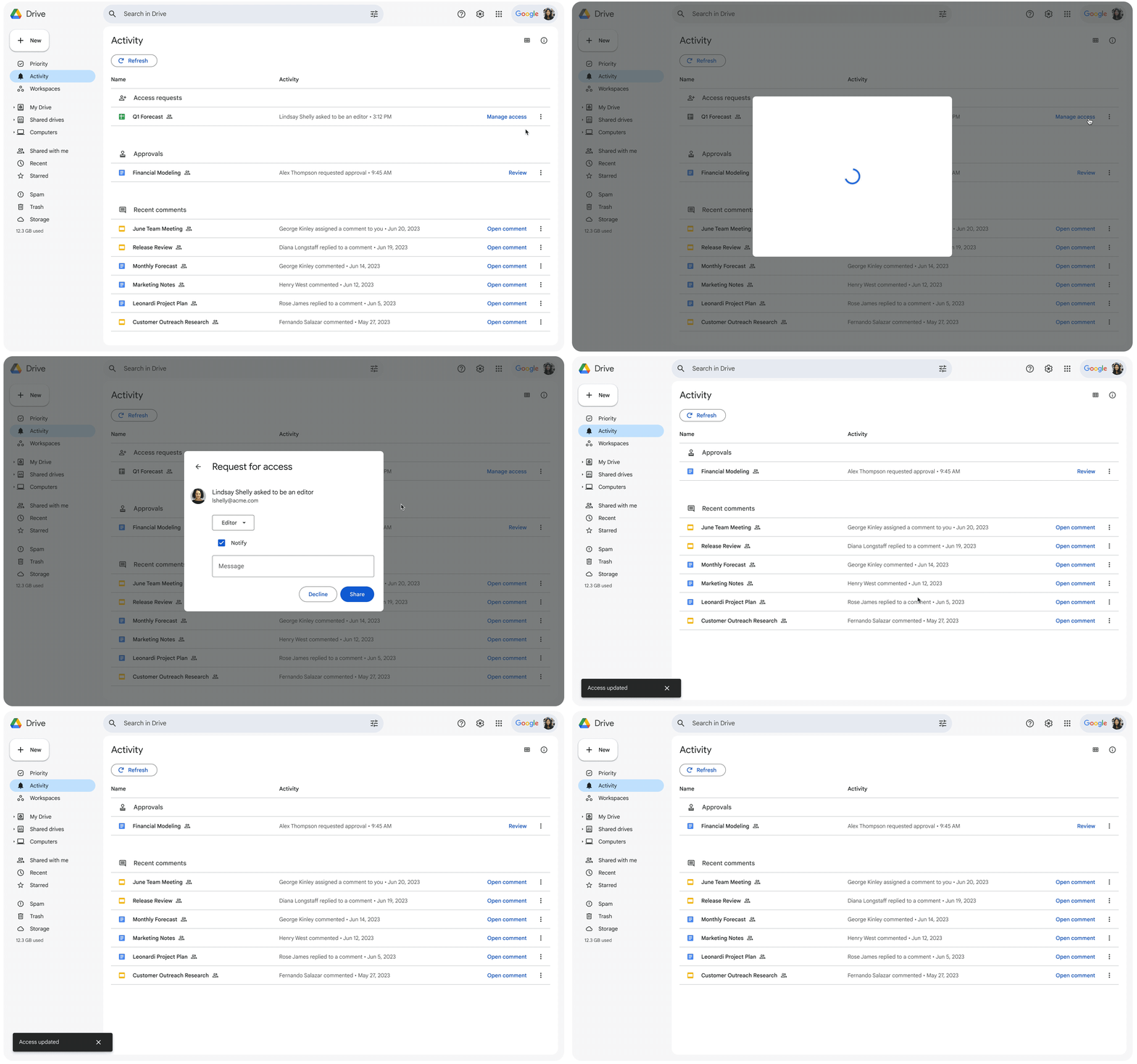
For documents that need your approval, the “Approvals” section is at the ready. A simple click on the “Review” button directs you to the document in question, eliminating the need for unnecessary searching.
Lastly, there’s a “Comments” section, displaying any comment-related activity from the past 30 days. However, you’ll notice that comments only appear for you if you’ve created them or have agreed to see them by opting into the conversation on a document or if you’ve been mentioned by someone.
If you have a Rapid Release domains, you should already start seeing this appear for you, but it could take up to two weeks to appear. If you have a Scheduled Release domain, you’ll start to see it on and after October 30, 2023. Let me know in the comments why you think this never existed before now despite how important it feels.
SUBSCRIBE TO UPSTREAM
Get Chrome Unboxed delivered straight to your inbox
Upstream is our flagship, curated newsletter with the top stories, most click-worthy deals, giveaways, and trending articles from Chrome Unboxed sent directly to your inbox a few times a week. Join 31,000+ subscribers.

