
• Skip to main content
  • Skip to primary sidebar
  • Deals
  • Features
  • Guides
  • Chromebooks
  • Videos
  • Podcast
  • More +
    • Reviews
    • Unboxing
    • Upcoming Devices
    • Chromebook Plus
    • Chrome
    • ChromeOS
    • Chrome OS Flex
  • Search
  • Sign Up
  • Log In
Chrome Unboxed – The Latest Chrome OS News

Chrome Unboxed - The Latest Chrome OS News

A Space for All Things Chrome, Google, and More!

  • Deals
  • Features
  • Guides
  • Chromebooks
  • Videos
  • Podcast
  • More +
    • Reviews
    • Unboxing
    • Upcoming Devices
    • Chromebook Plus
    • Chrome
    • ChromeOS
    • Chrome OS Flex
  • Search
  • Sign Up
  • Log In

Google Docs on mobile devices adopt a helpful feature for the task-minded

November 13, 2022 By Johanna Romero View Comments

Earlier this year, Google began to implement several updates to Tasks that elevated this small part of Google Workspace’s productivity suite into a more full-featured task manager. One of these updates allowed the delegation of tasks to others, which is very frequently done in an office setting. This change was done within Google Docs, giving you the ability to assign a checklist item to either yourself or a colleague, which caused the item to appear in the Tasks list of the assignee.

While extremely helpful and a welcomed addition to Google Docs users, it was still only available when using the web version of these apps. With Google focusing so much lately on improving the Workspace experience for larger screens, it was only a matter of time before this feature would also become available when using a phone or tablet.

Xremove ads

Thankfully, that time is now. Google has announced via a blog post that users will now be able to assign tasks through the Docs app on both Android and iOS devices. When adjustments are made to an assigned item in Tasks, such as a change to the title, due date, or completion state, those updates will show up in the Doc, and vice versa. Examples of such edits include changing the title of the item, moving the due date, or completing the task.
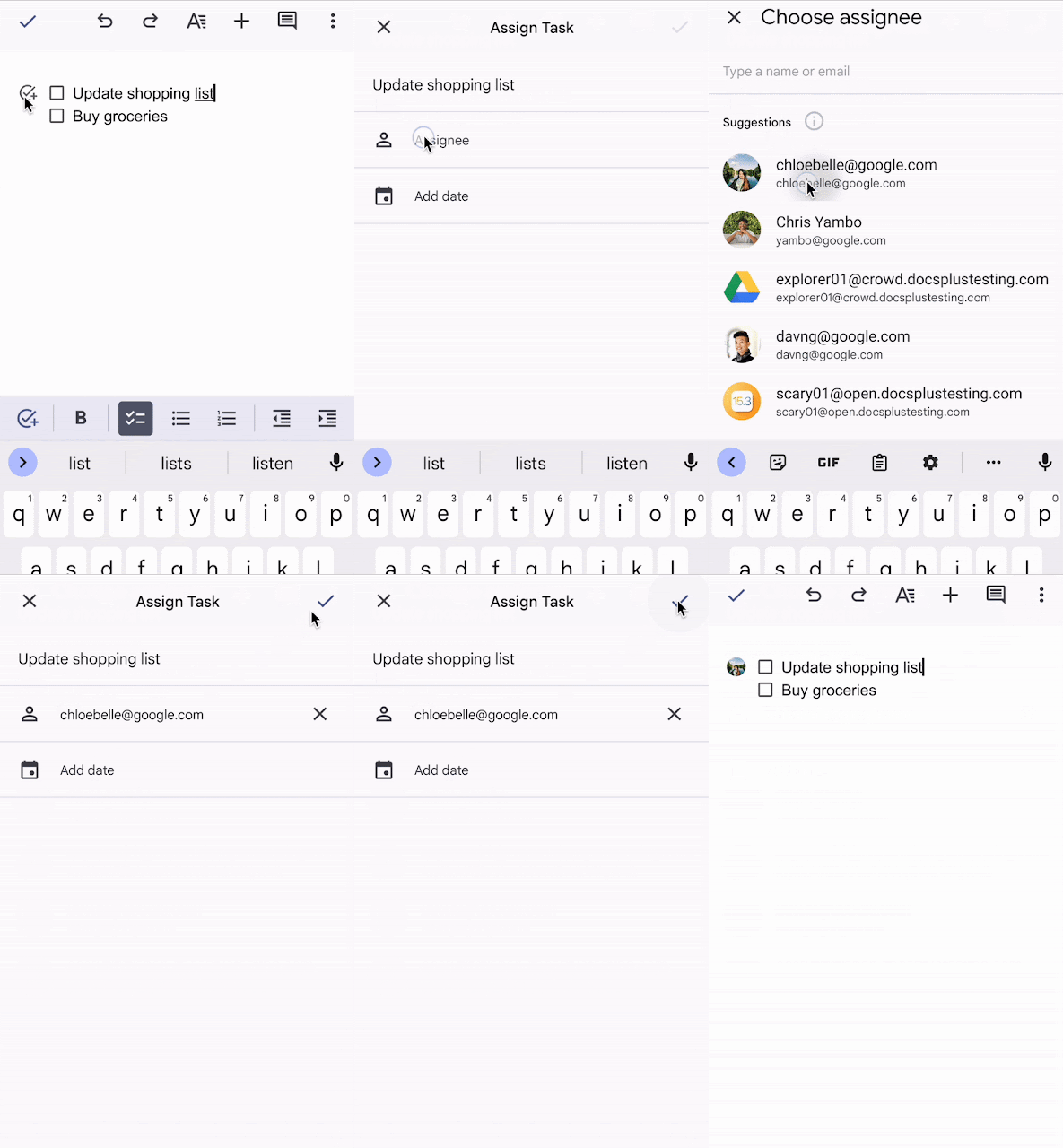
I am excited to see more of these Workspace improvements that start out as web-only make their way to their mobile counterparts. There is a growing number of users that are working remotely nowadays, and they prefer to carry the most convenient and less bulky piece of tech with them in order to stay productive. This oftentimes means the use of a tablet to keep up with their day-to-day tasks, and this update will allow them one more convenient tool to use.

Featured Videos

Xremove ads

Join Chrome Unboxed Plus

Introducing Chrome Unboxed Plus – our revamped membership community. Join today at just $2 / month to get access to our private Discord, exclusive giveaways, AMAs, an ad-free website, ad-free podcast experience and more.

Plus Monthly

$2/mo. after 7-day free trial

Pay monthly to support our independent coverage and get access to exclusive benefits.

Xremove ads
Start free trial

Plus Annual

$20/yr. after 7-day free trial

Pay yearly to support our independent coverage and get access to exclusive benefits.

Start free trial

Our newsletters are also a great way to get connected. Subscribe here!

Click here to learn more and for membership FAQ

Xremove ads

Filed Under: Workspace Tagged With: google docs, tasks, workspace

Primary Sidebar

Xremove ads

Deals

The best Chromebook deals today

By Robby Payne
December 22, 2025

Save $220 on the powerful, versatile Acer Chromebook Plus Spin 714

By Robby Payne
December 10, 2025

The Google Pixel 9a just hit its lowest price ever at $150 off

By Joseph Humphrey
December 8, 2025

At $349, this Lenovo Chromebook Plus is one of the best value laptops you can buy

By Joseph Humphrey
December 3, 2025

The elusive 8GB Lenovo Chromebook Duet 11 is finally back in stock and down to $279

By Robby Payne
December 2, 2025

More Deals

Xremove ads

Reviews

My review after 6 weeks with the Lenovo Chromebook Plus 14 [VIDEO]

By Robby Payne
August 11, 2025

One week with the best small Android tablet you can buy, and I’m sold

By Robby Payne
May 9, 2025

Best Chromebooks of 2024 [VIDEO]

By Robby Payne
November 28, 2024

Samsung Galaxy Chromebook Plus Review: Samsung is back! [VIDEO]

By Robby Payne
October 28, 2024

Lenovo Chromebook Duet 11″ Review [VIDEO]

By Robby Payne
October 19, 2024

More Reviews

Xremove ads

Guides

This Chromebook trackpad shortcut is definitely not new, but is blowing my mind

By Robby Payne
March 11, 2024

How to reduce broadcast delay on YouTube TV to stop live spoilers

By Robby Payne
December 8, 2023

Windows PC keyboard and Chromebook

How to use a Windows keyboard with a Chromebook

By Joseph Humphrey
December 8, 2023

How reset and revert your Chromebook to the previous version of Chrome OS

By Robby Payne
November 29, 2023

My Chromebook Plus features disappeared: here’s how I fixed it

By Robby Payne
November 24, 2023

More Guides

TWITTER · FACEBOOK · INSTAGRAM · YOUTUBE · EMAIL · ABOUT

Copyright © 2025 · Chrome Unboxed · Chrome is a registered trademark of Google Inc.
We are participants in various affiliate advertising programs designed to provide a means for us to earn fees by linking to affiliated sites.

PRIVACY POLICY