

Support our independent tech coverage. Chrome Unboxed is written by real people, for real people—not search algorithms. Join Chrome Unboxed Plus for just $2 a month to get an ad-free experience, access to our private Discord, and more. Learn more about membership here.
START FREE TRIAL (MONTHLY)START FREE TRIAL (ANNUAL)
It is that time of year again! The BETT conference in London—the”CES of Education”—is in full swing, and Google just dropped a massive list of updates for 2026.
If you are a teacher, an admin, or just someone who loves seeing how Google’s cloud tools evolve, there is a lot to unpack here. We’re talking about major interface changes, exciting new teacher tools, and a huge shift in how schools pay for AI.
This is a high-level overview of the latest update for my friends here at Chrome Unboxed. If you are a teacher or administrator and you want ALL the details, check out this 2026 BETT Update over on my personal blog, The Chromebook Classroom. Here is the high-level breakdown of what is coming to your Chromebooks and classrooms this year.
The Big Headline: Gemini is Moving “Downstream”
Perhaps the most significant news for school budgets is a major licensing shift. Previously, if you wanted the best AI features—like Gemini in Docs, Slides, and Drive—schools had to pay for a separate “Google AI Pro” add-on.
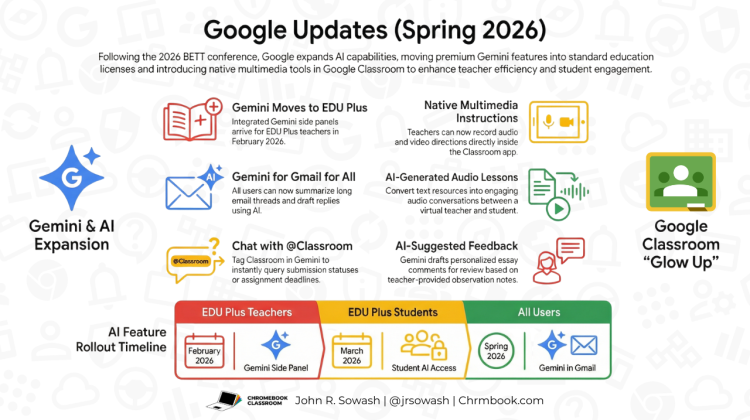
Google is announcing that these premium features are moving into the Education Plus license starting in February 2026. Even better? Gemini for Gmail is coming to all users, regardless of license type, allowing you to summarize long threads and draft replies instantly.
Google has indicated as it optimizes and scales its AI models, it would like to predictably shift many AI features “downstream” to lower product tiers. Google AI Pro, the highest AI subscription, will continue to provide power users with the most powerful models and AI-enhanced features, at the cost of $20/user/month.
Earlier this year, Google Vids moved from a premium to a standard product. The integration of Gemini for Workspace to EDU Plus districts continues this trend.
Google also re-announced Google Workspace Studio, the new home for creating agents with Gemini, like triggering a chat message when a form is submitted. Workspace studio will be available for all EDU customers, although the triggers available to you will vary by license type.
Google Classroom’s “Glow Up”
Google Classroom has looked largely the same for a while, but 2026 is bringing a refresh. A New Homepage: Say goodbye to the generic dashboard. The new Classroom homepage will feature a role-specific “actionable dashboard.” Students get deadline trackers, teachers get class insights, and leaders get engagement metrics.
Built-in Recording Studio: Finally! You will soon be able to record audio, video, and screen captures directly inside Classroom. No more third-party extensions are needed just to leave a voice note or explain a concept.
“Audio Lessons” (NotebookLM integration): Google is integrating the viral “Audio Overview” feature from NotebookLM directly into Classroom. This feature is also getting a few classroom friendly upgrades including the ability to customize the voice and direct the focus of the conversation. You can even export the transcript to Slides.
One final update allows teachers and students to “talk” to Google Classroom via Gemini. Teachers and students can soon tag @Classroom directly inside a Gemini chat to pull up information instantly without digging through assignments, gradebook details, and homework deadlines:
- Teachers: You can ask Gemini things like, “List all students who haven’t turned in the research report,” to get immediate insights.
- Students: No more forgetting assignment requirements! Just ask questions like, “When is my essay due?” or “how many sources do I need in my presentation.”
This feature creates a direct bridge between your conversational AI and your class data, essentially turning Gemini into a teaching assistant that knows your schedule and roster.
Chromebooks & “Power User” Tools
For the ChromeOS fans, there are a few Chromebook updates to mention:
- Universal Annotations: If you are rocking a touchscreen Chromebook, a new update will let you draw and annotate over any app or website when using the Class Tool application. This will be a huge help to math teachers!
- Screen Mirroring: A new “Class tools display app” allows teachers to wirelessly mirror a specific student’s screen to the main classroom display. This will require the teacher’s device to be connected to the front display via HDMI or wirelessly through cast-enabled displays.
One More Thing: SAT Prep in Gemini
In a partnership with The Princeton Review, students can now take full-length practice SAT tests directly inside Gemini for free. It’s a great example of how these AI assistants are moving from “chatbots” to actual study partners.
Get the Latest EDU news and updates
If you are a teacher or school leader that is interested in Chromebook and Google Workspace for education, sign up for my free monthly email newsletter, the Google EDU update. Each month I summarize the latest updates and new features for tools like Google Classroom, Drive, and ChromeOS. It’s the perfect companion for Chrome Unboxed readers!
SUBSCRIBE TO UPSTREAM
Get Chrome Unboxed delivered straight to your inbox
Upstream is our flagship, curated newsletter with the top stories, most click-worthy deals, giveaways, and trending articles from Chrome Unboxed sent directly to your inbox a few times a week. Join 31,000+ subscribers.

