

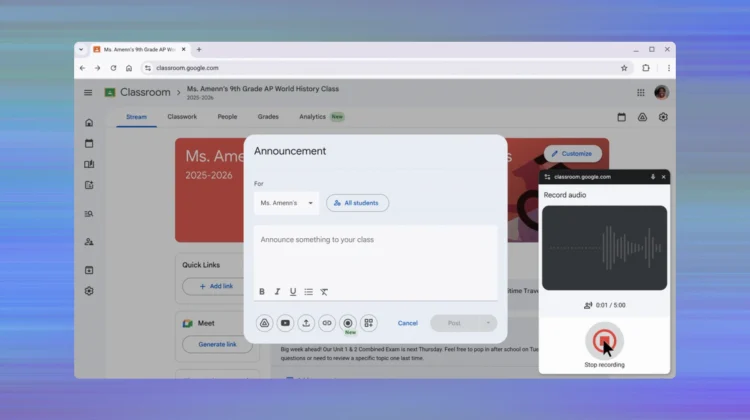
For years, teachers and students who wanted to leave a voice note or a quick screen recording in Google Classroom had to rely on a patchwork of third-party extensions like Screencastify or Loom. However, those days are officially over. Google is rolling out a built-in recording studio directly within the Classroom interface, allowing for a seamless, multimodal learning experience without ever leaving the tab.
This update is a major win for accessibility and engagement, moving Classroom beyond the world of static text and into a more “personal” digital environment.
A record button exactly where you need it

The new functionality shows up as a record button integrated into the core workflows of Classroom. This isn’t just a single tool; it’s a system-wide upgrade that changes how four key areas of the platform function:
- Private Comments: Instead of typing out long-winded feedback, teachers can now record a quick video or audio clip. For technical subjects or language learning, this is a game-changer—teachers can walk a student through a complex equation via a screencast or model the correct pronunciation of a word in real-time.
- Announcements and Posts: Teachers can now replace text-heavy updates with “video announcements.” This helps maintain a personal connection with students, especially in hybrid or remote learning environments.
- Assignments: Instructions no longer have to be just a list of bullets. Teachers can record their screen to show exactly where to find resources or explain the rubric, ensuring every student has a multimodal pathway to understanding the task.
- Submissions: If a student struggles with written expression, they can now record their response. This allows them to “show what they know” through video or audio, helping to close learning gaps and provide a more authentic check for understanding.
Simplified and Secure
One of the biggest headaches for school IT admins has been managing the privacy and permissions of third-party recording tools. By building this directly into Classroom, Google is ensuring that these recordings stay within the secure Workspace for Education environment.
- Platform: Currently, the recording feature is available on the web only.
- Permissions: Students only have access to record in the class stream if the teacher has explicitly granted them posting permissions. Teachers also have the granular ability to mute individual students if needed.
- No Admin Action Required: This feature is being toggled on at the system level, so admins don’t need to hunt for a new setting in the console.
This feature is rolling out to Google Workspace Education Plus and Teaching and Learning add-on subscribers.
Join Chrome Unboxed Plus
Introducing Chrome Unboxed Plus – our revamped membership community. Join today at just $2 / month to get access to our private Discord, exclusive giveaways, AMAs, an ad-free website, ad-free podcast experience and more.
Plus Monthly
$2/mo. after 7-day free trial
Pay monthly to support our independent coverage and get access to exclusive benefits.
Plus Annual
$20/yr. after 7-day free trial
Pay yearly to support our independent coverage and get access to exclusive benefits.
Our newsletters are also a great way to get connected. Subscribe here!
Click here to learn more and for membership FAQ

