


Support our independent tech coverage. Chrome Unboxed is written by real people, for real people—not search algorithms. Join Chrome Unboxed Plus for just $2 a month to get an ad-free experience, access to our private Discord, and more. Learn more about membership here.
START FREE TRIAL (MONTHLY)START FREE TRIAL (ANNUAL)
This past week, I took a trip out of the state and traveled by plane, where I got some much-needed time to decompress and disconnect from all of my devices. During the flight back, I decided to attempt to plug back in and organize my thoughts as I re-integrated into society like a normal person (as normal as I could muster).
That’s when I encountered something pretty shocking and quite honestly, offensive to my digital life. As many of you are well aware by now, I’ve touted the benefits of using Google Chat Spaces for organizing my life as a sort of digital bullet journal. Within it, there exists another version of Google Tasks that are – for whatever reason – almost completely disconnected from the standard Tasks experience and app.
As I was in mid-flight with airplane mode enabled on my Pixel 6 Pro, I opened Google Chat to check my spaces, and the tasks therein only to realize that without a connection, only the Chat part of Chat was accessible! Yes, who would have thought, right? I mean, it’s in the name, so it’s not exactly false advertising for it to live up to its name, but what took me aback was the fact that the Tasks and Files tabs for each space had completely disappeared! Whats more is that tapping on existing tasks in the Chat section would not launch the Tasks tab either.
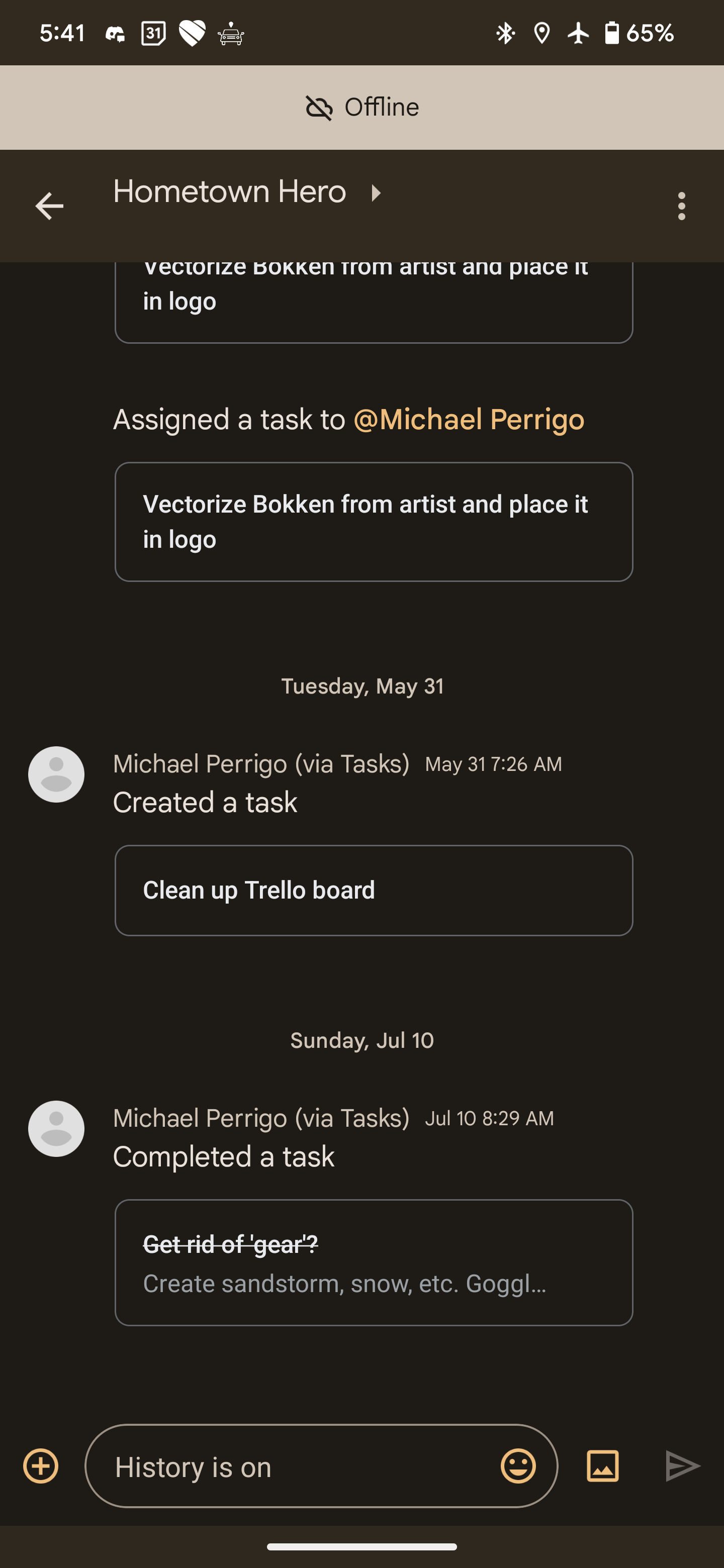
Completely appalled, I had hit a brick wall. At that moment, I had zero access to my to-do items and life planning. This is utterly unacceptable, if you ask me, and flies in the face of everything I ask of my productivity tools. Actually, it reminds me of that time that Google Shopping Lists migrated to Google Shopping from Keep, and I was left without access to the list of items I needed to add to my physical cart as I stood in the middle of the produce section of my local Publix holding my brick of a phone like a lost puppy. What, you’ve never seen a puppy hold a phone? Me either, but let’s not pretend the analogy needs to make sense, okay?
The point is that Google seems to be making decisions to cater to its branding strategy that are counter to its user experience, and over the past few years, I’ve seen the user suffer as a result. The fact that I simply can’t access any of my tasks backlog without a cell connection on Spaces while the standard Google Tasks app works flawlessly using the device’s local storage just kind of pisses me off.
It’s not like most users will be without an internet connection, and I certainly don’t travel much, but is it unreasonable to ask for this data to be accessible offline just in case, or would you agree that it should have been assumed given its predecessor’s handling of this information? I suppose today I’ve learned what they say about assuming though.
As a result of this discovery, I’ve completely abandoned Google Chat for life management, and have gone back to using my physical bullet journal for day-to-day planning and execution. I’m still using Google Tasks for Android as a field notes tool for quickly recording and storing things that come to mind until I can get back to my analog journal, but I assure you that I will never rely on Google’s newer or more experimental tools for the most important parts of my life again.
Sadly, this is the worst thing a user could tell the tech giant. I’m coming to the sad realization that Google is great for those of us living on the bleeding edge and who are okay with constant change, but not for those who are actually trying to be productive. Controversial, right?
I wish it weren’t true, but as I see the company nixing Google Calendar’s Assistant-based ,and location-based reminders and even today as they’ve announced they will remove one of my favorite digital journal tools (Google Calendar Goals…seriously, guys?), I can no longer endorse Workspace for anyone who is looking for a digital bullet journal system replacement. It’s still great for productivity, but that really does depend on who you ask.
For me, the beauty of what Google had was in the ability to cater to the user’s goals and desire to organize the different aspects of their life while executing on them, not just to dump a bunch of stuff in a feature-scarce task pool and on calendar. Let me know in the comments if you disagree, or if you think I’m being too picky and specific.
Perhaps I’m bitter because I’ve created a highly tailored system for my life around the company’s services and now that it’s being shifted around and changed, the foundation of what I’ve created is crumbling. While paper is not collaborative, or as flexible for changes (this isn’t exactly true), it will always win out in the end because you’re always in control of the experience.
SUBSCRIBE TO UPSTREAM
Get Chrome Unboxed delivered straight to your inbox
Upstream is our flagship, curated newsletter with the top stories, most click-worthy deals, giveaways, and trending articles from Chrome Unboxed sent directly to your inbox a few times a week. Join 31,000+ subscribers.

