

Support our independent tech coverage. Chrome Unboxed is written by real people, for real people—not search algorithms. Join Chrome Unboxed Plus for just $2 a month to get an ad-free experience, access to our private Discord, and more. Learn more about membership here.
START FREE TRIAL (MONTHLY)START FREE TRIAL (ANNUAL)
In the past, Google Calendar added a feature that let you set a location for your work day so that you could plan ahead. For instance, I like to write from home, from a coffee shop or Panera Bread every now and again to get some fresh air. This has helped me schedule my out of the house time beforehand, and even if I don’t always follow it, I do tend to use it as a nudge to remind me to go touch some grass.
Yesterday, in a Google Workspace Update, Google announced an expansion of this feature that will undoubtedly be useful to some more than others. You’ll now have the ability to add a specific work location for different times throughout the day in Google Calendar!
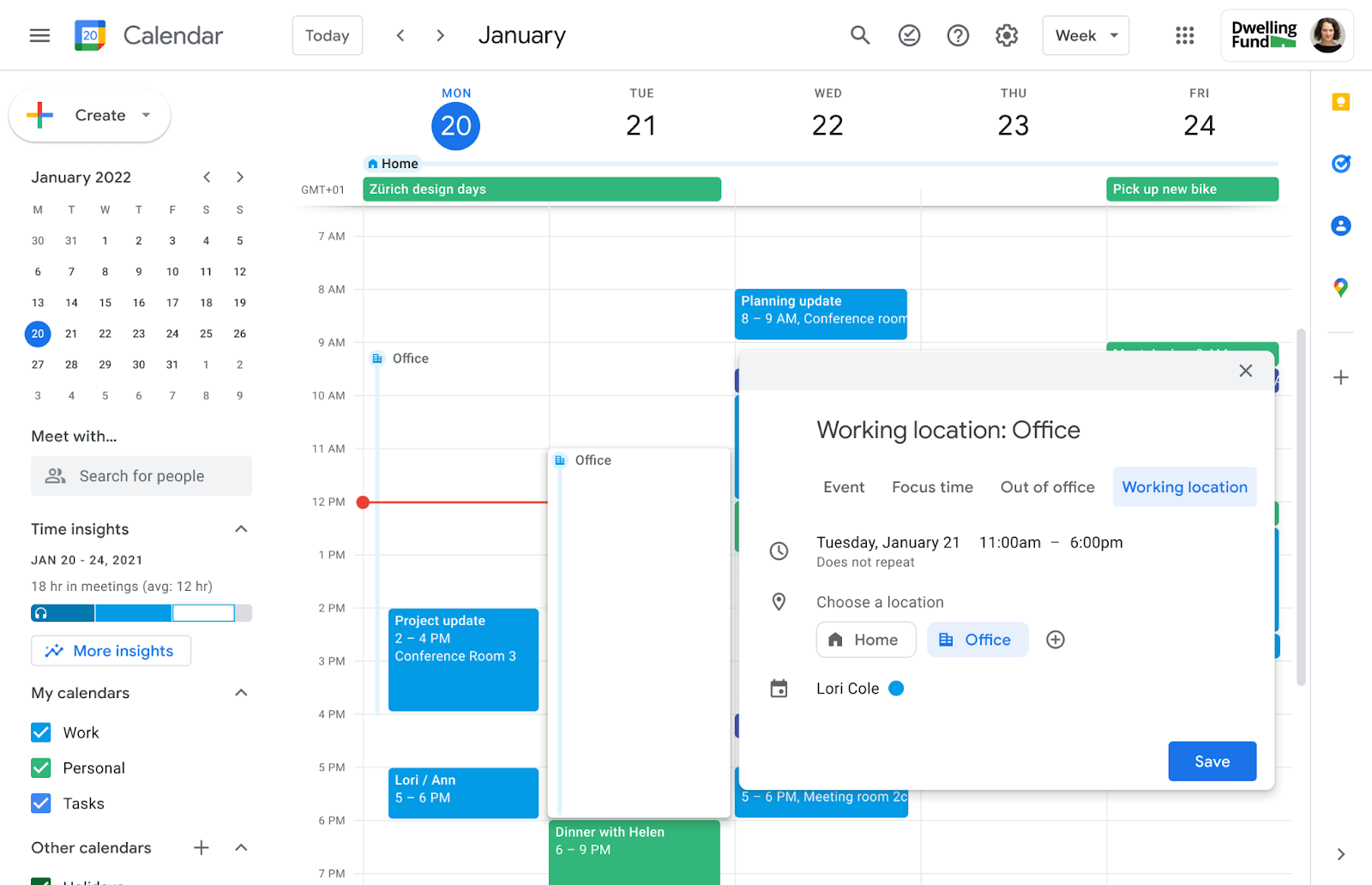
This update will let you accurately reflect your availability based on the physical location where you’ll be working, which can vary throughout the day – something the previous version of the feature didn’t account for! This is especially important for those who work in or manage large remote teams. Balancing work and personal life becomes much easier when you’ve got a plan.
For anyone using Google Workspace with employees and who have delegate access, the benefits extend even further. If you have an assistant, for instance, they can now plan out your comings and goings by adjusting your working location accordingly – cool, right? I wish I had an assistant, but I’m not that rich, and Google Assistant is trash these days.
Google has dubbed the new feature your “sub-day working location,” which is certainly an interesting choice. Nevertheless, I’m excited about it and believe it will be very well received. I get that if employers start requiring this to be filled out though, it could lead to some privacy concerns. Work from home company structures tend to be a bit too invasive with their employees, and that’s just not cool no matter how you slice it.

To set your sub-day working location, simply select “Working Location” as an event type in your Calendar, choose the appropriate location (of course), and if needed, modify the time, date, or recurrence by clicking on the time element. Once you’re done, just save the event.
As with most updates, the rollout is being staggered. Rapid Release domains with Google Workspace Business Standard, Business Plus, Enterprise Standard, Enterprise Plus, Education Fundamentals, Education Standard, Education Plus, the Teaching and Learning Upgrade, and Nonprofits already have access to this feature. For those in Scheduled Release domains, you’ll need to wait until July 14th to start seeing it, and even then, it will take approximately two weeks for the feature to be fully rolled out.
SUBSCRIBE TO UPSTREAM
Get Chrome Unboxed delivered straight to your inbox
Upstream is our flagship, curated newsletter with the top stories, most click-worthy deals, giveaways, and trending articles from Chrome Unboxed sent directly to your inbox a few times a week. Join 31,000+ subscribers.

