
• Skip to main content
  • Skip to primary sidebar
  • Deals
  • Features
  • Guides
  • Chromebooks
  • Videos
  • Podcast
  • More +
    • Reviews
    • Unboxing
    • Upcoming Devices
    • Chromebook Plus
    • Chrome
    • ChromeOS
    • Chrome OS Flex
  • Search
  • Sign Up
  • Log In
Chrome Unboxed – The Latest Chrome OS News

Chrome Unboxed - The Latest Chrome OS News

A Space for All Things Chrome, Google, and More!

  • Deals
  • Features
  • Guides
  • Chromebooks
  • Videos
  • Podcast
  • More +
    • Reviews
    • Unboxing
    • Upcoming Devices
    • Chromebook Plus
    • Chrome
    • ChromeOS
    • Chrome OS Flex
  • Search
  • Sign Up
  • Log In

Google Calendar for Android and iOS devices finally has a visual account switcher

December 15, 2021 By Michael Perrigo View Comments

Support our independent tech coverage. Chrome Unboxed is written by real people, for real people—not search algorithms. Join Chrome Unboxed Plus for just $2 a month to get an ad-free experience, access to our private Discord, and more. Learn more about membership here.
START FREE TRIAL (MONTHLY)START FREE TRIAL (ANNUAL)

For years now, Google Calendar has worked very different from the company’s other apps on mobile. Instead of allowing you to swap quickly between which account you’re utilizing for all of its primary tasks like creating and managing events, users have instead been forced to be very careful while creating new calendar entries to be certain they’re being added to the proper calendar. Truly, this was only an issue when multiple Google accounts were signed in simultaneously, but most people approach their digital life this way.

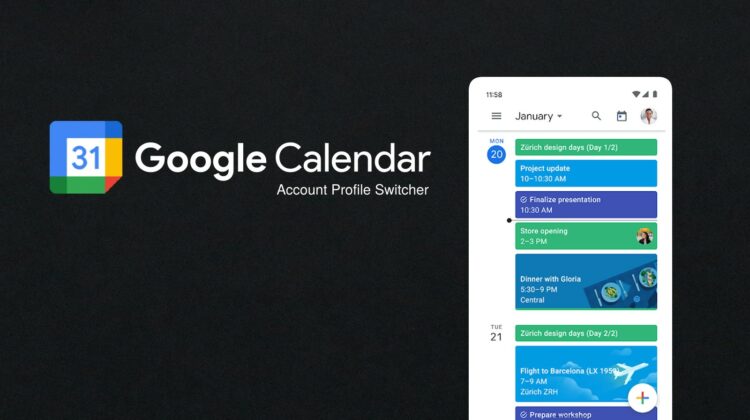
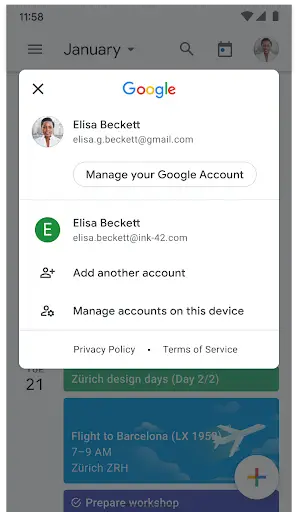
Today on the Google Workspace Updates blog, Google is rectifying this odd design choice. Over the next two weeks for both Rapid Release and Scheduled Release domains across all Google Workspace, G Suite, and personal accounts, a new profile image will appear at the top-right of the Google Calendar app for Android and iOS devices.

Xremove ads

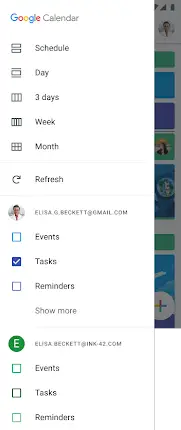
Tapping or swiping this account image up or down will jump you to another account on your phone to manage what’s being created or modified, thus making it easier to avoid placing things on the wrong calendar – an issue I’ve run into many times in recent memory. Please note that even though you’re isolating which account is in charge by swapping between profiles, you’ll still see all events from other accounts as usual, and all active accounts will appear in the left-hand overflow menu. The difference now is that your profile image will accompany them now. Before, the hamburger menu accounts list was just that – a list with no visual cues to help you easily determine what was what.

Do you want to hear my favorite line lately? Alright, I’ll say it again – “This feels like something that should have existed since the app’s inception or at least something that should have been added years ago.” I know, I’m getting tired of hearing me say it too, but many of the updates lately seem to feel that way, don’t you agree?

Featured Videos

Xremove ads

SUBSCRIBE TO UPSTREAM

Get Chrome Unboxed delivered straight to your inbox

Upstream is our flagship, curated newsletter with the top stories, most click-worthy deals, giveaways, and trending articles from Chrome Unboxed sent directly to your inbox a few times a week. Join 31,000+ subscribers.

SUBSCRIBE HERE!

Filed Under: Android, Apps, EDU week, Enterprise, iOS, New & Upcoming Features, News, Updates

About Michael Perrigo

Known as "Google Mike" to his customers, Michael worked at Best Buy as a Chromebook Expert who dedicated his time to understanding the user experience from a regular Chromebook owner's perspective. Having spent nearly 20 years meeting you face-to-face, he strives to help you understand your technology through carefully crafted guides and coverage, relentlessly seeking out the spark in what's new and exciting about ChromeOS.

Primary Sidebar

Googlebook

Dell XPS Googlebook unboxing: MacBook Air vibes and Snapdragon power

By Robby Payne
October 27, 2026

Googlebook should have been framed as the Chromebook successor, not a MacBook rival

By Robby Payne
October 27, 2026

Chrome 156 for Googlebook delivers 14 desktop upgrades and a look at what’s coming next

By Robby Payne
October 26, 2026

Googlebook OS is finally getting one of my favorite ChromeOS features

By Robby Payne
October 26, 2026

Google is bringing Chromebook’s best unlock feature to Googlebooks

By Robby Payne
October 26, 2026

More Googlebook

Xremove ads

Deals

My favorite convertible Chromebook is $150 off right now and primed for Googlebook OS

By Robby Payne
September 29, 2026

Google Pixel Buds 2a in Hazel bundled with a new Googlebook laptop at Best Buy

Score a free $129 pair of Pixel Buds 2a with any Googlebook pre-order at Best Buy

By Robby Payne
September 28, 2026

The best Chromebook deals today

By Robby Payne
September 2, 2026

The best Chromebook ever made is $350 off at Best Buy right now

By Robby Payne
August 21, 2026

The excellent, powerful Acer Chromebook Plus Spin 514 is $150 off right now

By Robby Payne
August 12, 2026

More Deals

Xremove ads

Reviews

Acer Chromebook Plus Spin 514 Review: the best convertible you can buy [VIDEO]

By Robby Payne
July 1, 2026

Lenovo Chromebook Plus 2-in-1 Review: pretty great in a vacuum

By Robby Payne
April 23, 2026

My review after 6 weeks with the Lenovo Chromebook Plus 14 [VIDEO]

By Robby Payne
August 11, 2025

One week with the best small Android tablet you can buy, and I’m sold

By Robby Payne
May 9, 2025

Best Chromebooks of 2024 [VIDEO]

By Robby Payne
November 28, 2024

More Reviews

Xremove ads

TWITTER · FACEBOOK · INSTAGRAM · YOUTUBE · EMAIL · ABOUT

Copyright © 2026 · Chrome Unboxed · Chrome is a registered trademark of Google Inc.
We are participants in various affiliate advertising programs designed to provide a means for us to earn fees by linking to affiliated sites.

PRIVACY POLICY