
• Skip to main content
  • Skip to primary sidebar
  • Deals
  • Features
  • Guides
  • Chromebooks
  • Videos
  • Podcast
  • More +
    • Reviews
    • Unboxing
    • Upcoming Devices
    • Chromebook Plus
    • Chrome
    • ChromeOS
    • Chrome OS Flex
  • Search
  • Sign Up
  • Log In
Chrome Unboxed – The Latest Chrome OS News

Chrome Unboxed - The Latest Chrome OS News

A Space for All Things Chrome, Google, and More!

  • Deals
  • Features
  • Guides
  • Chromebooks
  • Videos
  • Podcast
  • More +
    • Reviews
    • Unboxing
    • Upcoming Devices
    • Chromebook Plus
    • Chrome
    • ChromeOS
    • Chrome OS Flex
  • Search
  • Sign Up
  • Log In

Yatta! I just drew manga with Google Arts and Culture’s Giga Manga web app and you can too

April 2, 2022 By Michael Perrigo View Comments

Support our independent tech coverage. Chrome Unboxed is written by real people, for real people—not search algorithms. Join Chrome Unboxed Plus for just $2 a month to get an ad-free experience, access to our private Discord, and more. Learn more about membership here.
START FREE TRIAL (MONTHLY)START FREE TRIAL (ANNUAL)

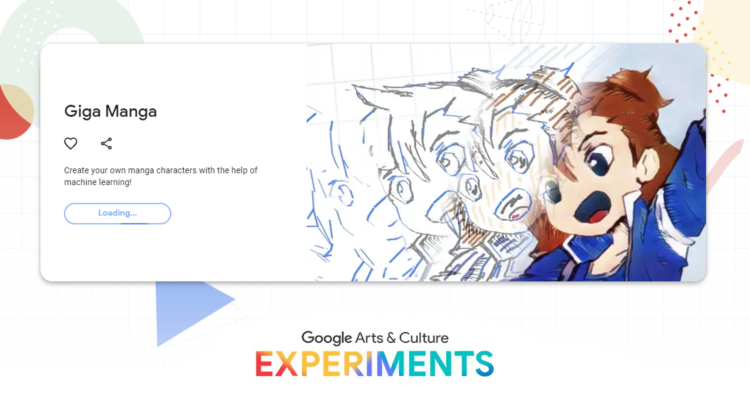
Over on Google’s Arts & Culture blog this week, the company revealed a new interactive experiment that allows anyone to magically draw manga-style ink artwork, all while exploring and learning about the history of manga. For those who are unaware, this popular Japanese art style originated in the 12th Century on animal scrolls and rose to prominence in the 1950s through the publishing industry. It was even used during WWII for war propaganda before publications like Astro Boy, Kimba The White Lion, and others took the world by storm.

Most people reading this may be more familiar with modern “Shōnen” manga like Dragon Ball Z, Full Metal Alchemist, and so on, but its roots go way further back than that. In fact, the “Father of Manga”, Osamu Tezuka began drawing his first pieces when he was 17 years old, back in 1947.

Xremove ads

Anyway, if you’re interested in trying your own hand at this, and you’ve already enjoyed spending some time learning all about manga via the new “Manga Out of the Box” series, you can visit Giga Manga on the web to make your own. Don’t worry, if you’re not quite an artist, that’s what makes this special – Google’s AI and machine learning automagically with nothing but a few lines from your hand. Add a bit of color, and let the tech giant take over and make it beautiful.

TRY FOR YOURSELF!

In this unique experiment, all you need to do is sketch a few simple lines and add some splashes of color – then let machine learning fill in the rest. You can also draw freeform to personalize your creation further. And when you’re done, the tool will help you discover manga similar to the one you’ve drawn.

The Keyword

My favorite aspect of the experiment is the row of related artwork that appears below your own attempt. Google Arts & Culture has many experiments that often pair your face, your own drawing, and so on with famous works of artists past. You can tap or click one to explore their work further and see who you draw most like! It’s a fun little way to waste some time, and I hope you try it out as manga, or at least anime has touched your life in some way or another this generation.

Featured Videos

Xremove ads

SUBSCRIBE TO UPSTREAM

Get Chrome Unboxed delivered straight to your inbox

Upstream is our flagship, curated newsletter with the top stories, most click-worthy deals, giveaways, and trending articles from Chrome Unboxed sent directly to your inbox a few times a week. Join 31,000+ subscribers.

SUBSCRIBE HERE!

Filed Under: Apps, Creativity, New & Upcoming Features, News, Updates

About Michael Perrigo

Known as "Google Mike" to his customers, Michael worked at Best Buy as a Chromebook Expert who dedicated his time to understanding the user experience from a regular Chromebook owner's perspective. Having spent nearly 20 years meeting you face-to-face, he strives to help you understand your technology through carefully crafted guides and coverage, relentlessly seeking out the spark in what's new and exciting about ChromeOS.

Primary Sidebar

Xremove ads

Deals

Massive Deal Alert: The Acer Chromebook Plus Spin 714 just hit an all-time low $499

By Robby Payne
April 1, 2026

The best Chromebook deals today

By Robby Payne
March 30, 2026

The Acer Chromebook Plus Spin 714 hits a new all-time low at $270 off

By Robby Payne
March 25, 2026

You can score $40 off Google’s battery-powered Nest Doorbell right now

By Joseph Humphrey
March 20, 2026

The touchscreen Lenovo Chromebook Slim 3 is a steal at under $200

By Robby Payne
March 16, 2026

More Deals

Xremove ads

Reviews

Acer Chromebook Plus Spin 514 Review: Kompanio Ultra power in a convertible

By Robby Payne
December 24, 2025

My review after 6 weeks with the Lenovo Chromebook Plus 14 [VIDEO]

By Robby Payne
August 11, 2025

One week with the best small Android tablet you can buy, and I’m sold

By Robby Payne
May 9, 2025

Best Chromebooks of 2024 [VIDEO]

By Robby Payne
November 28, 2024

Samsung Galaxy Chromebook Plus Review: Samsung is back! [VIDEO]

By Robby Payne
October 28, 2024

More Reviews

Xremove ads

Guides

This Chromebook trackpad shortcut is definitely not new, but is blowing my mind

By Robby Payne
March 11, 2024

How to reduce broadcast delay on YouTube TV to stop live spoilers

By Robby Payne
December 8, 2023

Windows PC keyboard and Chromebook

How to use a Windows keyboard with a Chromebook

By Joseph Humphrey
December 8, 2023

How reset and revert your Chromebook to the previous version of Chrome OS

By Robby Payne
November 29, 2023

My Chromebook Plus features disappeared: here’s how I fixed it

By Robby Payne
November 24, 2023

More Guides

TWITTER · FACEBOOK · INSTAGRAM · YOUTUBE · EMAIL · ABOUT

Copyright © 2026 · Chrome Unboxed · Chrome is a registered trademark of Google Inc.
We are participants in various affiliate advertising programs designed to provide a means for us to earn fees by linking to affiliated sites.

PRIVACY POLICY