


Support our independent tech coverage. Chrome Unboxed is written by real people, for real people—not search algorithms. Join Chrome Unboxed Plus for just $2 a month to get an ad-free experience, access to our private Discord, and more. Learn more about membership here.
START FREE TRIAL (MONTHLY)START FREE TRIAL (ANNUAL)
In a post on the Nest Community Forum today, Google unveiled a handful of new starters and actions for your smart home routines. Now, you can do things like change light effects, automatically open or close windows or blinds, adjust humidity levels, and even pause your TV or music when the doorbell rings. Devices can also be easily rebooted and updated, all through the Google Home app. These updates are aimed at making your smart home less of a pain in the neck to manage day-to-day. Let’s take a look at all of the new stuff, shall we?
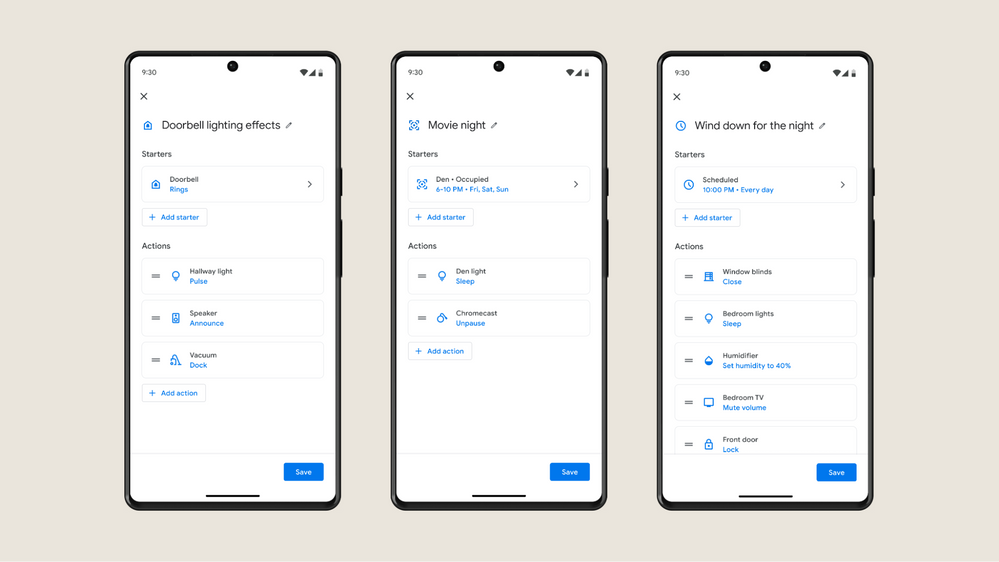
New Starters
For starters, literally, Starters for Household Routines can be accessed via the Automation tab on the Google Home app. The same applies for actions.
- Open/Close: When the window is opened, turn off the thermostat.
- Device is Charging / Plugged In: When your EV is charging, it could automatically start playing music or downloading updates.
- Temperature: When the temperature inside rises above 80 degrees, open the window and turn on the fan.
- Volume is Muted: When you mute your music, it could automatically turn off the speakers or start a timer.
- Device is Docked / Undocked: Commonly found on mops, mowers, and vacuums. For example: When the vacuum docks, broadcast to the home vacuuming is finished.
- Device is Paused: When you pause your TV show, it could automatically dim the lights or turn on the fireplace.
- Lock is Jammed: If your door lock is jammed, broadcast to the home the lock is jammed and pulse a light.
- Humidity Percentage: When humidity drops below 40%, turn on the humidifier.
- Occupancy Sensing: When someone is detected in a certain zone or room, turn on the light.
New Actions
- Light Effects: Here are some examples:
- Pulse: Provide visual feedback. When the doorbell is pressed, pulse my bedroom light.
- Wake/Sleep: When I dismiss my alarm, slowly wake the lights over a one-hour time period.
- Color Loop: When I say “Party Time”, Color Loop lights for 30 mins.
- Open or Close Device: Windows, doors, or blinds are a breeze to open or close with these actions: At 7 AM, open the blinds. At 10 PM close the blinds.
- Dock Device: Now you can set an action to dock a device like vacuums, mops, or mowers: At 5 PM, dock the vacuum cleaner.
- Set Humidity: You can set the humidity in your home depending on the temperature. These actions could help improve air quality: If the humidity in my house is too low, turn on the humidifier.
- Pause/Unpause Device: Simply pause or unpause devices such as your TV, music player, and video game. You can even control appliances like vacuums, sprinklers, dishwasher, washer, and dryer: When the doorbell rings, pause my robot vacuum.
- Timer: Start, pause, resume, or cancel timers for tasks such as cooking, cleaning, and running errands. Examples include:
- Set a timer for 30 minutes to cook dinner.
- Pause the timer when I need to check on the food.
- Resume the timer when I’m done checking on the food.
- Cancel the timer if I need to leave the house.
- Volume Mute: Mute or unmute devices such as your phone, TV, and music player when you need a moment of silence: Mute the TV at 9 PM when the kids are going to bed.
- Reboot Device: Quickly reboot devices like routers, game consoles, laptops, and TVs: Schedule a Reboot device on my router every first of the month.
- Run Software Update: Help your devices improve security and performance with this action to run software updates: Set a schedule for software updates.
The only thing you should be aware of is that the device compatibility support for these new actions is limited based on the manufacturer. This means all of these may not work for your device! Google has listed supported devices in detail over on its Home Developer Center. Let me know in the comments if you use starters or actions in your home.
I’ve personally gotten away from them since they were more of a pain in the neck to set up and manage and my lifestyle continued to change. Managing a smart home has become a full time job these days! I may dip my toes back in with these new things though, especially since I’m revamping my smart home soon.
SUBSCRIBE TO UPSTREAM
Get Chrome Unboxed delivered straight to your inbox
Upstream is our flagship, curated newsletter with the top stories, most click-worthy deals, giveaways, and trending articles from Chrome Unboxed sent directly to your inbox a few times a week. Join 31,000+ subscribers.

