
• Skip to main content
  • Skip to primary sidebar
  • Deals
  • Features
  • Guides
  • Chromebooks
  • Videos
  • Podcast
  • More +
    • Reviews
    • Unboxing
    • Upcoming Devices
    • Chromebook Plus
    • Chrome
    • ChromeOS
    • Chrome OS Flex
  • Search
  • Sign Up
  • Log In
Chrome Unboxed – The Latest Chrome OS News

Chrome Unboxed - The Latest Chrome OS News

A Space for All Things Chrome, Google, and More!

  • Deals
  • Features
  • Guides
  • Chromebooks
  • Videos
  • Podcast
  • More +
    • Reviews
    • Unboxing
    • Upcoming Devices
    • Chromebook Plus
    • Chrome
    • ChromeOS
    • Chrome OS Flex
  • Search
  • Sign Up
  • Log In

Future smart home devices may eventually ditch screens, blending into everyday materials instead

April 23, 2022 By Michael Perrigo View Comments

Support our independent tech coverage. Chrome Unboxed is written by real people, for real people—not search algorithms. Join Chrome Unboxed Plus for just $2 a month to get an ad-free experience, access to our private Discord, and more. Learn more about membership here.
START FREE TRIAL (MONTHLY)START FREE TRIAL (ANNUAL)

Google is researching the ability to mask interfaces to control ambient computing devices by making them blend in with materials like wood and cloth. Everyday materials around your house may hold and hide future smart devices so that they blend in better when you’re not using them. This has been a dream for quite some time, and you can even find smart mirror projects on YouTube, but Google is now putting its best foot forward to bring this vision to life at scale.

A graceful integration of devices requires adaptation to existing aesthetics and user styles rather than simply adding screens, which can easily disrupt a visual space, especially when they become monolithic surfaces or black screens when powered down or not actively used.

Google AI Blog

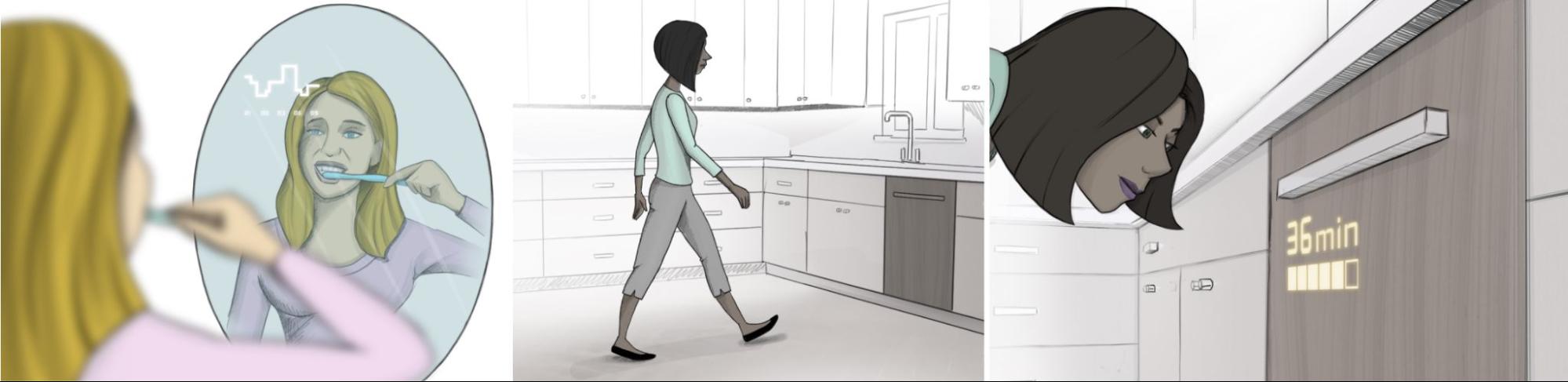
To be clear, the Google AI Blog explores this simply as an idea and has no current plans to transition Nest or Google products in this direction, but it’s clear that if this succeeds, we could finally be looking at getting a break from screens in the traditional sense. Imagine brushing your teeth and checking the weather in your reflection or looking at the lit up wood grain timer on the dishwasher to see how much time is remaining as seen in the examples below.
Xremove ads

Technology should “get out of the way”, and do its job while operating in the background of your life, effectively disappearing while never taking over in the way that phones have for most people, so this new direction is refreshing in my opinion. Check out the examples of Nest thermostats below blending into the wooden wall design or hiding in cloth. Other ideas include using Acrylic, PETG, wood veneer, mirror, basswood, and textile surfaces and displaying a font sufficiently visible on them as seen below.
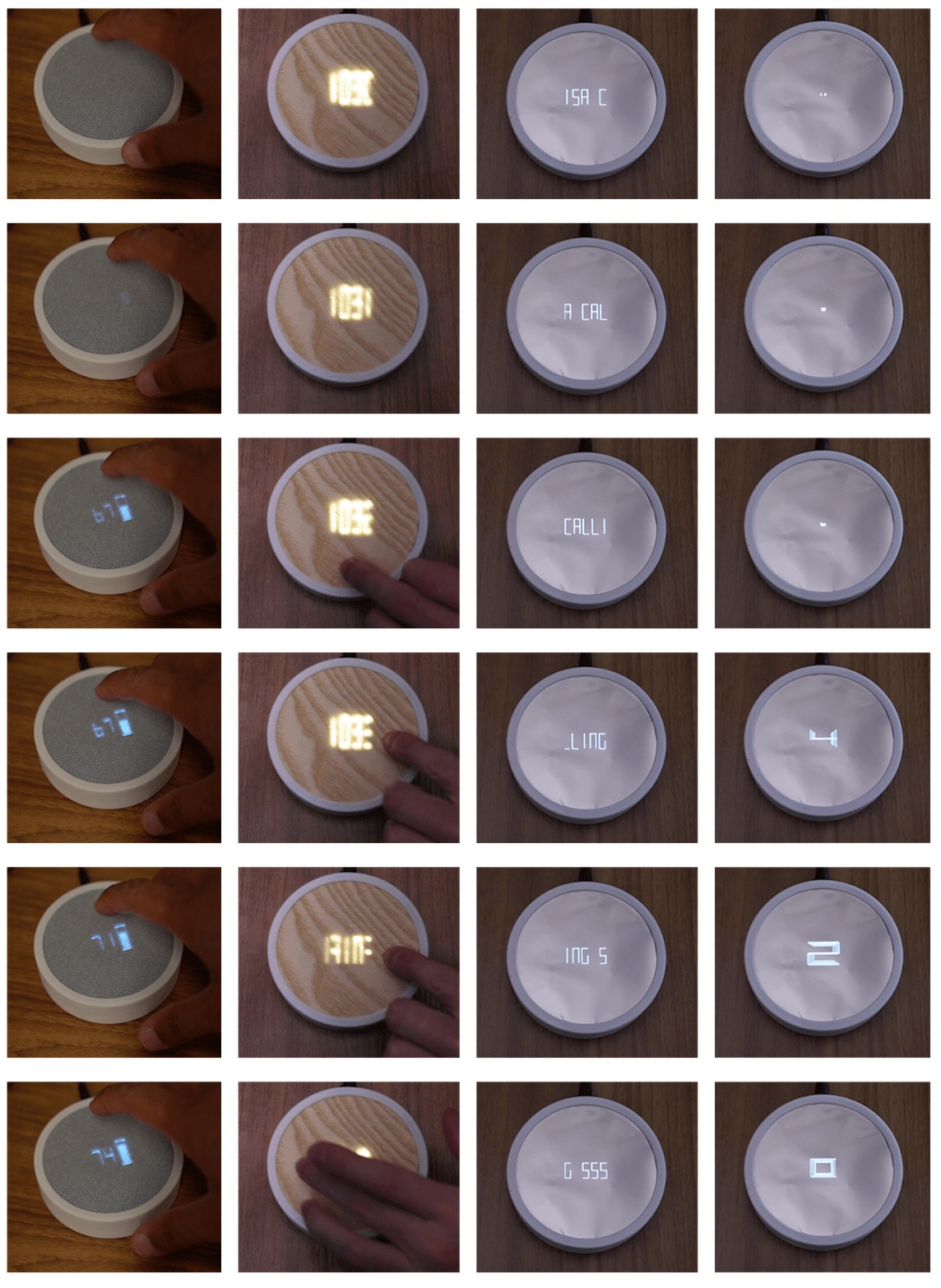
To do this, Google is using something called passive-matrix OLEDs which are based on a simple design that significantly reduces cost and complexity. Unfortunately, these displays normally utilize scanline rendering, meaning they have limited brightness and flickering. In essence, we’re going back to the good old days of digital clocks for displaying information, even if the devices are more complex in their functionality.

Featured Videos

Xremove ads

The team behind this is proposing a parallel rendering approach instead, which could solve some of these issues by using visual tricks. In the end, they hope that this new approach to display technology will encourage alternative scenarios where technology can be more harmonious and better coexist with us in our environments, and I couldn’t agree more!

SUBSCRIBE TO UPSTREAM

Get Chrome Unboxed delivered straight to your inbox

Upstream is our flagship, curated newsletter with the top stories, most click-worthy deals, giveaways, and trending articles from Chrome Unboxed sent directly to your inbox a few times a week. Join 31,000+ subscribers.

SUBSCRIBE HERE!

Filed Under: Nest, New & Upcoming Features, News, Smart Home, Updates Tagged With: videos

About Michael Perrigo

Known as "Google Mike" to his customers, Michael worked at Best Buy as a Chromebook Expert who dedicated his time to understanding the user experience from a regular Chromebook owner's perspective. Having spent nearly 20 years meeting you face-to-face, he strives to help you understand your technology through carefully crafted guides and coverage, relentlessly seeking out the spark in what's new and exciting about ChromeOS.

Primary Sidebar

Xremove ads

Deals

The best Chromebook deals today

By Robby Payne
March 30, 2026

The Acer Chromebook Plus Spin 714 hits a new all-time low at $270 off

By Robby Payne
March 25, 2026

You can score $40 off Google’s battery-powered Nest Doorbell right now

By Joseph Humphrey
March 20, 2026

The touchscreen Lenovo Chromebook Slim 3 is a steal at under $200

By Robby Payne
March 16, 2026

Google TV Streamer and Remote held in front of a wall-mounted TV

The premium Google TV Streamer 4K is back down to $80

By Joseph Humphrey
March 16, 2026

More Deals

Xremove ads

Reviews

Acer Chromebook Plus Spin 514 Review: Kompanio Ultra power in a convertible

By Robby Payne
December 24, 2025

My review after 6 weeks with the Lenovo Chromebook Plus 14 [VIDEO]

By Robby Payne
August 11, 2025

One week with the best small Android tablet you can buy, and I’m sold

By Robby Payne
May 9, 2025

Best Chromebooks of 2024 [VIDEO]

By Robby Payne
November 28, 2024

Samsung Galaxy Chromebook Plus Review: Samsung is back! [VIDEO]

By Robby Payne
October 28, 2024

More Reviews

Xremove ads

Guides

This Chromebook trackpad shortcut is definitely not new, but is blowing my mind

By Robby Payne
March 11, 2024

How to reduce broadcast delay on YouTube TV to stop live spoilers

By Robby Payne
December 8, 2023

Windows PC keyboard and Chromebook

How to use a Windows keyboard with a Chromebook

By Joseph Humphrey
December 8, 2023

How reset and revert your Chromebook to the previous version of Chrome OS

By Robby Payne
November 29, 2023

My Chromebook Plus features disappeared: here’s how I fixed it

By Robby Payne
November 24, 2023

More Guides

TWITTER · FACEBOOK · INSTAGRAM · YOUTUBE · EMAIL · ABOUT

Copyright © 2026 · Chrome Unboxed · Chrome is a registered trademark of Google Inc.
We are participants in various affiliate advertising programs designed to provide a means for us to earn fees by linking to affiliated sites.

PRIVACY POLICY