


Support our independent tech coverage. Chrome Unboxed is written by real people, for real people—not search algorithms. Join Chrome Unboxed Plus for just $2 a month to get an ad-free experience, access to our private Discord, and more. Learn more about membership here.
START FREE TRIAL (MONTHLY)START FREE TRIAL (ANNUAL)
Mail merges, or multi-send, were introduced to Gmail a few months ago as an exclusive feature for higher-tiered Google Workspace customers. This feature lets you send a large number of emails without having to BCC everyone and includes a built-in link for recipients to unsubscribe if desired.

However, a change is rolling out that will take this feature to a whole new level. Instead of sending an impersonal mass email, you will now be able to personalize it using mail merge tags like @firstname and @lastname and thus make your email look more professional than you would by sending a mass BCC. The process of sending a mail merge is very easy and as follows:
1. Turn multi-send on by using the button in the compose toolbar.
2. Add recipients to your email draft in the “To:” line.
3. Type “@” to see a list of available merge tags.
4. Insert the desired merge tag by pressing Enter or by clicking on the merge tag.
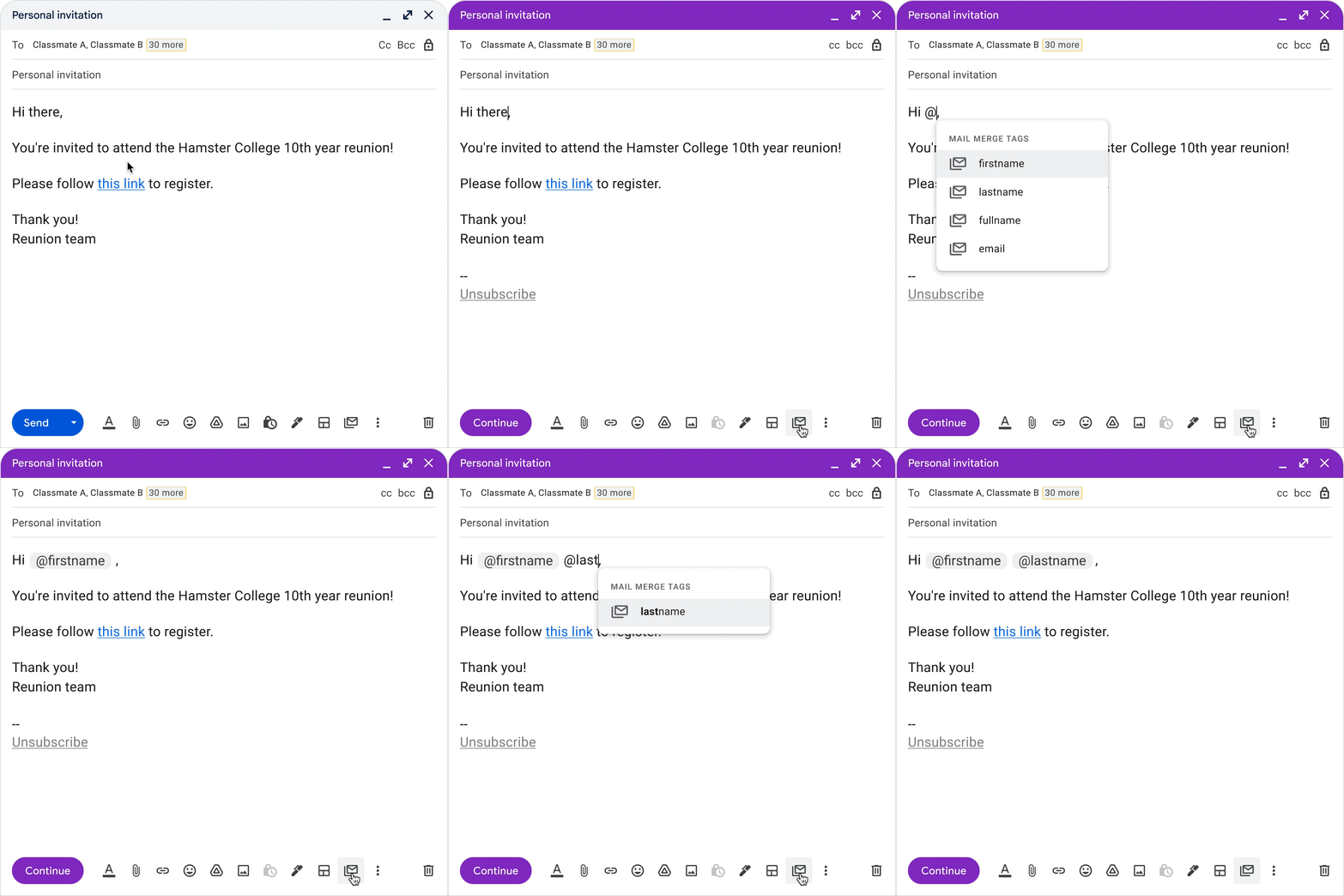
Currently, the only available merge tags are @firstname, @lastname, @fullname, and @email, but spreadsheet-based mail merge tags will be supported in future updates. Also, the first and last names that the recipient will see will mimic what you have set up in your Google Contacts. If the recipient is not in your Contacts, mail merge will try to guess their first and last names based on the formatting, thus adding recipients to Contacts is the best approach to ensure they see the correct names in emails.
This feature will roll out gradually over the next several weeks, beginning today for Rapid Release domains and on November 7, 2022 for Scheduled Release domains. In both cases, the feature may take up to 15 days to fully roll out. Additionally, Workspace tier availability will be as follows:
• Available to Google Workspace Business Standard, Business Plus, Enterprise Starter, Enterprise Standard, Enterprise Plus, Education Plus, and Workspace Individual customers
• Not available to Google Workspace Essentials, Business Starter, Enterprise Essentials, Education Fundamentals, Education Standard, Education Teaching and Learning Upgrade, Frontline, as well as legacy G Suite Basic and Business customers
• Not available to users with personal Google Accounts
SUBSCRIBE TO UPSTREAM
Get Chrome Unboxed delivered straight to your inbox
Upstream is our flagship, curated newsletter with the top stories, most click-worthy deals, giveaways, and trending articles from Chrome Unboxed sent directly to your inbox a few times a week. Join 31,000+ subscribers.
