
• Skip to main content
  • Skip to primary sidebar
  • Deals
  • Features
  • Guides
  • Chromebooks
  • Videos
  • Podcast
  • More +
    • Reviews
    • Unboxing
    • Upcoming Devices
    • Chromebook Plus
    • Chrome
    • ChromeOS
    • Chrome OS Flex
  • Search
  • Sign Up
  • Log In
Chrome Unboxed – The Latest Chrome OS News

Chrome Unboxed - The Latest Chrome OS News

A Space for All Things Chrome, Google, and More!

  • Deals
  • Features
  • Guides
  • Chromebooks
  • Videos
  • Podcast
  • More +
    • Reviews
    • Unboxing
    • Upcoming Devices
    • Chromebook Plus
    • Chrome
    • ChromeOS
    • Chrome OS Flex
  • Search
  • Sign Up
  • Log In

Gmail adds built-in tags to personalize mail merges for Workspace users

October 24, 2022 By Johanna Romero View Comments

Featured image of gmail mail merge

Support our independent tech coverage. Chrome Unboxed is written by real people, for real people—not search algorithms. Join Chrome Unboxed Plus for just $2 a month to get an ad-free experience, access to our private Discord, and more. Learn more about membership here.
START FREE TRIAL (MONTHLY)START FREE TRIAL (ANNUAL)

Mail merges, or multi-send, were introduced to Gmail a few months ago as an exclusive feature for higher-tiered Google Workspace customers. This feature lets you send a large number of emails without having to BCC everyone and includes a built-in link for recipients to unsubscribe if desired.

However, a change is rolling out that will take this feature to a whole new level. Instead of sending an impersonal mass email, you will now be able to personalize it using mail merge tags like @firstname and @lastname and thus make your email look more professional than you would by sending a mass BCC. The process of sending a mail merge is very easy and as follows:

Xremove ads

1. Turn multi-send on by using the button in the compose toolbar.

2. Add recipients to your email draft in the “To:” line.

3. Type “@” to see a list of available merge tags.

4. Insert the desired merge tag by pressing Enter or by clicking on the merge tag.
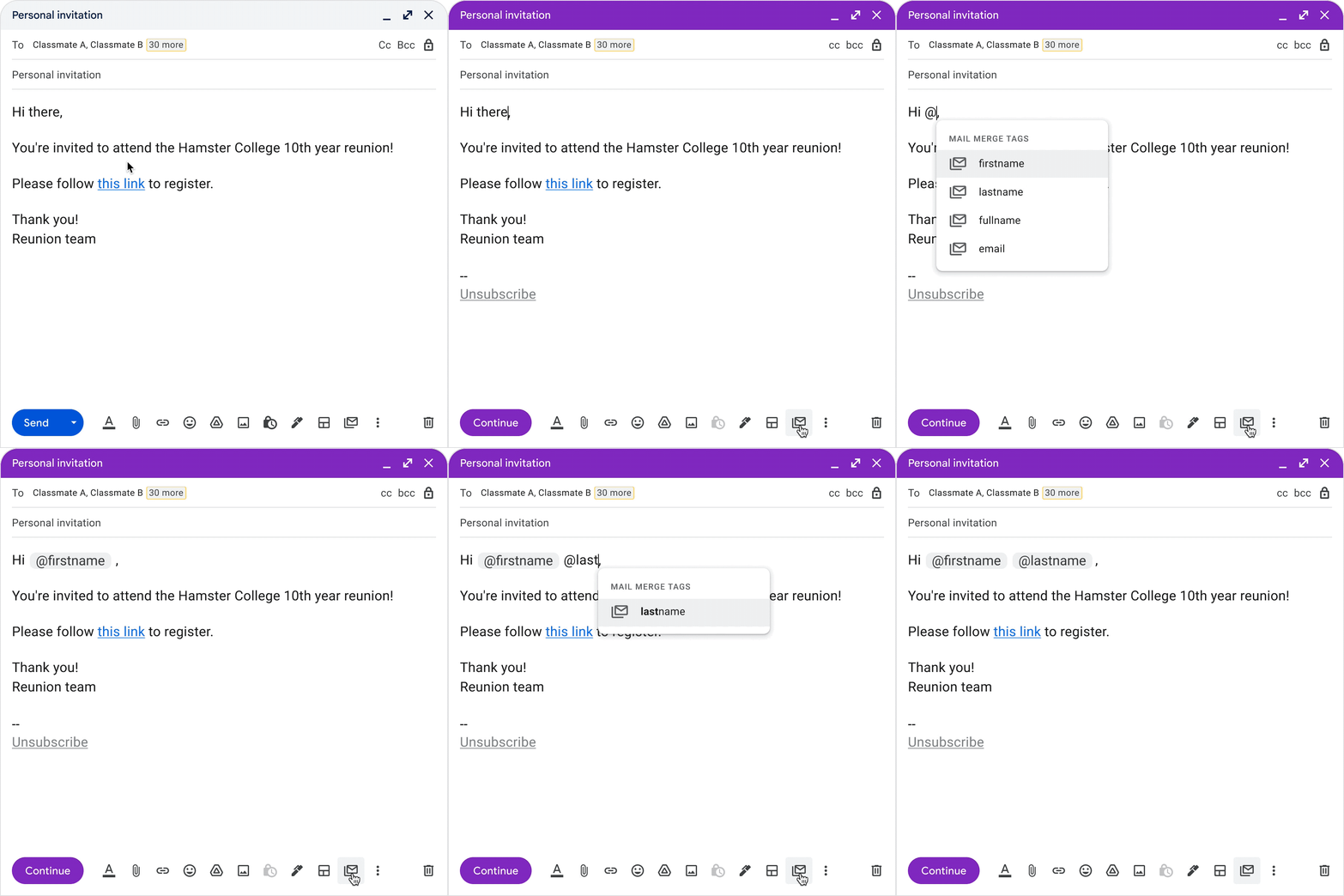
Currently, the only available merge tags are @firstname, @lastname, @fullname, and @email, but spreadsheet-based mail merge tags will be supported in future updates. Also, the first and last names that the recipient will see will mimic what you have set up in your Google Contacts. If the recipient is not in your Contacts, mail merge will try to guess their first and last names based on the formatting, thus adding recipients to Contacts is the best approach to ensure they see the correct names in emails.

This feature will roll out gradually over the next several weeks, beginning today for Rapid Release domains and on November 7, 2022 for Scheduled Release domains. In both cases, the feature may take up to 15 days to fully roll out. Additionally, Workspace tier availability will be as follows:

Featured Videos

Xremove ads

• Available to Google Workspace Business Standard, Business Plus, Enterprise Starter, Enterprise Standard, Enterprise Plus, Education Plus, and Workspace Individual customers 

• Not available to Google Workspace Essentials, Business Starter, Enterprise Essentials, Education Fundamentals, Education Standard, Education Teaching and Learning Upgrade, Frontline, as well as legacy G Suite Basic and Business customers 

• Not available to users with personal Google Accounts 

SUBSCRIBE TO UPSTREAM

Get Chrome Unboxed delivered straight to your inbox

Upstream is our flagship, curated newsletter with the top stories, most click-worthy deals, giveaways, and trending articles from Chrome Unboxed sent directly to your inbox a few times a week. Join 31,000+ subscribers.

SUBSCRIBE HERE!

Filed Under: Workspace Tagged With: gmail, mail merge, multi-send, workspace

Primary Sidebar

Googlebook

Googlebook OS is getting keyboard shortcuts for play/pause and previous/next in media

By Robby Payne
November 28, 2026

Flagships, tablets, or budget laptops: why the Googlebook launch was always going to be a gamble

By Robby Payne
November 25, 2026

Googlebook ‘Pelion’ borrows its battery from one of my favorite Acer Chromebooks

By Robby Payne
November 25, 2026

Entry-level Googlebooks might finally be coming with Snapdragon C silicon

By Robby Payne
November 24, 2026

When I need to get technical work done, I still reach for a Chromebook over a Googlebook

By Robby Payne
November 24, 2026

More Googlebook

Xremove ads

Deals

The best Black Friday Googlebook and Chromebook deals

By Robby Payne
November 27, 2026

The first Googlebook deals are here, slashing up to $300 off two 3K OLED models

By Robby Payne
November 20, 2026

My favorite convertible Chromebook is $150 off right now and primed for Googlebook OS

By Robby Payne
September 29, 2026

Google Pixel Buds 2a in Hazel bundled with a new Googlebook laptop at Best Buy

Score a free $129 pair of Pixel Buds 2a with any Googlebook pre-order at Best Buy

By Robby Payne
September 28, 2026

The best Chromebook ever made is $350 off at Best Buy right now

By Robby Payne
August 21, 2026

More Deals

Xremove ads

Reviews

My brutally honest thoughts on Googlebook after one month [VIDEO]

By Robby Payne
November 2, 2026

Acer Chromebook Plus Spin 514 Review: the best convertible you can buy [VIDEO]

By Robby Payne
July 1, 2026

Lenovo Chromebook Plus 2-in-1 Review: pretty great in a vacuum

By Robby Payne
April 23, 2026

My review after 6 weeks with the Lenovo Chromebook Plus 14 [VIDEO]

By Robby Payne
August 11, 2025

One week with the best small Android tablet you can buy, and I’m sold

By Robby Payne
May 9, 2025

More Reviews

Xremove ads

TWITTER · FACEBOOK · INSTAGRAM · YOUTUBE · EMAIL · ABOUT

Copyright © 2026 · Chrome Unboxed · Chrome is a registered trademark of Google Inc.
We are participants in various affiliate advertising programs designed to provide a means for us to earn fees by linking to affiliated sites.

PRIVACY POLICY