

Support our independent tech coverage. Chrome Unboxed is written by real people, for real people—not search algorithms. Join Chrome Unboxed Plus for just $2 a month to get an ad-free experience, access to our private Discord, and more. Learn more about membership here.
START FREE TRIAL (MONTHLY)START FREE TRIAL (ANNUAL)
When Google quietly folded the “Spark” brand into the main Gemini app last month, it immediately made handing off background work feel less like a separate science project and more like a normal part of using Gemini. The only real catch was the paywall: if you wanted to actually use those autonomous tasks, you still needed to be paying for a $20/month Google AI Pro subscription.
That barrier just came down in a pretty big way. Starting today, Google is making Gemini tasks free for users in six countries, while simultaneously rolling out the new Email and Text channels it teased back at Google I/O 2026.
This update changes how practical Gemini actually feels in day-to-day life. For starters, you no longer have to pay to test out Google’s background agent; and you don’t even have to open the Gemini app to put it to work.
Free Gemini tasks arrive in six countries
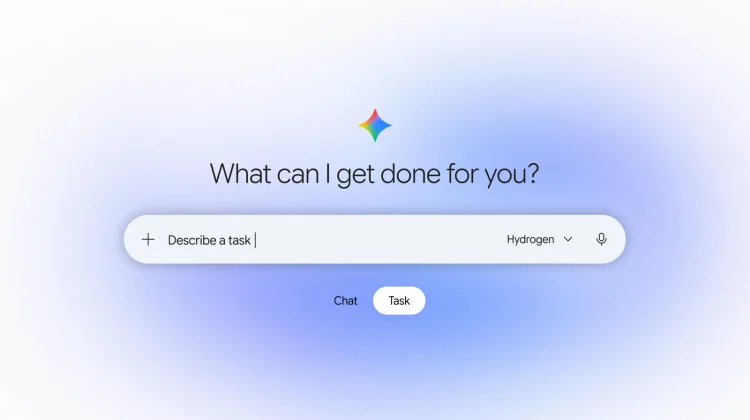
If you are in the US, Japan, Korea, Canada, Australia, or India, you should start seeing the Chat and Task toggle (above the prompt box on mobile, or below it on the web) unlocked for free accounts. Powered by the new Hydrogen model, the Task side of Gemini is built for the multi-step errands you don’t want to babysit yourself.
Google shared a couple of concrete examples of how it expects people to use this, and honestly, they are far more relatable than the usual AI demo fluff:
- Tracking down bill spikes: Letting Gemini sign into a utility portal through Google Password Manager, cross-reference past billing PDFs in Gmail, and figure out that a $389 electric bill happened because a heat pump was kicking on at 4:00 p.m. during peak pricing.
- Shopping without the tab overload: Asking Gemini to compare USB-C chargers via Google’s Shopping Graph, answer a quick follow-up on wattage and color, dig up a $10 discount code, and walk you through checkout using Google Pay.
Because giving an AI access to passwords, emails, and payment cards understandably makes people nervous, Google is leaning hard on the security pitch here. Behind the scenes, Gemini tasks run inside your own sandboxed, “hardware-isolated virtual machine” backed by Google Safe Browsing and prompt-injection defenses. It will also stop to ask clarifying questions if your prompt is vague, and it forces a manual confirmation before completing a purchase.
Text or email Gemini from the apps you already live in
Making tasks free is huge, but letting you trigger them over text or email might actually be what gets normal people to use them. By heading over to gemini.google.com/channels in the US, you can now connect your phone number or start emailing Gemini directly without ever launching a dedicated AI app. Here is how both new channels work:
- Text with Gemini (Google Messages and iMessage): After verifying a phone number on the Channels page (https://gemini.google.com/channels), you get a 1:1 RCS Business Messaging thread with Gemini. You can text a quick request, snap a photo of a school flyer to get dates onto Google Calendar, receive scheduled check-ins, or reply mid-task to change course without starting over. Before Gemini sends something, books anything, or takes a major action, it prompts you for a one-tap confirmation.
- Email with Gemini: You can also kick off tasks or forward messy threads straight to gemini@google.com from Gmail, Apple Mail, or Outlook. Google notes that replies are always 1:1 and never a dreaded “Reply-All”; and include a link to review and confirm the results. Forwarding a batch of school emails to spot calendar conflicts or sending over medical bills and insurance PDFs to organize is the exact kind of busywork I’d happily offload from my inbox.
And if you decide you don’t want Gemini living in your texts or inbox anymore, you can manage your numbers and toggle either channel right back off from the same Channels setting in the Gemini app on the web.
Why this pairing matters right now
With both the free tasks and this new messaging/email automation, the whole “personal AI agent” pitch might finally click for everyday users. Most people don’t wake up thinking about opening an AI chatbot to manage their day; but they certainly wake up and check their texts and email. Meeting you right inside Messages, iMessage, Gmail, or Outlook while taking away the $20/month entry fee gives Gemini tasks a real shot at becoming a habit instead of a novelty.
SUBSCRIBE TO UPSTREAM
Get Chrome Unboxed delivered straight to your inbox
Upstream is our flagship, curated newsletter with the top stories, most click-worthy deals, giveaways, and trending articles from Chrome Unboxed sent directly to your inbox a few times a week. Join 31,000+ subscribers.

