

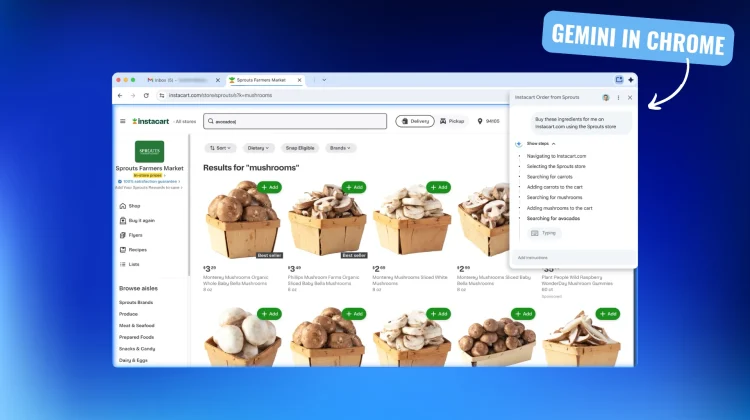
While we’ve seen Gemini’s powerful AI integrated into countless Google products over the past year, its arrival in the Chrome browser itself has been the one many have been waiting for. Today, Google is pulling back the curtain on a massive suite of 10 new AI-powered features for Chrome, fundamentally changing how we search, browse, and stay safe on the web.
The centerpiece of this announcement is the official rollout of Gemini in Chrome, an integrated AI assistant that is more powerful and proactive than anything we’ve seen in a browser before.
Gemini in Chrome: your new browsing partner
Starting today for Mac and Windows users in the U.S., Gemini is being built directly into Chrome. This new integration allows you to ask Gemini to clarify complex information on any webpage you’re reading. But it gets far more powerful than that.
Gemini in Chrome can now work across multiple open tabs, allowing it to quickly compare and summarize information from different websites. For example, you can have your flight, hotel, and activity tabs open and ask Gemini to consolidate all that information into a single, clean itinerary. It also features deeper integration with Google apps like YouTube and Maps, so you can ask it to find a specific spot in a video or get location details without ever leaving the page you’re on.
The future is an AI agent that browses for you
The most impressive part of today’s announcement is a look at what’s coming in the next few months: agentic capabilities. Soon, you’ll be able to give Gemini in Chrome high-level tasks, and it will act on webpages on your behalf. The examples Google gives are stunning: you can tell it to book a haircut or order your weekly groceries, and the AI will navigate the necessary sites and forms to get it done for you.
On top of that, Gemini will soon be able to recall webpages you’ve previously visited using natural language. No more scrolling through your history; you’ll be able to just ask, “what was that blog I read on back to school shopping?” and Gemini will find it for you.
A smarter, safer browser, powered by AI
The updates don’t stop there. The Chrome omnibox (the address bar) is getting smarter, with direct access to AI Mode for asking longer, more complex questions. You’ll also be able to ask questions about the page you’re currently on and get a helpful AI Overview in the side panel.
On the security front, Chrome’s Enhanced Protection will now use Gemini Nano to stop more sophisticated scams, and AI will help detect and reduce spammy notifications and unwanted permission requests. Finally, a new AI password agent is coming that can take you to a website and change a compromised password for you with a single click.
This is a massive, multi-faceted upgrade that touches every part of the browsing experience. These features will be rolling out starting today and in the coming weeks and months, transforming Chrome from a simple browser into a truly intelligent, proactive assistant. The only question left is; when will this stuff arrive for Chromebooks?
Join Chrome Unboxed Plus
Introducing Chrome Unboxed Plus – our revamped membership community. Join today at just $2 / month to get access to our private Discord, exclusive giveaways, AMAs, an ad-free website, ad-free podcast experience and more.
Plus Monthly
$2/mo. after 7-day free trial
Pay monthly to support our independent coverage and get access to exclusive benefits.
Plus Annual
$20/yr. after 7-day free trial
Pay yearly to support our independent coverage and get access to exclusive benefits.
Our newsletters are also a great way to get connected. Subscribe here!
Click here to learn more and for membership FAQ

