
• Skip to main content
  • Skip to primary sidebar
  • Deals
  • Features
  • Guides
  • Chromebooks
  • Videos
  • Podcast
  • More +
    • Reviews
    • Unboxing
    • Upcoming Devices
    • Chromebook Plus
    • Chrome
    • ChromeOS
    • Chrome OS Flex
  • Search
  • Sign Up
  • Log In
Chrome Unboxed – The Latest Chrome OS News

Chrome Unboxed - The Latest Chrome OS News

A Space for All Things Chrome, Google, and More!

  • Deals
  • Features
  • Guides
  • Chromebooks
  • Videos
  • Podcast
  • More +
    • Reviews
    • Unboxing
    • Upcoming Devices
    • Chromebook Plus
    • Chrome
    • ChromeOS
    • Chrome OS Flex
  • Search
  • Sign Up
  • Log In

Gboard rolling out new magic wand “Emojify” feature

March 31, 2022 By Johanna Romero View Comments

Gboard is one of Google’s feature-packed applications that is great no matter which platform you use it on. It is top-rated on both the Android Play Store and the Apple App Store alike and has been instrumental in bringing features like glide and voice typing to the mainstream. It has also gained quite a few helpful features lately, including the rollout of a grammar check feature using AI that works entirely on-device to preserve privacy.

Now a new feature is rolling out for Gboard that turns your text into emojis via a magic wand. This magic wand appears where the microphone normally resides, and only once you’ve already typed something that the keyboard can associate with Emojis. Android Police describes it as working in the following manner:

Xremove ads

There are two modes here — tapping once will put an emoji translation after your text, and tapping it twice will insert one emoji between each word. Sometimes it works pretty well, while in other sentences, it’s kind of a hit-or-miss thing. So far it looks like you need your keyboard set to English, but we may see support for more languages in the future.

Android Police
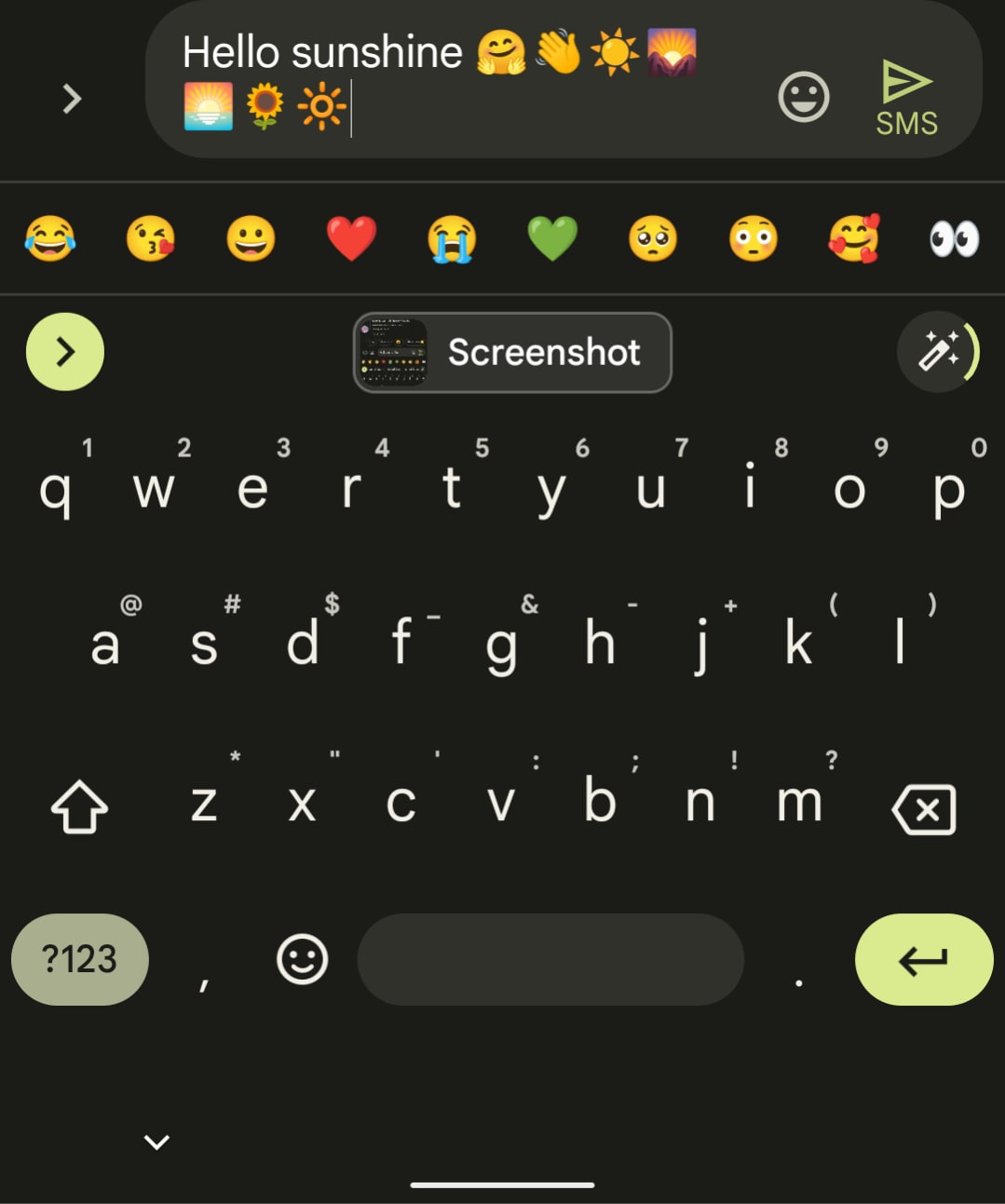
Source: u/dannymanny3

I could not test this myself as the feature has not shown up for me even though I have the Gboard Beta app installed and updated to the latest version. It seems to be a staged rollout, as others have reported fully seeing this in action, so it is unclear whether you need to be on a specific version of the app to try this out or if you just have to wait your turn as it appears to be an account-level feature. I will be waiting for this to show up on my phone – hopefully soon – as I am curious to try this out. I will you updated if there are any new developments to report on this feature.

Join Chrome Unboxed Plus

Introducing Chrome Unboxed Plus – our revamped membership community. Join today at just $2 / month to get access to our private Discord, exclusive giveaways, AMAs, an ad-free website, ad-free podcast experience and more.

Featured Videos

Xremove ads

Plus Monthly

$2/mo. after 7-day free trial

Pay monthly to support our independent coverage and get access to exclusive benefits.

Start free trial

Plus Annual

$20/yr. after 7-day free trial

Xremove ads

Pay yearly to support our independent coverage and get access to exclusive benefits.

Start free trial

Our newsletters are also a great way to get connected. Subscribe here!

Click here to learn more and for membership FAQ

Filed Under: Android, Apps, New & Upcoming Features Tagged With: android, emoji, emojify, gboard, magic wand

Primary Sidebar

Xremove ads

Deals

The Acer Chromebook Plus Spin 514 hits an all-time low price of $499

By Robby Payne
December 23, 2025

The best Chromebook deals today

By Robby Payne
December 22, 2025

Save $220 on the powerful, versatile Acer Chromebook Plus Spin 714

By Robby Payne
December 10, 2025

The Google Pixel 9a just hit its lowest price ever at $150 off

By Joseph Humphrey
December 8, 2025

At $349, this Lenovo Chromebook Plus is one of the best value laptops you can buy

By Joseph Humphrey
December 3, 2025

More Deals

Xremove ads

Reviews

Acer Chromebook Plus Spin 514 Review: Kompanio Ultra power in a convertible

By Robby Payne
December 24, 2025

My review after 6 weeks with the Lenovo Chromebook Plus 14 [VIDEO]

By Robby Payne
August 11, 2025

One week with the best small Android tablet you can buy, and I’m sold

By Robby Payne
May 9, 2025

Best Chromebooks of 2024 [VIDEO]

By Robby Payne
November 28, 2024

Samsung Galaxy Chromebook Plus Review: Samsung is back! [VIDEO]

By Robby Payne
October 28, 2024

More Reviews

Xremove ads

Guides

This Chromebook trackpad shortcut is definitely not new, but is blowing my mind

By Robby Payne
March 11, 2024

How to reduce broadcast delay on YouTube TV to stop live spoilers

By Robby Payne
December 8, 2023

Windows PC keyboard and Chromebook

How to use a Windows keyboard with a Chromebook

By Joseph Humphrey
December 8, 2023

How reset and revert your Chromebook to the previous version of Chrome OS

By Robby Payne
November 29, 2023

My Chromebook Plus features disappeared: here’s how I fixed it

By Robby Payne
November 24, 2023

More Guides

TWITTER · FACEBOOK · INSTAGRAM · YOUTUBE · EMAIL · ABOUT

Copyright © 2025 · Chrome Unboxed · Chrome is a registered trademark of Google Inc.
We are participants in various affiliate advertising programs designed to provide a means for us to earn fees by linking to affiliated sites.

PRIVACY POLICY