
• Skip to main content
  • Skip to primary sidebar
  • Deals
  • Features
  • Guides
  • Chromebooks
  • Videos
  • Podcast
  • More +
    • Reviews
    • Unboxing
    • Upcoming Devices
    • Chromebook Plus
    • Chrome
    • ChromeOS
    • Chrome OS Flex
  • Search
  • Sign Up
  • Log In
Chrome Unboxed – The Latest Chrome OS News

Chrome Unboxed - The Latest Chrome OS News

A Space for All Things Chrome, Google, and More!

  • Deals
  • Features
  • Guides
  • Chromebooks
  • Videos
  • Podcast
  • More +
    • Reviews
    • Unboxing
    • Upcoming Devices
    • Chromebook Plus
    • Chrome
    • ChromeOS
    • Chrome OS Flex
  • Search
  • Sign Up
  • Log In

Fitbit Sense 2 and Versa 4 update rolling out with new features

November 19, 2022 By Johanna Romero View Comments

Fitbit Sense and Versa

Support our independent tech coverage. Chrome Unboxed is written by real people, for real people—not search algorithms. Join Chrome Unboxed Plus for just $2 a month to get an ad-free experience, access to our private Discord, and more. Learn more about membership here.
START FREE TRIAL (MONTHLY)START FREE TRIAL (ANNUAL)

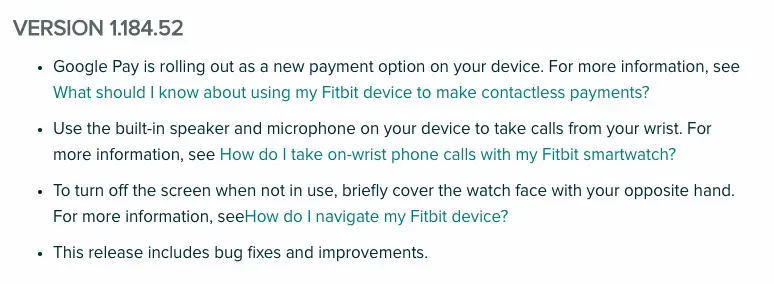
One month after their initial release, Fitbit is making available the first update for the Sense 2 and the Versa 4 fitness watches. This new update is the same one that was previously announced, which would bring Google Pay payment integration, plus two previously unannounced new features.

The additional features were mentioned as part of the release notes for version 1.184.52 on the Fitbit site’s help pages, in addition to the usual bug fixes and improvements. The rollout was first noticed by the team at 9to5Google, which promptly reported the findings on their site.
Xremove ads

The ability to use the built-in speaker and microphone on your device to take calls from your wrist is the most significant new feature made available with this update. Despite being a standard feature on earlier wearables, this capability was not available when both products first went on sale.

Covering the screen to turn it off is another substantial improvement to the usefulness of the device in day-to-day life. Before this update, you had the option of either having the screen timeout (with shorter intervals given) or the display would go off when you put your wrist down, but in order for it to happen, you had to allow the “Button & motion” gesture in the settings. However, now you can take advantage of using this standard smartwatch feature.

Featured Videos

Xremove ads

To update your Fitbit Sense 2 or Versa 4 to the newest version, you’ll need to start the process from the Fitbit app on your phone. It is recommended that your device is fully charged before you begin and that you start the process when you have about an hour or so to spare, as it may take that long for the update to complete. In the Fitbit app, tap on the Today tab > your profile picture > your device image, then tap the pink “Update” button, which should only appear if an update is available. From there, just follow the on-screen instructions and wait until the update progress bar is finished before you use the watch again.

SUBSCRIBE TO UPSTREAM

Get Chrome Unboxed delivered straight to your inbox

Upstream is our flagship, curated newsletter with the top stories, most click-worthy deals, giveaways, and trending articles from Chrome Unboxed sent directly to your inbox a few times a week. Join 31,000+ subscribers.

SUBSCRIBE HERE!

Filed Under: Accessories Tagged With: fitbit, sense 2, update, versa 4

Primary Sidebar

Xremove ads

Deals

You can score $40 off Google’s battery-powered Nest Doorbell right now

By Joseph Humphrey
March 20, 2026

The touchscreen Lenovo Chromebook Slim 3 is a steal at under $200

By Robby Payne
March 16, 2026

Google TV Streamer and Remote held in front of a wall-mounted TV

The premium Google TV Streamer 4K is back down to $80

By Joseph Humphrey
March 16, 2026

The best Chromebook deals today

By Robby Payne
March 16, 2026

Pixel Buds Pro 2 running

I still love the Pixel Buds Pro 2 and they are $60 off right now

By Joseph Humphrey
March 13, 2026

More Deals

Xremove ads

Reviews

Acer Chromebook Plus Spin 514 Review: Kompanio Ultra power in a convertible

By Robby Payne
December 24, 2025

My review after 6 weeks with the Lenovo Chromebook Plus 14 [VIDEO]

By Robby Payne
August 11, 2025

One week with the best small Android tablet you can buy, and I’m sold

By Robby Payne
May 9, 2025

Best Chromebooks of 2024 [VIDEO]

By Robby Payne
November 28, 2024

Samsung Galaxy Chromebook Plus Review: Samsung is back! [VIDEO]

By Robby Payne
October 28, 2024

More Reviews

Xremove ads

Guides

This Chromebook trackpad shortcut is definitely not new, but is blowing my mind

By Robby Payne
March 11, 2024

How to reduce broadcast delay on YouTube TV to stop live spoilers

By Robby Payne
December 8, 2023

Windows PC keyboard and Chromebook

How to use a Windows keyboard with a Chromebook

By Joseph Humphrey
December 8, 2023

How reset and revert your Chromebook to the previous version of Chrome OS

By Robby Payne
November 29, 2023

My Chromebook Plus features disappeared: here’s how I fixed it

By Robby Payne
November 24, 2023

More Guides

TWITTER · FACEBOOK · INSTAGRAM · YOUTUBE · EMAIL · ABOUT

Copyright © 2026 · Chrome Unboxed · Chrome is a registered trademark of Google Inc.
We are participants in various affiliate advertising programs designed to provide a means for us to earn fees by linking to affiliated sites.

PRIVACY POLICY