

• Skip to main content
  • Skip to primary sidebar
  • Deals
  • Features
  • Guides
  • Chromebooks
  • Videos
  • Podcast
  • More +
    • Reviews
    • Unboxing
    • Upcoming Devices
    • Chromebook Plus
    • Chrome
    • ChromeOS
    • Chrome OS Flex
  • Search
  • Sign Up
  • Log In
Chrome Unboxed – The Latest Chrome OS News

Chrome Unboxed - The Latest Chrome OS News

A Space for All Things Chrome, Google, and More!

  • Deals
  • Features
  • Guides
  • Chromebooks
  • Videos
  • Podcast
  • More +
    • Reviews
    • Unboxing
    • Upcoming Devices
    • Chromebook Plus
    • Chrome
    • ChromeOS
    • Chrome OS Flex
  • Search
  • Sign Up
  • Log In

First firmware update for the new Google Home Speaker improves network traffic

July 10, 2026 By Robby Payne View Comments

Support our independent tech coverage. Chrome Unboxed is written by real people, for real people—not search algorithms. Join Chrome Unboxed Plus for just $2 a month to get an ad-free experience, access to our private Discord, and more. Learn more about membership here.
START FREE TRIAL (MONTHLY)START FREE TRIAL (ANNUAL)

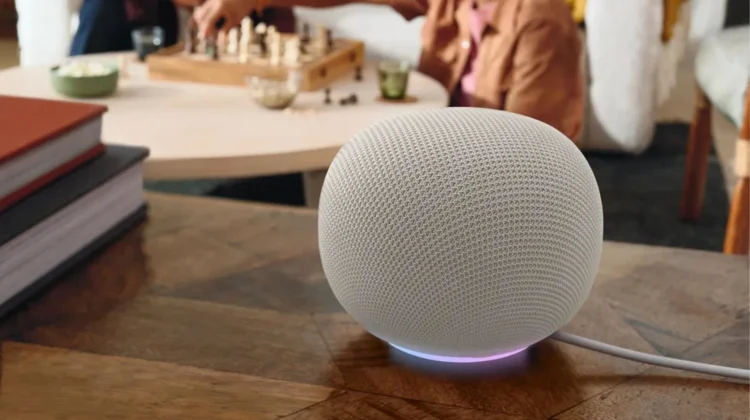
The brand new Google Home Speaker just recently started arriving for new purchasers, but Google is pushing out its first post-launch software patch.According to a new report from 9to5Google, Google is actively rolling out a new production firmware update across its smart speaker ecosystem. While the spotlight is on the newly released Google Home Speaker, the update is also making its way to older hardware, including the Nest Audio, Nest Mini, Home Mini, and the original Google Home.

A highly specific network fix

Usually, when these background firmware updates roll out, the release notes are incredibly vague, relying on the classic “Bug fixes and improvements” boilerplate. This time, however, Google is being very specific. The new firmware version (jumping to 3.78.5.40761) officially notes that it “Improves network traffic.”

Xremove ads

While a network traffic optimization might sound a bit dry, it is likely addressing a highly annoying bug that some early adopters have been dealing with. Over the last week, some users reported their new Google Home Speakers were repeatedly dropping and reconnecting to their routers, triggering back-to-back “joined your Wi-Fi network” notifications in the middle of the night. This patch appears to be the direct fix to keep those network connections stable and your notification tray clean.

How to check your firmware version

Google is bypassing the usual Preview Program track for this release, meaning it is actively rolling out to all standard production devices right now.

Featured Videos

Xremove ads

Because Google handles smart home updates completely in the background, you don’t actually need to press a button to initiate the download. However, if you want to verify that your speaker has successfully pulled the patch, you can check its current status directly from your phone:

  • Open the Google Home app and tap on your specific speaker.
  • Tap the settings gear icon in the top-right corner.
  • Tap Device information, and then check the version number listed under Technical information.

If you haven’t seen the .40761 version number hit your device just yet, sit tight. These rollouts can sometimes take a few days to hit every region, but your speaker should automatically update itself while idle very soon.

SUBSCRIBE TO UPSTREAM

Get Chrome Unboxed delivered straight to your inbox

Upstream is our flagship, curated newsletter with the top stories, most click-worthy deals, giveaways, and trending articles from Chrome Unboxed sent directly to your inbox a few times a week. Join 31,000+ subscribers.

Xremove ads
SUBSCRIBE HERE!

Filed Under: News

About Robby Payne

As the founder of Chrome Unboxed, Robby has been reviewing Chromebooks for over a decade. His passion for ChromeOS and the devices it runs on drives his relentless pursuit to find the best Chromebooks, best services, and best tips for those looking to adopt ChromeOS and those who've already made the switch.

Primary Sidebar

Xremove ads

Deals

The new Lenovo IdeaPad Slim 3 Chromebook gets a super-affordable $249 configuration

By Robby Payne
July 7, 2026

The best Chromebook deals today

By Robby Payne
July 7, 2026

Lenovo quietly updates the IdeaPad Slim 3 Chromebook in some pretty big ways

By Robby Payne
July 2, 2026

The impressive ASUS CM32 Detachable from CES 2026 just landed at Best Buy and is on sale

By Robby Payne
July 1, 2026

Deal alert: the best Chromebook ever made is a whopping $400 off right now

By Robby Payne
June 22, 2026

More Deals

Xremove ads

Reviews

Acer Chromebook Plus Spin 514 Review: the best convertible you can buy [VIDEO]

By Robby Payne
July 1, 2026

Lenovo Chromebook Plus 2-in-1 Review: pretty great in a vacuum

By Robby Payne
April 23, 2026

My review after 6 weeks with the Lenovo Chromebook Plus 14 [VIDEO]

By Robby Payne
August 11, 2025

One week with the best small Android tablet you can buy, and I’m sold

By Robby Payne
May 9, 2025

Best Chromebooks of 2024 [VIDEO]

By Robby Payne
November 28, 2024

More Reviews

Xremove ads

Guides

This Chromebook trackpad shortcut is definitely not new, but is blowing my mind

By Robby Payne
March 11, 2024

How to reduce broadcast delay on YouTube TV to stop live spoilers

By Robby Payne
December 8, 2023

Windows PC keyboard and Chromebook

How to use a Windows keyboard with a Chromebook

By Joseph Humphrey
December 8, 2023

How reset and revert your Chromebook to the previous version of Chrome OS

By Robby Payne
November 29, 2023

My Chromebook Plus features disappeared: here’s how I fixed it

By Robby Payne
November 24, 2023

More Guides

TWITTER · FACEBOOK · INSTAGRAM · YOUTUBE · EMAIL · ABOUT

Copyright © 2026 · Chrome Unboxed · Chrome is a registered trademark of Google Inc.
We are participants in various affiliate advertising programs designed to provide a means for us to earn fees by linking to affiliated sites.

PRIVACY POLICY