
• Skip to main content
  • Skip to primary sidebar
  • Deals
  • Features
  • Guides
  • Chromebooks
  • Videos
  • Podcast
  • More +
    • Reviews
    • Unboxing
    • Upcoming Devices
    • Chromebook Plus
    • Chrome
    • ChromeOS
    • Chrome OS Flex
  • Search
  • Sign Up
  • Log In
Chrome Unboxed – The Latest Chrome OS News

Chrome Unboxed - The Latest Chrome OS News

A Space for All Things Chrome, Google, and More!

  • Deals
  • Features
  • Guides
  • Chromebooks
  • Videos
  • Podcast
  • More +
    • Reviews
    • Unboxing
    • Upcoming Devices
    • Chromebook Plus
    • Chrome
    • ChromeOS
    • Chrome OS Flex
  • Search
  • Sign Up
  • Log In

Experimental Chrome Feature Could Help Keep Extensions In Check

February 24, 2019 By Gabriel Brangers View Comments

Support our independent tech coverage. Chrome Unboxed is written by real people, for real people—not search algorithms. Join Chrome Unboxed Plus for just $2 a month to get an ad-free experience, access to our private Discord, and more. Learn more about membership here.
START FREE TRIAL (MONTHLY)START FREE TRIAL (ANNUAL)

As much as we love Chrome OS, there’s always room for improvement, Like any other operating system, it has its shortcomings, quirks and sometimes just flat out issues that need to be addressed.

One particular area that is in desperate need of some polishing is the Chrome Web Store. With Android and Linux apps now a reality for most Chromebook users, it should be a priority, in my opinion, that Google focuses on a unified app marketplace that would hone away a lot of the fragmentation that Chrome OS is currently experiencing.

Xremove ads

We’ll talk more at length on that later but for now, it looks like the Chrome team is offering a little bit of assistance in the Extensions department of the Web Store.

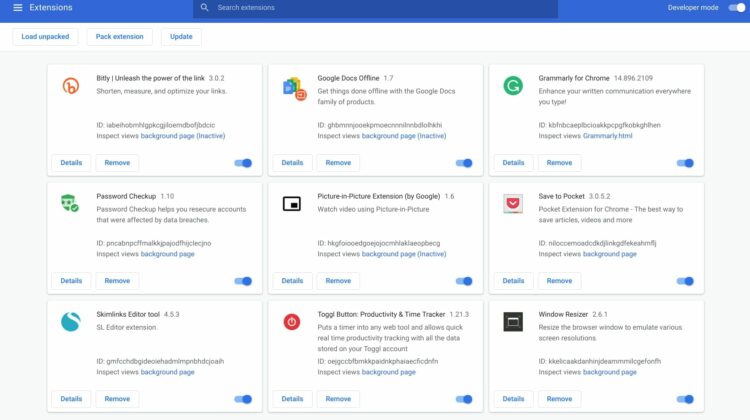
If I had to pinpoint one particular “thing” that would be the biggest security and/or resource depleting problem in Chrome and Chrome OS, Extensions would be at or near the top of the list.

Featured Videos

Xremove ads

Don’t get me wrong, they can be a wonderful thing and good ones can enhance the user experience ten-fold. The problem is that the Chrome Web Store is in dire need of some housekeeping. There are countless extensions that go unchecked by developers and sadly, many of them are uploaded to the Store with malicious intent.

Browser hijacks, data scraping and even crypto-mining can all be done by extensions that are disguised as harmless, or even useful tools. Even legitimate extensions can fall victim to rogue programmers that inject malicious code into otherwise proper extensions with the intent of using them for personal gain or downright chaotic destruction.

While a massive overhaul of the Chrome Web Store is certainly much-needed, Chrome developers are now experimenting with a tool that will allow users to track extension activity in real time.

Xremove ads

Add a real time tab so users can see what their extensions are doing in real-time. This achieves feature parity with the real-time tab for the activity log in Chrome Apps and Extensions Developer Tool

CR Bug Tracker

The feature, which has yet to make its way to the Canary Channel, will let users start and stop “recording” sessions that show extension activity. Extension Activity Logging, as the flag has been named, could give users insight into extensions that may be performing processes outside of their intended purpose. This, in turn, could key developers into those extensions that may have slipped into the Web Store with malicious intent.

On a less alarming front, the feature could also assist in identifying extensions that may be using vital CPU and RAM resources when not a priority. Once pinpointed, users could easily enable/disable essential extensions to enhance the performance of their devices.

To follow along with the Extension Activity Logging development, head to the CR Bug Tracker and star the issue for updates. We’ll keep close watch for this flag to pop up and report back with a first look when available.

Xremove ads

CR Bug Tracker

Check Out Chrome Unboxed’s Top Picks On Amazon

Source: Techdows via Engadget

Filed Under: Apps, Chrome, News, Preview

About Gabriel Brangers

Lover of all things coffee. Foodie for life. Passionate drummer, hobby guitar player, Web designer and proud Army Veteran. I have come to drink coffee and tell the world of all things Chrome. "Whatever you do, Carpe the heck out of that Diem" - Roman poet, Horace. Slightly paraphrased.

Primary Sidebar

Xremove ads

Deals

The best Chromebook deals today

By Robby Payne
April 20, 2026

Deal Alert: the excellent Lenovo Chromebook Plus 2-in-1 returns to $429

By Robby Payne
April 20, 2026

Lenovo Legion Tab Gen 3 drops to $399, ahead of the much pricier Gen 5 release

By Joseph Humphrey
April 18, 2026

How to get 50% off YouTube Premium for a full year with Google One

By Robby Payne
April 16, 2026

The Pixel 10a just dropped to $449, but here’s why you should buy the Pixel 10 instead

By Joseph Humphrey
April 13, 2026

More Deals

Xremove ads

Reviews

Acer Chromebook Plus Spin 514 Review: Kompanio Ultra power in a convertible

By Robby Payne
December 24, 2025

My review after 6 weeks with the Lenovo Chromebook Plus 14 [VIDEO]

By Robby Payne
August 11, 2025

One week with the best small Android tablet you can buy, and I’m sold

By Robby Payne
May 9, 2025

Best Chromebooks of 2024 [VIDEO]

By Robby Payne
November 28, 2024

Samsung Galaxy Chromebook Plus Review: Samsung is back! [VIDEO]

By Robby Payne
October 28, 2024

More Reviews

Xremove ads

Guides

This Chromebook trackpad shortcut is definitely not new, but is blowing my mind

By Robby Payne
March 11, 2024

How to reduce broadcast delay on YouTube TV to stop live spoilers

By Robby Payne
December 8, 2023

Windows PC keyboard and Chromebook

How to use a Windows keyboard with a Chromebook

By Joseph Humphrey
December 8, 2023

How reset and revert your Chromebook to the previous version of Chrome OS

By Robby Payne
November 29, 2023

My Chromebook Plus features disappeared: here’s how I fixed it

By Robby Payne
November 24, 2023

More Guides

TWITTER · FACEBOOK · INSTAGRAM · YOUTUBE · EMAIL · ABOUT

Copyright © 2026 · Chrome Unboxed · Chrome is a registered trademark of Google Inc.
We are participants in various affiliate advertising programs designed to provide a means for us to earn fees by linking to affiliated sites.

PRIVACY POLICY