
• Skip to main content
  • Skip to primary sidebar
  • Deals
  • Features
  • Guides
  • Chromebooks
  • Videos
  • Podcast
  • More +
    • Reviews
    • Unboxing
    • Upcoming Devices
    • Chromebook Plus
    • Chrome
    • ChromeOS
    • Chrome OS Flex
  • Search
  • Sign Up
  • Log In
Chrome Unboxed – The Latest Chrome OS News

Chrome Unboxed - The Latest Chrome OS News

A Space for All Things Chrome, Google, and More!

  • Deals
  • Features
  • Guides
  • Chromebooks
  • Videos
  • Podcast
  • More +
    • Reviews
    • Unboxing
    • Upcoming Devices
    • Chromebook Plus
    • Chrome
    • ChromeOS
    • Chrome OS Flex
  • Search
  • Sign Up
  • Log In

ChromeOS experimenting with separating calendar widget from quick settings to simplify its usage

April 9, 2022 By Michael Perrigo View Comments

Support our independent tech coverage. Chrome Unboxed is written by real people, for real people—not search algorithms. Join Chrome Unboxed Plus for just $2 a month to get an ad-free experience, access to our private Discord, and more. Learn more about membership here.
START FREE TRIAL (MONTHLY)START FREE TRIAL (ANNUAL)

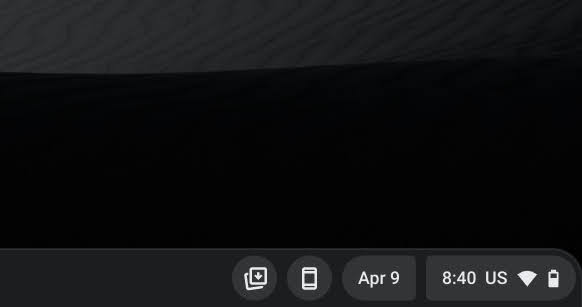
I woke up to a ChromeOS Canary update on my Samsung Galaxy Chromebook, and after applying it, I scoured the entire OS for changes, only to miss the one that was the most obvious and right out in front of my face. I looked at the bottom-right of the display only to notice that the date had been separated from the time clock.

While this may not seem significant at first, it marks an important glimpse into the ideation process of the development team. For anyone who’s currently testing the Google Calendar event widget that can be turned on via a developer flag, you’ll know that it’s not always your first thought to click on the date instead of the whole quick settings button as a whole.
Xremove ads

This sort of acts as a whole button with several clickable and hoverable hotspots for the time, date, Wi-fi, and battery, but it’s not exactly the most user-friendly from a UX standpoint. Most people see a button and they click it, and the quick settings are an oval pill-shaped button that almost gives the impression it has one function because, well, clicking it pulls up everything in addition to those separate functions.

So, it would seem that Google is looking for ways to make it easier to understand what’s happening on the ever-increasingly cluttered chromeOS shelf and to interact with it with less confusion by splitting the time and date into their own pill-shaped buttons. The unfortunate part about this update is that as soon as I updated again, and all within the same morning, this neat UI feature was gone from both Chromebooks it briefly appeared on.

Featured Videos

Xremove ads

While at first strange looking due to the asymmetrically shaped sides of each pill shape, the two buttons together make up one single oval still, so even though it looked weird to me at first blush, I immediately took a liking to it for its simplicity. Because it was pulled almost as soon as it was released on ChromeOS Canary though, I’m willing to bet that the developers are still thinking through what the best implementation will be before it reaches the masses.

SUBSCRIBE TO UPSTREAM

Get Chrome Unboxed delivered straight to your inbox

Upstream is our flagship, curated newsletter with the top stories, most click-worthy deals, giveaways, and trending articles from Chrome Unboxed sent directly to your inbox a few times a week. Join 31,000+ subscribers.

SUBSCRIBE HERE!

Filed Under: Apps, ChromeOS, New & Upcoming Features, News, Updates

About Michael Perrigo

Known as "Google Mike" to his customers, Michael worked at Best Buy as a Chromebook Expert who dedicated his time to understanding the user experience from a regular Chromebook owner's perspective. Having spent nearly 20 years meeting you face-to-face, he strives to help you understand your technology through carefully crafted guides and coverage, relentlessly seeking out the spark in what's new and exciting about ChromeOS.

Primary Sidebar

Xremove ads

Deals

The Acer Chromebook Plus Spin 714 hits a new all-time low at $270 off

By Robby Payne
March 25, 2026

The best Chromebook deals today

By Robby Payne
March 24, 2026

You can score $40 off Google’s battery-powered Nest Doorbell right now

By Joseph Humphrey
March 20, 2026

The touchscreen Lenovo Chromebook Slim 3 is a steal at under $200

By Robby Payne
March 16, 2026

Google TV Streamer and Remote held in front of a wall-mounted TV

The premium Google TV Streamer 4K is back down to $80

By Joseph Humphrey
March 16, 2026

More Deals

Xremove ads

Reviews

Acer Chromebook Plus Spin 514 Review: Kompanio Ultra power in a convertible

By Robby Payne
December 24, 2025

My review after 6 weeks with the Lenovo Chromebook Plus 14 [VIDEO]

By Robby Payne
August 11, 2025

One week with the best small Android tablet you can buy, and I’m sold

By Robby Payne
May 9, 2025

Best Chromebooks of 2024 [VIDEO]

By Robby Payne
November 28, 2024

Samsung Galaxy Chromebook Plus Review: Samsung is back! [VIDEO]

By Robby Payne
October 28, 2024

More Reviews

Xremove ads

Guides

This Chromebook trackpad shortcut is definitely not new, but is blowing my mind

By Robby Payne
March 11, 2024

How to reduce broadcast delay on YouTube TV to stop live spoilers

By Robby Payne
December 8, 2023

Windows PC keyboard and Chromebook

How to use a Windows keyboard with a Chromebook

By Joseph Humphrey
December 8, 2023

How reset and revert your Chromebook to the previous version of Chrome OS

By Robby Payne
November 29, 2023

My Chromebook Plus features disappeared: here’s how I fixed it

By Robby Payne
November 24, 2023

More Guides

TWITTER · FACEBOOK · INSTAGRAM · YOUTUBE · EMAIL · ABOUT

Copyright © 2026 · Chrome Unboxed · Chrome is a registered trademark of Google Inc.
We are participants in various affiliate advertising programs designed to provide a means for us to earn fees by linking to affiliated sites.

PRIVACY POLICY