


Support our independent tech coverage. Chrome Unboxed is written by real people, for real people—not search algorithms. Join Chrome Unboxed Plus for just $2 a month to get an ad-free experience, access to our private Discord, and more. Learn more about membership here.
START FREE TRIAL (MONTHLY)START FREE TRIAL (ANNUAL)
Well, there have been 132 versions of ChromeOS we’ve had over the years, and not once do I ever remember this happening. Chromium Dash has the update for ChromeOS 133 arriving tomorrow, February 18th, but chromeOS.dev has published updated release notes for the latest version of the operating system as of this morning.
Usually, we see an update roll out and then some release notes a few days after most people have the latest version. Whether this is an attempt to get out in front of things a bit or just an instance of miscommunication by the team, we have release notes for the latest version of ChromeOS a full day before we actually expect to see things begin to roll out. Here’s what’s new!
Bluetooth microphone Super Resolution
First up, we have a new Bluetooth Super Resolution setting for the microphone. The new toggle should show up in the settings page in the Audio section, and when you have a Bluetooth microphone of any sort connected to your Chromebook, you’ll get the option to “Improve Bluetooth headset sound quality by upscaling low-res audio to hi-res.”
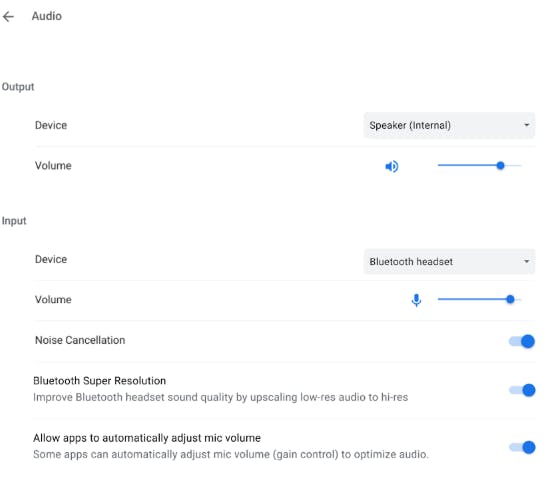
How this will sound in practice remains to be seen, but I like the sound of it. I find the audio in calls from Bluetooth headsets to always sound a bit tinny, so if this can round that sound out a bit, I’m all for it. We’ll be testing it out the moment it arrives for sure.
An upgraded welcome tour
I’m assuming this new tour will go hand-in-hand with ChromeOS 132’s introduction of the new onboarding checklist. Google says this new Welcome Tour will show up immediately following device setup, and will give users a more interactive experience to learn the basics and get up and running on a new Chromebook quickly and easily.
Bounce Keys setting
A new accessibility feature has been added in ChromeOS 133 that makes Chromebooks easier to use for those with limited dexterity or tremors. It allows your device to ignore repeated keystroke inputs for precise, adjustable time intervals to alleviate unintentional double key presses.

In the Accessibility section of the settings, you can flip this option on and then use the slider to adjust the delay ChromeOS will enforce before activating the same key after it has already been pressed. This will allow for a fine-tuned, granular setup that should really go a long way towards assisting those who really need to thwart double key presses on a regular basis.
More language support for Screencast
If you’ve never used Screen cast, you may be missing out on a massive tool that could really be beneficial to your workflow. It allows you to record your screen and your front camera while creating cloud-based presentations that have built-in transcription tools for those viewing later. It’s powerful and impressive, and now it supports over 50 languages as well.
Those are the main highlights we expect to see when ChromeOS 133 arrives (presumably) tomorrow. We don’t know if the release of the features a tad bit ahead of the actual update is something we should expect next time around, but I love it! Here’s hoping ChromeOS 134 arrives with a similar pre-arrival feature update.
SUBSCRIBE TO UPSTREAM
Get Chrome Unboxed delivered straight to your inbox
Upstream is our flagship, curated newsletter with the top stories, most click-worthy deals, giveaways, and trending articles from Chrome Unboxed sent directly to your inbox a few times a week. Join 31,000+ subscribers.

