


Support our independent tech coverage. Chrome Unboxed is written by real people, for real people—not search algorithms. Join Chrome Unboxed Plus for just $2 a month to get an ad-free experience, access to our private Discord, and more. Learn more about membership here.
START FREE TRIAL (MONTHLY)START FREE TRIAL (ANNUAL)
Right on the heels of new hardware being announced alongside of a slew of new features for both Chromebook and Chromebook Plus this week, the ChromeOS team is now rolling out ChromeOS 129 to all users and it is hitting with some pretty nice perks. While not everything announced at the Chromebook Showcase event is here just yet, there’s still a lot to talk about for a single ChromeOS update.
Basically, all the new Chromebook features talked about at the Chromebook event are here and ready to use. The Chromebook Plus-specific stuff is all still in a holding pattern, so features like Help me read, Live Translate, the new Recorder App, and new Video Call enhancements are things we hope to see arriving throughout the month of October. Let’s dive into what’s new!
Quick Insert is here
This is one I didn’t think we’d see right away, but it’s here in ChromeOS 129 and ready for use. The only Chromebook with a dedicated key for Quick Insert is the Galaxy Chromebook Plus, but you don’t need that Chromebook or its fancy, new keyboard key to take advantage of this useful feature. Out of the box, you can now just hit Launcher + F and you’ll be met with the new Quick Insert welcome screen.

Quick Insert gives you all sorts of handy tools anywhere you go in the OS, allowing you to quickly insert relevant images, links, emoji, GIFs, and lots more. You can search your local files, Google Drive, scan your browsing history, do quick calculations, and all sorts of other things. And if you have a Chromebook Plus, you can perform a few AI-driven functions in this pop-up as well. It’s handy right now, and I think this will be one that develops into a wildly-useful feature in the coming months.
Welcome Recap
We showcased the Welcome Recap in late August in the Developer Channel of ChromeOS 129, and little has changed since then. The main difference is the fact that all users will now see this updated interface in the Stable Channel moving forward, and it’s another one of those incredibly handy tools that you didn’t know you needed.
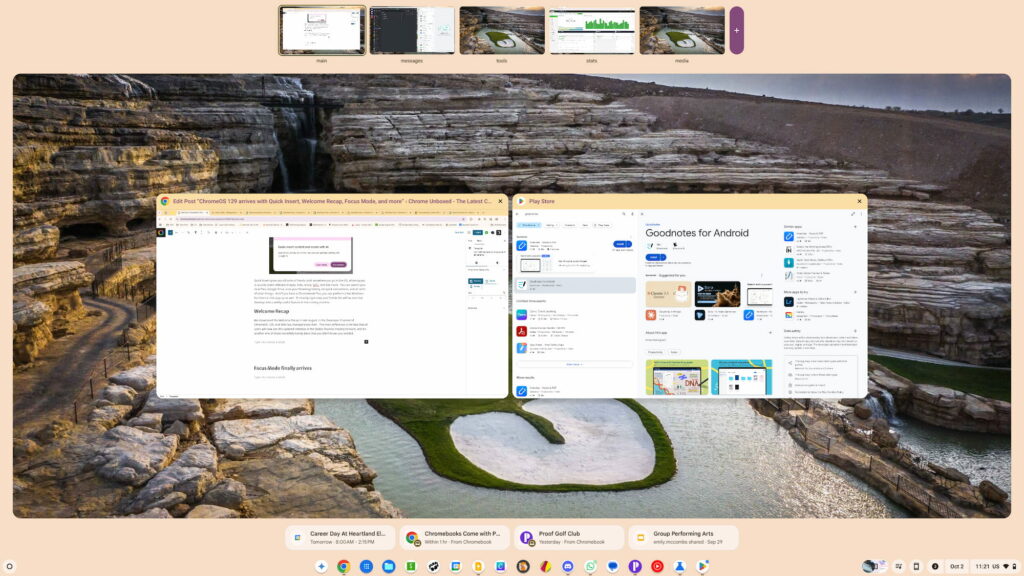
Not only does the Welcome Recap give you the option to open and resume all your windows and apps when starting up your Chromebook, it also provides a new look to the overview mode and drops helpful, relevant actions at the bottom of the screen when you are in this view.
Focus Mode finally arrives
As a feature that was talked about since December of last year, Focus mode actually arrived on ChromeOS 123, but behind a flag. With ChromeOS 129, Focus Mode comes to the front lines and is something you can start using right now.
With it, you can set a timer, set up do not disturb, play some focus music, and really hone in on a certain task you need to get done. I’ve been tempted to use it, but I’m also fairly good at focusing in on tasks naturally. If you find you aren’t inclined to single-task sort of focus, this could be a really handy tool for you.
Gemini is here for all
Finally, the Gemini app that showed up on all Chromebook Plus devices pinned right on the shelf is now here for all Chromebooks. And to sweeten the deal, there’s even a Chromebook Perk for 3 months of free Google AI Premium, so you can test out Gemini to the fullest extent for 90 days to see if you want to keep that ability moving forward.

As always, I’m sure there are plenty more features hiding just out of sight with ChromeOS 129, so we’ll keep looking around until the official release notes arrive. Hopefully we’ll see those in a day or two and there will be even more great stuff to try out in this latest installation of ChromeOS.
SUBSCRIBE TO UPSTREAM
Get Chrome Unboxed delivered straight to your inbox
Upstream is our flagship, curated newsletter with the top stories, most click-worthy deals, giveaways, and trending articles from Chrome Unboxed sent directly to your inbox a few times a week. Join 31,000+ subscribers.

