

According to a quick peek over at cros.tech, it looks like the vast majority of Chromebook users should now have the ability to update to the latest version of Chrome OS 123 on their devices. The only notable device I see that is still on 122 is the ASUS Chromebook Plus CX34. Whatever small hiccup is holding that device back should hopefully be patched up shortly, and it looks like once again we’ll see the vast majority of Chromebooks all getting updated right on schedule.
Past updates missing expected features
Before we get into the fun that is here for ChromeOS 123, let me quickly address the past few updates. I’ve been harsh; and while I don’t feel bad about being aggravated with promised features not available at the start of an update, I also don’t want to come across like I know everything about what goes on behind the scenes with ChromeOS development.
Without doubt, there are a lot of moving parts, and that likely means new features need a couple extra weeks to hit the ground running. I still hold to the opinion that Google should simply remain tight-lipped about a new feature if it isn’t rolling out with the main update, but I also don’t want to come off like a petulant child, either. And I’m glad that all but one of the new features in ChromeOS 123 seem to be here right out of the box.
Keyboard shortcut customization
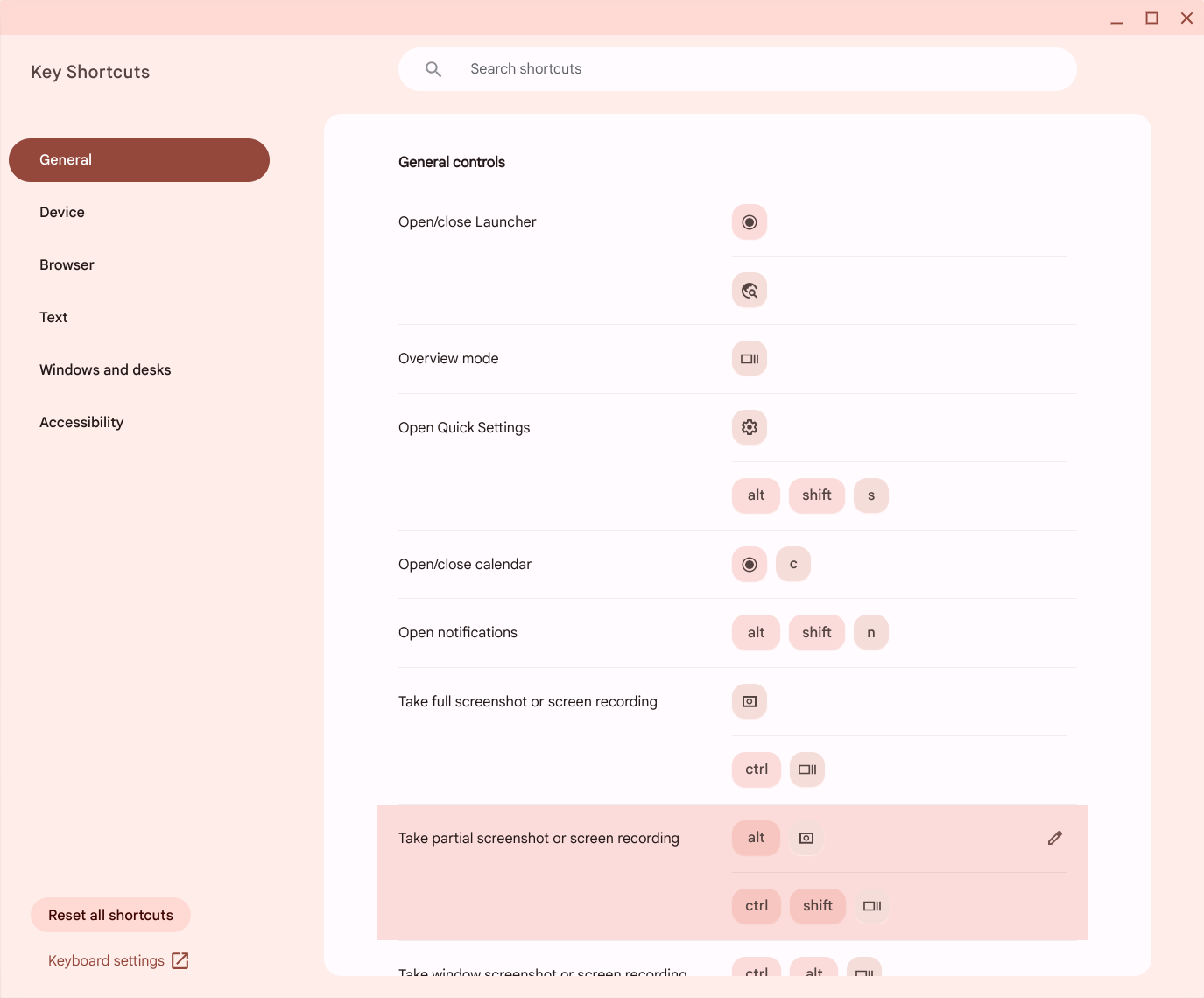
Now, let’s get into the good stuff. To start, I’ll get the one feature that isn’t exactly here out of the box out of the way: custom keyboard shortcuts. This one has been on the way for quite some time, so when I saw this as a new addition in ChromeOS 123, I was excited. At least for the couple devices I tested on, it isn’t enabled just yet, but you can easily change that.
Go to chrome://flags and search for #enable-shortcut-customization-app and #enable-shortcut-customization. After doing so, restart Chrome and go to your Settings > Device > Keyboard > View keyboard shortcuts (or just hit CTRL + SEARCH + S) and you’ll now see a nifty little pencil beside every single ChromeOS keyboard shortcut combo. Click that pencil and you’ll have the option to add your own shortcut combo. It even tells you when a combination is in use and keeps you from double-dipping. Sweet!

Mouse button customization
In the same vein, we also have mouse button customization finally here and part of the OS with no extra steps. Simply go to Settings > Device > Mouse > Customize mouse buttons and you’ll be able to map any button on your mouse to whatever your heart desires. Since you can choose key combos for the mouse buttons, the sky is the limit to what you can now make your mouse do when using a Chromebook.

Per-app language customization
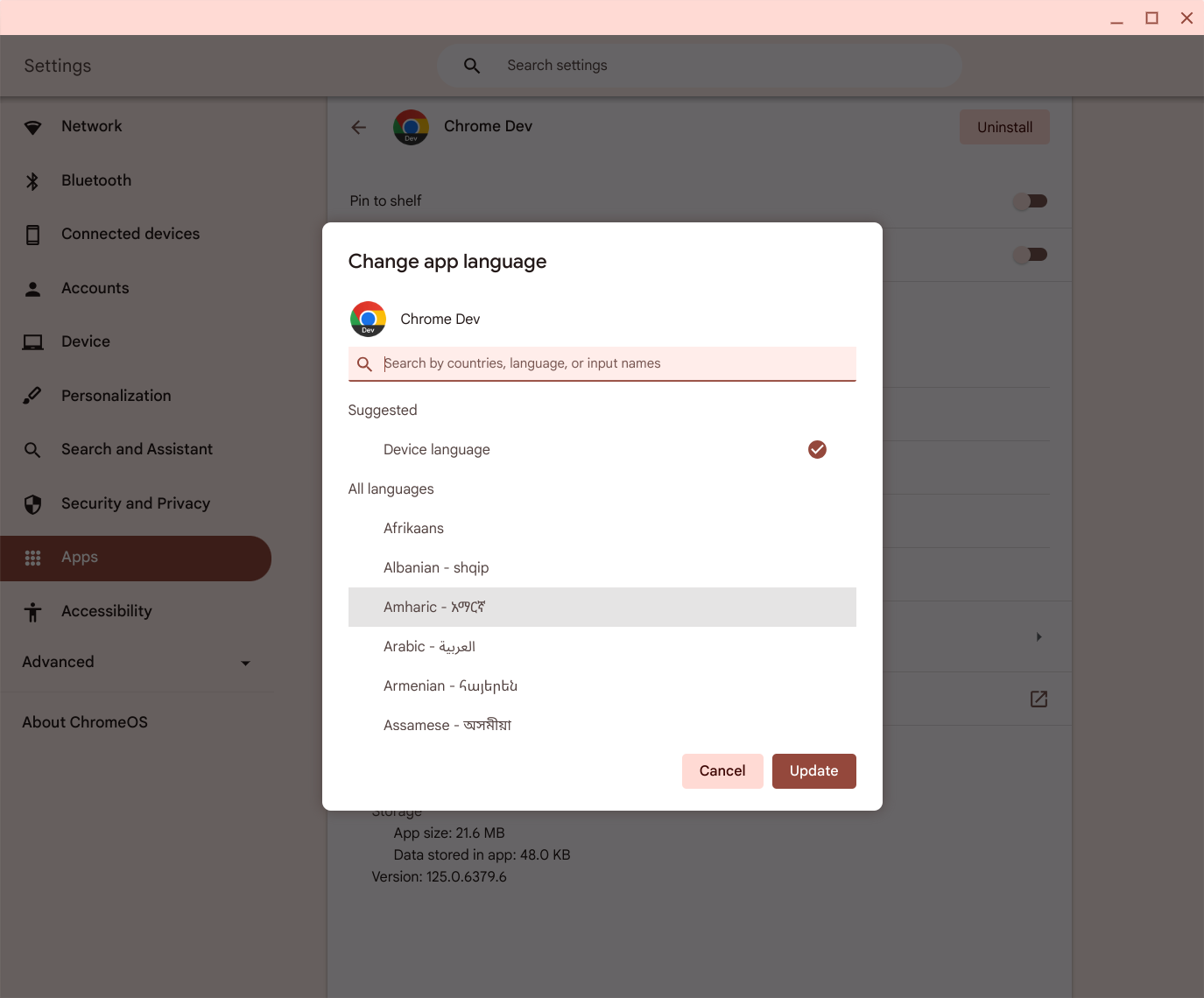
Like I said, this update is all about some added customization. Google has now added the ability to choose your language based on the app itself. Not every app seems to support this, but quite a few that I clicked through 100% do; and though I don’t have a particular use for this, I’m sure many users who speak more languages that I can will find this very helpful indeed. Simply go to Settings > Apps > Manage your apps > Choose an app > App language to select what language you prefer for a particular one.
ChromeOS tethered hotspot
Another feature we’ve seen whispers of in the past is now here for ChromeOS 123 in the form of a legit hotspot you can broadcast directly from your Chromebook. We unfortunately don’t have any LTE-enabled devices here in the office, but I imagine in quite a few scenarios this could come in quite handy. Like your phone, if you have a network-connected Chromebook and want to share that connection with others, you’ll now have the ability to do so.
For now, this is limited to users on T-Mobile’s network, but Google says it will add more networks in the future. And as we see more 5G RedCap devices hit the market, we should see an uptick in Chromebooks with high speed data connections that don’t have to rely on local Wi-Fi to get down to business. Being able to share that data could be very useful.
More natural text-to-speech voices
Finally, for the announced features on board for the ChromeOS 123 update, we have a more-natural set of text-to-speech voices. I tried 5 or 6 of them and it really does sound far more natural than what I’ve heard in the past. I even compared the voices from a non-updated device to these new models and there’s a definite injection of humanity to each of them for sure. And for those that really rely on text-to-speech, this is a pretty major thing. I’m glad to see Google’s voice model expertise getting put to good use, here.
I’m certain there will be other, smaller changes with ChromeOS 123 that we stumble across in the coming weeks. As we find them and verify, we’ll let you know, but this set of new features for Chromebook users is pretty awesome, I think, and its a group of additions that should come in very handy for a lot of us moving forward.
Join Chrome Unboxed Plus
Introducing Chrome Unboxed Plus – our revamped membership community. Join today at just $2 / month to get access to our private Discord, exclusive giveaways, AMAs, an ad-free website, ad-free podcast experience and more.
Plus Monthly
$2/mo. after 7-day free trial
Pay monthly to support our independent coverage and get access to exclusive benefits.
Plus Annual
$20/yr. after 7-day free trial
Pay yearly to support our independent coverage and get access to exclusive benefits.
Our newsletters are also a great way to get connected. Subscribe here!
Click here to learn more and for membership FAQ

