
• Skip to main content
  • Skip to primary sidebar
  • Deals
  • Features
  • Guides
  • Chromebooks
  • Videos
  • Podcast
  • More +
    • Reviews
    • Unboxing
    • Upcoming Devices
    • Chromebook Plus
    • Chrome
    • ChromeOS
    • Chrome OS Flex
  • Search
  • Sign Up
  • Log In
Chrome Unboxed – The Latest Chrome OS News

Chrome Unboxed - The Latest Chrome OS News

A Space for All Things Chrome, Google, and More!

  • Deals
  • Features
  • Guides
  • Chromebooks
  • Videos
  • Podcast
  • More +
    • Reviews
    • Unboxing
    • Upcoming Devices
    • Chromebook Plus
    • Chrome
    • ChromeOS
    • Chrome OS Flex
  • Search
  • Sign Up
  • Log In

Chromebooks will soon report stylus battery levels

January 9, 2021 By Gabriel Brangers View Comments

Support our independent tech coverage. Chrome Unboxed is written by real people, for real people—not search algorithms. Join Chrome Unboxed Plus for just $2 a month to get an ad-free experience, access to our private Discord, and more. Learn more about membership here.
START FREE TRIAL (MONTHLY)START FREE TRIAL (ANNUAL)

The relationship between Chromebooks and accessories has advanced exponentially over the past couple of years thank, in part, to Google’s “Works with Chromebook” initiative. The relatively new branding is a way for peripheral makers to market products such as portable storage, mice, webcams, and other accessories to Chrome OS users by giving them the peace of mind that these add-ons will simply work out of the box when used in conjunction with a Chromebook.

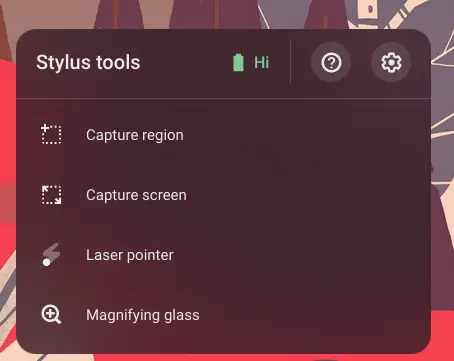
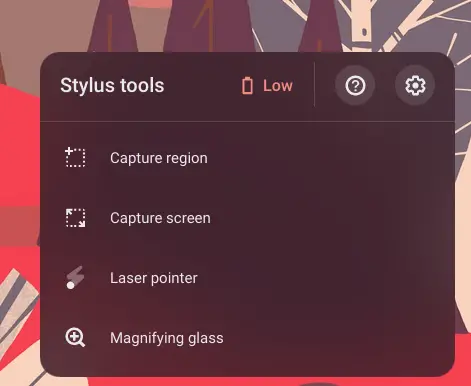
One such peripheral, the USI stylus, made its debut on Chromebooks last year and Google is adamant about ensuring that touch-enabled devices work with the USI protocol no matter where you decide to purchase your pen. To further the integration between Chrome OS and digital pens, Chromebooks will soon feature a battery level indicator in the stylus tool menu of compatible devices. Behind a flag in the Canary channel, the feature reports the battery level of the detected stylus as “low, medium, or high.”
Xremove ads

While the feature is clearly still a work in progress, my Lenovo Flex 5 did detect the USI stylus I had on hand and the battery reporting changed from low to high when the pen woke up. A recent commit connected to the feature did remove the “high” and “med” labels which tell me that it will eventually be used simply to alert users that their styluses battery needs to be charged or replaced. That said, future updates could add actual battery percentages if the USI protocol reports them and Chrome OS developers deem it a worthwhile addition.

With Google requiring USI compatibility on any and all future touch-enabled Chromebooks, this will be a much-needed and quite welcome addition to the stylus tools. For educators, creators, and even the average consumer, having an easy way to see the battery level or your peripherals is a simple yet very useful feature and I think that the Chrome OS developers are spot on with this addition. At this time, it is unclear whether this feature will work with current, non-USI styli such as the Pixelbook Pen or HP’s AES stylus. Hopefully, we will see this update land in Chrome OS 89 or perhaps sooner when version 88 lands later this month but that’s just wishful thinking.

Featured Videos

Xremove ads

Correction: This feature was first spotted in the Chromium repository by Dinsan Francis at Chrome Store. See the full story here.

SUBSCRIBE TO UPSTREAM

Get Chrome Unboxed delivered straight to your inbox

Upstream is our flagship, curated newsletter with the top stories, most click-worthy deals, giveaways, and trending articles from Chrome Unboxed sent directly to your inbox a few times a week. Join 31,000+ subscribers.

SUBSCRIBE HERE!

Shout out to Android Police’s Kent Duke for spotting this cool new feature.

Xremove ads

Filed Under: Accessories, ChromeOS, New & Upcoming Features, News

About Gabriel Brangers

Lover of all things coffee. Foodie for life. Passionate drummer, hobby guitar player, Web designer and proud Army Veteran. I have come to drink coffee and tell the world of all things Chrome. "Whatever you do, Carpe the heck out of that Diem" - Roman poet, Horace. Slightly paraphrased.

Primary Sidebar

Xremove ads

Deals

Massive Deal Alert: The Acer Chromebook Plus Spin 714 just hit an all-time low $499

By Robby Payne
April 1, 2026

The best Chromebook deals today

By Robby Payne
March 30, 2026

The Acer Chromebook Plus Spin 714 hits a new all-time low at $270 off

By Robby Payne
March 25, 2026

You can score $40 off Google’s battery-powered Nest Doorbell right now

By Joseph Humphrey
March 20, 2026

The touchscreen Lenovo Chromebook Slim 3 is a steal at under $200

By Robby Payne
March 16, 2026

More Deals

Xremove ads

Reviews

Acer Chromebook Plus Spin 514 Review: Kompanio Ultra power in a convertible

By Robby Payne
December 24, 2025

My review after 6 weeks with the Lenovo Chromebook Plus 14 [VIDEO]

By Robby Payne
August 11, 2025

One week with the best small Android tablet you can buy, and I’m sold

By Robby Payne
May 9, 2025

Best Chromebooks of 2024 [VIDEO]

By Robby Payne
November 28, 2024

Samsung Galaxy Chromebook Plus Review: Samsung is back! [VIDEO]

By Robby Payne
October 28, 2024

More Reviews

Xremove ads

Guides

This Chromebook trackpad shortcut is definitely not new, but is blowing my mind

By Robby Payne
March 11, 2024

How to reduce broadcast delay on YouTube TV to stop live spoilers

By Robby Payne
December 8, 2023

Windows PC keyboard and Chromebook

How to use a Windows keyboard with a Chromebook

By Joseph Humphrey
December 8, 2023

How reset and revert your Chromebook to the previous version of Chrome OS

By Robby Payne
November 29, 2023

My Chromebook Plus features disappeared: here’s how I fixed it

By Robby Payne
November 24, 2023

More Guides

TWITTER · FACEBOOK · INSTAGRAM · YOUTUBE · EMAIL · ABOUT

Copyright © 2026 · Chrome Unboxed · Chrome is a registered trademark of Google Inc.
We are participants in various affiliate advertising programs designed to provide a means for us to earn fees by linking to affiliated sites.

PRIVACY POLICY