
• Skip to main content
  • Skip to primary sidebar
  • Deals
  • Features
  • Guides
  • Chromebooks
  • Videos
  • Podcast
  • More +
    • Reviews
    • Unboxing
    • Upcoming Devices
    • Chromebook Plus
    • Chrome
    • ChromeOS
    • Chrome OS Flex
  • Search
  • Sign Up
  • Log In
Chrome Unboxed – The Latest Chrome OS News

Chrome Unboxed - The Latest Chrome OS News

A Space for All Things Chrome, Google, and More!

  • Deals
  • Features
  • Guides
  • Chromebooks
  • Videos
  • Podcast
  • More +
    • Reviews
    • Unboxing
    • Upcoming Devices
    • Chromebook Plus
    • Chrome
    • ChromeOS
    • Chrome OS Flex
  • Search
  • Sign Up
  • Log In

Don’t miss out on claiming your free 6-month Squid Pro subscription

February 3, 2020 By Robby Payne View Comments

Support our independent tech coverage. Chrome Unboxed is written by real people, for real people—not search algorithms. Join Chrome Unboxed Plus for just $2 a month to get an ad-free experience, access to our private Discord, and more. Learn more about membership here.
START FREE TRIAL (MONTHLY)START FREE TRIAL (ANNUAL)

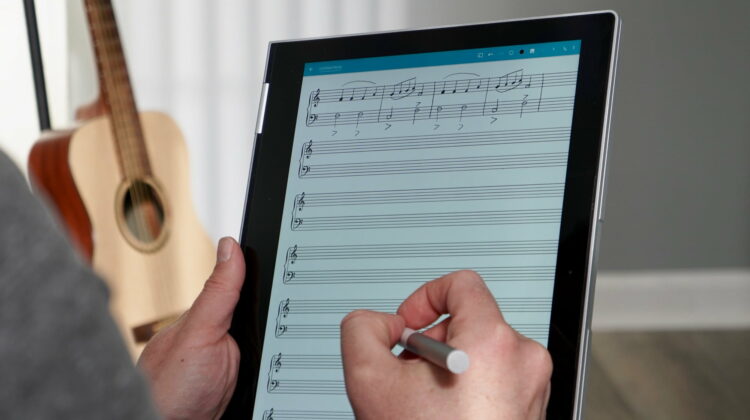
Without question, Squid is the best handwriting app available on a Chromebook. Having been on board with Chrome OS and Android apps since the early days, Squid has only gotten better over time. More than any other app in the Play Store, Squid takes pen input on Chromebooks seriously and delivers an inking experience that is simply unmatched right now.

Even Google’s own in-house notes app isn’t even close to Squid from a pen input perspective. Try the two apps out side by side and you’ll notice right off the bat that Squid’s pen tracking, pressure sensitivity, and natural feel are miles ahead of what Google Keep is capable of.

Xremove ads

That doesn’t just apply to Keep, though, as Squid feels better and performs on a higher level than any handwriting app we’ve tried in the Play Store from a precision and lag perspective. While not geared towards drawing, Squid offers a great selection of paper templates (ruled, grids, sports scoring, etc.), the ability to drop in images, manipulate selected handwriting as vectors, and import/export PDFs. As a tool for getting things done, it has what most people need from a note taking tool.

My biggest complaint with Squid is the backup feature. You can set up Box or DropBox for backups, but a nice, neat integration with Google Drive would make way more sense. I’ve seen the developers from Squid reply that this is tricky for some technical reasons, but I have a hard time understanding why they can’t get around this. As an app on the Play Store, I’d rather see it install and pull up all my notes via my Play Store Google account, but that still doesn’t happen for now.

Featured Videos

Xremove ads

If you are interested in Squid and would like to take the Pro version and all its abilities for a free 6-month test drive, you can go and claim you Chromebook perk if you’ve bought a new device. Simply head over to Google’s Chromebook Perks page, scroll down to the Squid option, and click to redeem the offer. The process is quick, simple, and definitely worth a look if you like taking handwritten notes and have a Chromebook with stylus support. You’ll be glad you took the time.

SUBSCRIBE TO UPSTREAM

Get Chrome Unboxed delivered straight to your inbox

Upstream is our flagship, curated newsletter with the top stories, most click-worthy deals, giveaways, and trending articles from Chrome Unboxed sent directly to your inbox a few times a week. Join 31,000+ subscribers.

SUBSCRIBE HERE!

Filed Under: Apps, ChromeOS, Deals

About Robby Payne

As the founder of Chrome Unboxed, Robby has been reviewing Chromebooks for over a decade. His passion for ChromeOS and the devices it runs on drives his relentless pursuit to find the best Chromebooks, best services, and best tips for those looking to adopt ChromeOS and those who've already made the switch.

Primary Sidebar

Xremove ads

Deals

Lenovo Legion Tab Gen 3 drops to $399, ahead of the much pricier Gen 5 release

By Joseph Humphrey
April 18, 2026

How to get 50% off YouTube Premium for a full year with Google One

By Robby Payne
April 16, 2026

The Pixel 10a just dropped to $449, but here’s why you should buy the Pixel 10 instead

By Joseph Humphrey
April 13, 2026

Save up to $200 on the two best Chromebooks on the market

By Robby Payne
April 13, 2026

The best Chromebook deals today

By Robby Payne
April 13, 2026

More Deals

Xremove ads

Reviews

Acer Chromebook Plus Spin 514 Review: Kompanio Ultra power in a convertible

By Robby Payne
December 24, 2025

My review after 6 weeks with the Lenovo Chromebook Plus 14 [VIDEO]

By Robby Payne
August 11, 2025

One week with the best small Android tablet you can buy, and I’m sold

By Robby Payne
May 9, 2025

Best Chromebooks of 2024 [VIDEO]

By Robby Payne
November 28, 2024

Samsung Galaxy Chromebook Plus Review: Samsung is back! [VIDEO]

By Robby Payne
October 28, 2024

More Reviews

Xremove ads

Guides

This Chromebook trackpad shortcut is definitely not new, but is blowing my mind

By Robby Payne
March 11, 2024

How to reduce broadcast delay on YouTube TV to stop live spoilers

By Robby Payne
December 8, 2023

Windows PC keyboard and Chromebook

How to use a Windows keyboard with a Chromebook

By Joseph Humphrey
December 8, 2023

How reset and revert your Chromebook to the previous version of Chrome OS

By Robby Payne
November 29, 2023

My Chromebook Plus features disappeared: here’s how I fixed it

By Robby Payne
November 24, 2023

More Guides

TWITTER · FACEBOOK · INSTAGRAM · YOUTUBE · EMAIL · ABOUT

Copyright © 2026 · Chrome Unboxed · Chrome is a registered trademark of Google Inc.
We are participants in various affiliate advertising programs designed to provide a means for us to earn fees by linking to affiliated sites.

PRIVACY POLICY